
Greetings from the Isle of Man, We seldom use Echolink for outgoing connections but, with an influx of visitors for the Isle of Man TT races this week, we've seen a couple of stations trying to connect "back home" via Echolink - and failing. The issue seems to be that AllStar is unaware of the nodes that the users are trying to connect to. An example is ON0VOS-L (node 356825). If I issue the command "asterisk -rx "database show" | grep ON0" I get a list of entries similar to ON0VOS, but not the one that I'm interested in. Also, comparing with the current logins page on the Echolink site. There are a lot of other nodes missing from the Allstar database. Does anyone know why this might be and what I can do about it? I want our visitors to be able to leave with a favourable view of AllStar and even if I have to fudge a nasty hack to make the desired nodes accessible, I'll do it! Here's a clipping of sections of the response to the database show command mentioned above. /echolink/a/call/ON0OST-R : 82010:91.181.37.10 /echolink/a/call/ON0RCL-R : 377156:83.101.44.168 /echolink/a/call/ON0TLO-R : 488668:193.22.239.31 /echolink/a/call/ON0WL-R : 409331:81.83.131.158 /echolink/a/call/ON0WV-R : 357361:91.181.123.174 /echolink/b/call/ON0OST-R : 82010:91.181.102.165 /echolink/b/call/ON0RCL-R : 377156:83.101.44.168 /echolink/b/call/ON0TLO-R : 488668:193.22.239.31 /echolink/b/call/ON0WL-R : 409331:81.83.131.158 /echolink/b/call/ON0WV-R : 357361:91.181.69.224 /echolink/b/nodenum-call/160278 : ON0LIR-R /echolink/b/nodenum-call/171471 : ON0GRC-R /echolink/b/nodenum-call/187696 : ON0LG-R /echolink/b/nodenum-call/282623 : ON0KTK-R /echolink/b/nodenum-call/352778 : ON0DVS-R /echolink/b/nodenum-call/357361 : ON0WV-R /echolink/b/nodenum-call/368568 : ON0KB-R /echolink/b/nodenum-call/377156 : ON0RCL-R /echolink/b/nodenum-call/394137 : ON0LN-R /echolink/b/nodenum-call/409331 : ON0WL-R /echolink/b/nodenum-call/429437 : ON0BA-R /echolink/b/nodenum-call/45573 : ON0AN-R /echolink/b/nodenum-call/47009 :ON0LFE-L /echolink/b/nodenum-call/488668 : ON0TLO-R /echolink/b/nodenum-call/522270 : ON0LIL-L /echolink/b/nodenum-call/81560 : ON0GB-R /echolink/b/nodenum-call/82010 : ON0OST-R /echolink/b/nodenum-call/93644 : ON0LIM-R Whilst copying this lot, I saw the following on the Asterisk CLI: -- Received OK from Echolink server server1.echolink.org -- Directory pgm done downloading(partial,compressed), 739 records -- new CALL=ON0VOS-L,ip=81.165.69.72,name= 145.337,5 FM Aha!, I thought - an update. So I re-ran the database show command and it came up empty again. No sign of ON0VOS in the database So, the download is being received but it's not updating the database. Can the entry be added manually? What am I missing here? Thanks David Osborn GD4HOZ

FYI… asterisk -rx "echolink dbdump" | grep ON0VOS 356825|ON0VOS-L|81.165.69.72 -- Tim :wq
On Jun 7, 2015, at 5:32 AM, David Osborn <david.osborn@manx.net> wrote:
Greetings from the Isle of Man,
We seldom use Echolink for outgoing connections but, with an influx of visitors for the Isle of Man TT races this week, we've seen a couple of stations trying to connect "back home" via Echolink - and failing.
The issue seems to be that AllStar is unaware of the nodes that the users are trying to connect to. An example is ON0VOS-L (node 356825).
If I issue the command "asterisk -rx "database show" | grep ON0" I get a list of entries similar to ON0VOS, but not the one that I'm interested in. Also, comparing with the current logins page on the Echolink site. There are a lot of other nodes missing from the Allstar database.
Does anyone know why this might be and what I can do about it? I want our visitors to be able to leave with a favourable view of AllStar and even if I have to fudge a nasty hack to make the desired nodes accessible, I'll do it!
Here's a clipping of sections of the response to the database show command mentioned above.
/echolink/a/call/ON0OST-R : 82010:91.181.37.10 /echolink/a/call/ON0RCL-R : 377156:83.101.44.168 /echolink/a/call/ON0TLO-R : 488668:193.22.239.31 /echolink/a/call/ON0WL-R : 409331:81.83.131.158 /echolink/a/call/ON0WV-R : 357361:91.181.123.174
/echolink/b/call/ON0OST-R : 82010:91.181.102.165 /echolink/b/call/ON0RCL-R : 377156:83.101.44.168 /echolink/b/call/ON0TLO-R : 488668:193.22.239.31 /echolink/b/call/ON0WL-R : 409331:81.83.131.158 /echolink/b/call/ON0WV-R : 357361:91.181.69.224
/echolink/b/nodenum-call/160278 : ON0LIR-R /echolink/b/nodenum-call/171471 : ON0GRC-R /echolink/b/nodenum-call/187696 : ON0LG-R /echolink/b/nodenum-call/282623 : ON0KTK-R /echolink/b/nodenum-call/352778 : ON0DVS-R /echolink/b/nodenum-call/357361 : ON0WV-R /echolink/b/nodenum-call/368568 : ON0KB-R /echolink/b/nodenum-call/377156 : ON0RCL-R /echolink/b/nodenum-call/394137 : ON0LN-R /echolink/b/nodenum-call/409331 : ON0WL-R /echolink/b/nodenum-call/429437 : ON0BA-R /echolink/b/nodenum-call/45573 : ON0AN-R /echolink/b/nodenum-call/47009 :ON0LFE-L /echolink/b/nodenum-call/488668 : ON0TLO-R /echolink/b/nodenum-call/522270 : ON0LIL-L /echolink/b/nodenum-call/81560 : ON0GB-R /echolink/b/nodenum-call/82010 : ON0OST-R /echolink/b/nodenum-call/93644 : ON0LIM-R
Whilst copying this lot, I saw the following on the Asterisk CLI:
-- Received OK from Echolink server server1.echolink.org -- Directory pgm done downloading(partial,compressed), 739 records -- new CALL=ON0VOS-L,ip=81.165.69.72,name= 145.337,5 FM
Aha!, I thought - an update. So I re-ran the database show command and it came up empty again. No sign of ON0VOS in the database
So, the download is being received but it's not updating the database. Can the entry be added manually?
What am I missing here?
Thanks
David Osborn GD4HOZ _______________________________________________ App_rpt-users mailing list App_rpt-users@ohnosec.org http://ohnosec.org/cgi-bin/mailman/listinfo/app_rpt-users
To unsubscribe from this list please visit http://ohnosec.org/cgi-bin/mailman/listinfo/app_rpt-users and scroll down to the bottom of the page. Enter your email address and press the "Unsubscribe or edit options button" You do not need a password to unsubscribe, you can do it via email confirmation. If you have trouble unsubscribing, please send a message to the list detailing the problem.
Aha!!! So, I was looking under the wrong rock. He's there alright so the mystery remains as to why we can't connect to his node :-( snaefell*CLI> rpt fun 2480 *33356825 -- new CALL=OUTBOUND,ip=81.165.69.72,name=OUTBOUND -- Received OK from Echolink server europe.echolink.org -- Received OK from Echolink server europe.echolink.org -- Directory pgm done downloading(partial,compressed), 637 records -- Hungup 'Zap/pseudo-767367332' -- Hungup 'Zap/pseudo-249305130' -- Received OK from Echolink server europe.echolink.org -- Directory pgm done downloading(partial,compressed), 267 records -- Received OK from Echolink server server1.echolink.org -- <Zap/pseudo-204097906> Playing 'rpt/node' (language 'en') -- <Zap/pseudo-204097906> Playing 'digits/3' (language 'en') -- <Zap/pseudo-204097906> Playing 'digits/3' (language 'en') -- <Zap/pseudo-204097906> Playing 'digits/5' (language 'en') -- <Zap/pseudo-204097906> Playing 'digits/6' (language 'en') -- <Zap/pseudo-204097906> Playing 'digits/8' (language 'en') -- <Zap/pseudo-204097906> Playing 'digits/2' (language 'en') -- <Zap/pseudo-204097906> Playing 'digits/5' (language 'en') -- <Zap/pseudo-204097906> Playing 'rpt/connection_failed' (language 'en') -- Hungup 'Zap/pseudo-204097906' I believe that a local user has been connecting us to the Irish conference from time to time, but at the moment I don't seem to be able to connect out to anyone. Incoming works fine. Cheers, Tim. -----Original Message----- From: Tim Sawyer [mailto:tim.sawyer@mac.com] Sent: 07 June 2015 14:00 To: David Osborn Cc: app_rpt-users@ohnosec.org Subject: Re: [App_rpt-users] Echolink Updates FYI… asterisk -rx "echolink dbdump" | grep ON0VOS 356825|ON0VOS-L|81.165.69.72 -- Tim :wq
On Jun 7, 2015, at 5:32 AM, David Osborn <david.osborn@manx.net> wrote:
Greetings from the Isle of Man,
We seldom use Echolink for outgoing connections but, with an influx of visitors for the Isle of Man TT races this week, we've seen a couple of stations trying to connect "back home" via Echolink - and failing.
The issue seems to be that AllStar is unaware of the nodes that the users are trying to connect to. An example is ON0VOS-L (node 356825).
If I issue the command "asterisk -rx "database show" | grep ON0" I get a list of entries similar to ON0VOS, but not the one that I'm interested in. Also, comparing with the current logins page on the Echolink site. There are a lot of other nodes missing from the Allstar database.
Does anyone know why this might be and what I can do about it? I want our visitors to be able to leave with a favourable view of AllStar and even if I have to fudge a nasty hack to make the desired nodes accessible, I'll do it!
Here's a clipping of sections of the response to the database show command mentioned above.
/echolink/a/call/ON0OST-R : 82010:91.181.37.10 /echolink/a/call/ON0RCL-R : 377156:83.101.44.168 /echolink/a/call/ON0TLO-R : 488668:193.22.239.31 /echolink/a/call/ON0WL-R : 409331:81.83.131.158 /echolink/a/call/ON0WV-R : 357361:91.181.123.174
/echolink/b/call/ON0OST-R : 82010:91.181.102.165 /echolink/b/call/ON0RCL-R : 377156:83.101.44.168 /echolink/b/call/ON0TLO-R : 488668:193.22.239.31 /echolink/b/call/ON0WL-R : 409331:81.83.131.158 /echolink/b/call/ON0WV-R : 357361:91.181.69.224
/echolink/b/nodenum-call/160278 : ON0LIR-R /echolink/b/nodenum-call/171471 : ON0GRC-R /echolink/b/nodenum-call/187696 : ON0LG-R /echolink/b/nodenum-call/282623 : ON0KTK-R /echolink/b/nodenum-call/352778 : ON0DVS-R /echolink/b/nodenum-call/357361 : ON0WV-R /echolink/b/nodenum-call/368568 : ON0KB-R /echolink/b/nodenum-call/377156 : ON0RCL-R /echolink/b/nodenum-call/394137 : ON0LN-R /echolink/b/nodenum-call/409331 : ON0WL-R /echolink/b/nodenum-call/429437 : ON0BA-R /echolink/b/nodenum-call/45573 : ON0AN-R /echolink/b/nodenum-call/47009 :ON0LFE-L /echolink/b/nodenum-call/488668 : ON0TLO-R /echolink/b/nodenum-call/522270 : ON0LIL-L /echolink/b/nodenum-call/81560 : ON0GB-R /echolink/b/nodenum-call/82010 : ON0OST-R /echolink/b/nodenum-call/93644 : ON0LIM-R
Whilst copying this lot, I saw the following on the Asterisk CLI:
-- Received OK from Echolink server server1.echolink.org -- Directory pgm done downloading(partial,compressed), 739 records -- new CALL=ON0VOS-L,ip=81.165.69.72,name= 145.337,5 FM
Aha!, I thought - an update. So I re-ran the database show command and it came up empty again. No sign of ON0VOS in the database
So, the download is being received but it's not updating the database. Can the entry be added manually?
What am I missing here?
Thanks
David Osborn GD4HOZ _______________________________________________ App_rpt-users mailing list App_rpt-users@ohnosec.org http://ohnosec.org/cgi-bin/mailman/listinfo/app_rpt-users
To unsubscribe from this list please visit http://ohnosec.org/cgi-bin/mailman/listinfo/app_rpt-users and scroll down to the bottom of the page. Enter your email address and press the "Unsubscribe or edit options button" You do not need a password to unsubscribe, you can do it via email confirmation. If you have trouble unsubscribing, please send a message to the list detailing the problem.
That’s weird, outbound connects are not usually the problem. Is something blocking outbound ports? -- Tim :wq
On Jun 7, 2015, at 9:10 AM, David Osborn <david.osborn@manx.net> wrote:
Aha!!!
So, I was looking under the wrong rock. He's there alright so the mystery remains as to why we can't connect to his node :-(
snaefell*CLI> rpt fun 2480 *33356825 -- new CALL=OUTBOUND,ip=81.165.69.72,name=OUTBOUND -- Received OK from Echolink server europe.echolink.org -- Received OK from Echolink server europe.echolink.org -- Directory pgm done downloading(partial,compressed), 637 records -- Hungup 'Zap/pseudo-767367332' -- Hungup 'Zap/pseudo-249305130' -- Received OK from Echolink server europe.echolink.org -- Directory pgm done downloading(partial,compressed), 267 records -- Received OK from Echolink server server1.echolink.org -- <Zap/pseudo-204097906> Playing 'rpt/node' (language 'en') -- <Zap/pseudo-204097906> Playing 'digits/3' (language 'en') -- <Zap/pseudo-204097906> Playing 'digits/3' (language 'en') -- <Zap/pseudo-204097906> Playing 'digits/5' (language 'en') -- <Zap/pseudo-204097906> Playing 'digits/6' (language 'en') -- <Zap/pseudo-204097906> Playing 'digits/8' (language 'en') -- <Zap/pseudo-204097906> Playing 'digits/2' (language 'en') -- <Zap/pseudo-204097906> Playing 'digits/5' (language 'en') -- <Zap/pseudo-204097906> Playing 'rpt/connection_failed' (language 'en') -- Hungup 'Zap/pseudo-204097906'
I believe that a local user has been connecting us to the Irish conference from time to time, but at the moment I don't seem to be able to connect out to anyone. Incoming works fine.
Cheers, Tim.
-----Original Message----- From: Tim Sawyer [mailto:tim.sawyer@mac.com] Sent: 07 June 2015 14:00 To: David Osborn Cc: app_rpt-users@ohnosec.org Subject: Re: [App_rpt-users] Echolink Updates
FYI…
asterisk -rx "echolink dbdump" | grep ON0VOS 356825|ON0VOS-L|81.165.69.72
-- Tim :wq
On Jun 7, 2015, at 5:32 AM, David Osborn <david.osborn@manx.net> wrote:
Greetings from the Isle of Man,
We seldom use Echolink for outgoing connections but, with an influx of visitors for the Isle of Man TT races this week, we've seen a couple of stations trying to connect "back home" via Echolink - and failing.
The issue seems to be that AllStar is unaware of the nodes that the users are trying to connect to. An example is ON0VOS-L (node 356825).
If I issue the command "asterisk -rx "database show" | grep ON0" I get a list of entries similar to ON0VOS, but not the one that I'm interested in. Also, comparing with the current logins page on the Echolink site. There are a lot of other nodes missing from the Allstar database.
Does anyone know why this might be and what I can do about it? I want our visitors to be able to leave with a favourable view of AllStar and even if I have to fudge a nasty hack to make the desired nodes accessible, I'll do it!
Here's a clipping of sections of the response to the database show command mentioned above.
/echolink/a/call/ON0OST-R : 82010:91.181.37.10 /echolink/a/call/ON0RCL-R : 377156:83.101.44.168 /echolink/a/call/ON0TLO-R : 488668:193.22.239.31 /echolink/a/call/ON0WL-R : 409331:81.83.131.158 /echolink/a/call/ON0WV-R : 357361:91.181.123.174
/echolink/b/call/ON0OST-R : 82010:91.181.102.165 /echolink/b/call/ON0RCL-R : 377156:83.101.44.168 /echolink/b/call/ON0TLO-R : 488668:193.22.239.31 /echolink/b/call/ON0WL-R : 409331:81.83.131.158 /echolink/b/call/ON0WV-R : 357361:91.181.69.224
/echolink/b/nodenum-call/160278 : ON0LIR-R /echolink/b/nodenum-call/171471 : ON0GRC-R /echolink/b/nodenum-call/187696 : ON0LG-R /echolink/b/nodenum-call/282623 : ON0KTK-R /echolink/b/nodenum-call/352778 : ON0DVS-R /echolink/b/nodenum-call/357361 : ON0WV-R /echolink/b/nodenum-call/368568 : ON0KB-R /echolink/b/nodenum-call/377156 : ON0RCL-R /echolink/b/nodenum-call/394137 : ON0LN-R /echolink/b/nodenum-call/409331 : ON0WL-R /echolink/b/nodenum-call/429437 : ON0BA-R /echolink/b/nodenum-call/45573 : ON0AN-R /echolink/b/nodenum-call/47009 :ON0LFE-L /echolink/b/nodenum-call/488668 : ON0TLO-R /echolink/b/nodenum-call/522270 : ON0LIL-L /echolink/b/nodenum-call/81560 : ON0GB-R /echolink/b/nodenum-call/82010 : ON0OST-R /echolink/b/nodenum-call/93644 : ON0LIM-R
Whilst copying this lot, I saw the following on the Asterisk CLI:
-- Received OK from Echolink server server1.echolink.org -- Directory pgm done downloading(partial,compressed), 739 records -- new CALL=ON0VOS-L,ip=81.165.69.72,name= 145.337,5 FM
Aha!, I thought - an update. So I re-ran the database show command and it came up empty again. No sign of ON0VOS in the database
So, the download is being received but it's not updating the database. Can the entry be added manually?
What am I missing here?
Thanks
David Osborn GD4HOZ _______________________________________________ App_rpt-users mailing list App_rpt-users@ohnosec.org http://ohnosec.org/cgi-bin/mailman/listinfo/app_rpt-users
To unsubscribe from this list please visit http://ohnosec.org/cgi-bin/mailman/listinfo/app_rpt-users and scroll down to the bottom of the page. Enter your email address and press the "Unsubscribe or edit options button" You do not need a password to unsubscribe, you can do it via email confirmation. If you have trouble unsubscribing, please send a message to the list detailing the problem.
App_rpt-users mailing list App_rpt-users@ohnosec.org http://ohnosec.org/cgi-bin/mailman/listinfo/app_rpt-users
To unsubscribe from this list please visit http://ohnosec.org/cgi-bin/mailman/listinfo/app_rpt-users and scroll down to the bottom of the page. Enter your email address and press the "Unsubscribe or edit options button" You do not need a password to unsubscribe, you can do it via email confirmation. If you have trouble unsubscribing, please send a message to the list detailing the problem.
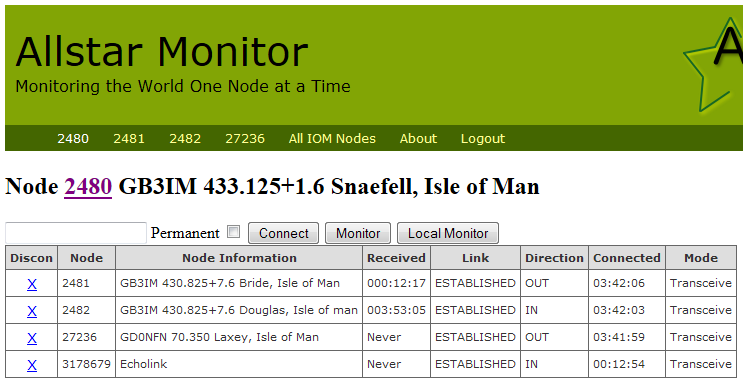
It gets stranger! I can connect to the Echolink Test Node (3009999). The nice man told me I could connect as often as I liked As a more informative test I loaded Echolink on my laptop and logged in as GD4HOZ. I then told GB3IM (2480) to connect to me: [Jun 7 17:29:50] ERROR[2570] chan_echolink.c: Cannot find DB entry for IP addr 89.107.6.110 [Jun 7 17:29:50] ERROR[2570] chan_echolink.c: Cannot find DB entry for IP addr 89.107.6.110 [root@snaefell ~]# asterisk -rx "echolink dbdump" | grep GD4HOZ 338712|GD4HOZ|89.107.6.110 [root@snaefell ~]# My laptop made the Echolink “Boop Beep” noise and said GB3IM was connected to me and then, a couple of seconds later, the connection dropped “Beep Boop”. As you can see from above the entry it’s there in the database. I can’t see why the connection dropped after successfully connecting. Incoming links are fine. 2480 is behind a pFSense firewall with outbound rules set to allow all. I have full control of that firewall and I don’t think that anything’s blocking anything but I’ll check again. I’m getting splinters in my fingers with all of this head-scratching J Just to rub it in, we have a standing incoming Echolink connection at the moment – DJ8QC on his mobile: Thanks for trying to help. David From: Tim Sawyer [mailto:tim.sawyer@mac.com] Sent: 07 June 2015 17:39 To: David Osborn Cc: app_rpt-users@ohnosec.org Subject: Re: [App_rpt-users] Echolink Updates That’s weird, outbound connects are not usually the problem. Is something blocking outbound ports? -- Tim :wq On Jun 7, 2015, at 9:10 AM, David Osborn <david.osborn@manx.net> wrote: Aha!!! So, I was looking under the wrong rock. He's there alright so the mystery remains as to why we can't connect to his node :-( snaefell*CLI> rpt fun 2480 *33356825 -- new CALL=OUTBOUND,ip=81.165.69.72,name=OUTBOUND -- Received OK from Echolink server europe.echolink.org -- Received OK from Echolink server europe.echolink.org -- Directory pgm done downloading(partial,compressed), 637 records -- Hungup 'Zap/pseudo-767367332' -- Hungup 'Zap/pseudo-249305130' -- Received OK from Echolink server europe.echolink.org -- Directory pgm done downloading(partial,compressed), 267 records -- Received OK from Echolink server server1.echolink.org -- <Zap/pseudo-204097906> Playing 'rpt/node' (language 'en') -- <Zap/pseudo-204097906> Playing 'digits/3' (language 'en') -- <Zap/pseudo-204097906> Playing 'digits/3' (language 'en') -- <Zap/pseudo-204097906> Playing 'digits/5' (language 'en') -- <Zap/pseudo-204097906> Playing 'digits/6' (language 'en') -- <Zap/pseudo-204097906> Playing 'digits/8' (language 'en') -- <Zap/pseudo-204097906> Playing 'digits/2' (language 'en') -- <Zap/pseudo-204097906> Playing 'digits/5' (language 'en') -- <Zap/pseudo-204097906> Playing 'rpt/connection_failed' (language 'en') -- Hungup 'Zap/pseudo-204097906' I believe that a local user has been connecting us to the Irish conference from time to time, but at the moment I don't seem to be able to connect out to anyone. Incoming works fine. Cheers, Tim. -----Original Message----- From: Tim Sawyer [mailto:tim.sawyer@mac.com] Sent: 07 June 2015 14:00 To: David Osborn Cc: app_rpt-users@ohnosec.org Subject: Re: [App_rpt-users] Echolink Updates FYI… asterisk -rx "echolink dbdump" | grep ON0VOS 356825|ON0VOS-L|81.165.69.72 -- Tim :wq On Jun 7, 2015, at 5:32 AM, David Osborn <david.osborn@manx.net> wrote: Greetings from the Isle of Man, We seldom use Echolink for outgoing connections but, with an influx of visitors for the Isle of Man TT races this week, we've seen a couple of stations trying to connect "back home" via Echolink - and failing. The issue seems to be that AllStar is unaware of the nodes that the users are trying to connect to. An example is ON0VOS-L (node 356825). If I issue the command "asterisk -rx "database show" | grep ON0" I get a list of entries similar to ON0VOS, but not the one that I'm interested in. Also, comparing with the current logins page on the Echolink site. There are a lot of other nodes missing from the Allstar database. Does anyone know why this might be and what I can do about it? I want our visitors to be able to leave with a favourable view of AllStar and even if I have to fudge a nasty hack to make the desired nodes accessible, I'll do it! Here's a clipping of sections of the response to the database show command mentioned above. /echolink/a/call/ON0OST-R : 82010:91.181.37.10 /echolink/a/call/ON0RCL-R : 377156:83.101.44.168 /echolink/a/call/ON0TLO-R : 488668:193.22.239.31 /echolink/a/call/ON0WL-R : 409331:81.83.131.158 /echolink/a/call/ON0WV-R : 357361:91.181.123.174 /echolink/b/call/ON0OST-R : 82010:91.181.102.165 /echolink/b/call/ON0RCL-R : 377156:83.101.44.168 /echolink/b/call/ON0TLO-R : 488668:193.22.239.31 /echolink/b/call/ON0WL-R : 409331:81.83.131.158 /echolink/b/call/ON0WV-R : 357361:91.181.69.224 /echolink/b/nodenum-call/160278 : ON0LIR-R /echolink/b/nodenum-call/171471 : ON0GRC-R /echolink/b/nodenum-call/187696 : ON0LG-R /echolink/b/nodenum-call/282623 : ON0KTK-R /echolink/b/nodenum-call/352778 : ON0DVS-R /echolink/b/nodenum-call/357361 : ON0WV-R /echolink/b/nodenum-call/368568 : ON0KB-R /echolink/b/nodenum-call/377156 : ON0RCL-R /echolink/b/nodenum-call/394137 : ON0LN-R /echolink/b/nodenum-call/409331 : ON0WL-R /echolink/b/nodenum-call/429437 : ON0BA-R /echolink/b/nodenum-call/45573 : ON0AN-R /echolink/b/nodenum-call/47009 :ON0LFE-L /echolink/b/nodenum-call/488668 : ON0TLO-R /echolink/b/nodenum-call/522270 : ON0LIL-L /echolink/b/nodenum-call/81560 : ON0GB-R /echolink/b/nodenum-call/82010 : ON0OST-R /echolink/b/nodenum-call/93644 : ON0LIM-R Whilst copying this lot, I saw the following on the Asterisk CLI: -- Received OK from Echolink server server1.echolink.org -- Directory pgm done downloading(partial,compressed), 739 records -- new CALL=ON0VOS-L,ip=81.165.69.72,name= 145.337,5 FM Aha!, I thought - an update. So I re-ran the database show command and it came up empty again. No sign of ON0VOS in the database So, the download is being received but it's not updating the database. Can the entry be added manually? What am I missing here? Thanks David Osborn GD4HOZ _______________________________________________ App_rpt-users mailing list App_rpt-users@ohnosec.org http://ohnosec.org/cgi-bin/mailman/listinfo/app_rpt-users To unsubscribe from this list please visit http://ohnosec.org/cgi-bin/mailman/listinfo/app_rpt-users and scroll down to the bottom of the page. Enter your email address and press the "Unsubscribe or edit options button" You do not need a password to unsubscribe, you can do it via email confirmation. If you have trouble unsubscribing, please send a message to the list detailing the problem. _______________________________________________ App_rpt-users mailing list App_rpt-users@ohnosec.org http://ohnosec.org/cgi-bin/mailman/listinfo/app_rpt-users To unsubscribe from this list please visit http://ohnosec.org/cgi-bin/mailman/listinfo/app_rpt-users and scroll down to the bottom of the page. Enter your email address and press the "Unsubscribe or edit options button" You do not need a password to unsubscribe, you can do it via email confirmation. If you have trouble unsubscribing, please send a message to the list detailing the problem.

On 6/7/15 12:10 PM, David Osborn wrote:
Aha!!!
So, I was looking under the wrong rock. He's there alright so the mystery remains as to why we can't connect to his node :-(
snaefell*CLI> rpt fun 2480 *33356825 -- new CALL=OUTBOUND,ip=81.165.69.72,name=OUTBOUND
Do a traceroute to 81.165.69.72 and see what it looks like. I had an issue with routing once like this, worked with every other echolink user except my friend who was on a network in Chicago owned by the ISP that my data center is owned by. Since I bring my own IP space, they had a routing issue with their cable customers getting to my IP's. There was basically nothing of value in the logs to say why this happened. 73's -- Bryan Fields 727-409-1194 - Voice 727-214-2508 - Fax http://bryanfields.net
Thanks for your input guys, It turned out that our pFSense firewall was in a really mean mood. It would allow traffic, then deny it (must be female!). I installed the latest updates - which introduced a bunch of other problems requiring a power-off reboot - then everything worked fine.... for now. Good tip on the echolink database, though. That needs to be Drupal-ed :-) Cheers David -----Original Message----- From: Bryan Fields [mailto:Bryan@bryanfields.net] Sent: 07 June 2015 18:21 To: APP RPT Subject: Re: [App_rpt-users] Echolink Updates On 6/7/15 12:10 PM, David Osborn wrote:
Aha!!!
So, I was looking under the wrong rock. He's there alright so the mystery remains as to why we can't connect to his node :-(
snaefell*CLI> rpt fun 2480 *33356825 -- new CALL=OUTBOUND,ip=81.165.69.72,name=OUTBOUND
Do a traceroute to 81.165.69.72 and see what it looks like. I had an issue with routing once like this, worked with every other echolink user except my friend who was on a network in Chicago owned by the ISP that my data center is owned by. Since I bring my own IP space, they had a routing issue with their cable customers getting to my IP's. There was basically nothing of value in the logs to say why this happened. 73's -- Bryan Fields 727-409-1194 - Voice 727-214-2508 - Fax http://bryanfields.net

Is there a command to force a full DB download from echolink? Seen many time that am echolink user try to connect to my node, it is not known in the DB on my node, this trig a DB download, it receive a partial one then it is rejected cause not in the DB. the only way I can fix this is by stopping the service then start it back, the echolink driver will make a full DB download and the user can then connect.. So it is not a networking isue, user that use a public echolink proxy conect every time (cause the proxy dont change IP most of the time and are in the DB from the start) I am not fluent in C so cant read the source to understand how this is working.. Pierre -----Message d'origine----- From: Tim Sawyer Sent: Sunday, June 07, 2015 9:00 AM To: David Osborn Cc: app_rpt-users@ohnosec.org Subject: Re: [App_rpt-users] Echolink Updates FYI… asterisk -rx "echolink dbdump" | grep ON0VOS 356825|ON0VOS-L|81.165.69.72 -- Tim :wq
On Jun 7, 2015, at 5:32 AM, David Osborn <david.osborn@manx.net> wrote:
Greetings from the Isle of Man,
We seldom use Echolink for outgoing connections but, with an influx of visitors for the Isle of Man TT races this week, we've seen a couple of stations trying to connect "back home" via Echolink - and failing.
The issue seems to be that AllStar is unaware of the nodes that the users are trying to connect to. An example is ON0VOS-L (node 356825).
If I issue the command "asterisk -rx "database show" | grep ON0" I get a list of entries similar to ON0VOS, but not the one that I'm interested in. Also, comparing with the current logins page on the Echolink site. There are a lot of other nodes missing from the Allstar database.
Does anyone know why this might be and what I can do about it? I want our visitors to be able to leave with a favourable view of AllStar and even if I have to fudge a nasty hack to make the desired nodes accessible, I'll do it!
Here's a clipping of sections of the response to the database show command mentioned above.
/echolink/a/call/ON0OST-R : 82010:91.181.37.10 /echolink/a/call/ON0RCL-R : 377156:83.101.44.168 /echolink/a/call/ON0TLO-R : 488668:193.22.239.31 /echolink/a/call/ON0WL-R : 409331:81.83.131.158 /echolink/a/call/ON0WV-R : 357361:91.181.123.174
/echolink/b/call/ON0OST-R : 82010:91.181.102.165 /echolink/b/call/ON0RCL-R : 377156:83.101.44.168 /echolink/b/call/ON0TLO-R : 488668:193.22.239.31 /echolink/b/call/ON0WL-R : 409331:81.83.131.158 /echolink/b/call/ON0WV-R : 357361:91.181.69.224
/echolink/b/nodenum-call/160278 : ON0LIR-R /echolink/b/nodenum-call/171471 : ON0GRC-R /echolink/b/nodenum-call/187696 : ON0LG-R /echolink/b/nodenum-call/282623 : ON0KTK-R /echolink/b/nodenum-call/352778 : ON0DVS-R /echolink/b/nodenum-call/357361 : ON0WV-R /echolink/b/nodenum-call/368568 : ON0KB-R /echolink/b/nodenum-call/377156 : ON0RCL-R /echolink/b/nodenum-call/394137 : ON0LN-R /echolink/b/nodenum-call/409331 : ON0WL-R /echolink/b/nodenum-call/429437 : ON0BA-R /echolink/b/nodenum-call/45573 : ON0AN-R /echolink/b/nodenum-call/47009 :ON0LFE-L /echolink/b/nodenum-call/488668 : ON0TLO-R /echolink/b/nodenum-call/522270 : ON0LIL-L /echolink/b/nodenum-call/81560 : ON0GB-R /echolink/b/nodenum-call/82010 : ON0OST-R /echolink/b/nodenum-call/93644 : ON0LIM-R
Whilst copying this lot, I saw the following on the Asterisk CLI:
-- Received OK from Echolink server server1.echolink.org -- Directory pgm done downloading(partial,compressed), 739 records -- new CALL=ON0VOS-L,ip=81.165.69.72,name= 145.337,5 FM
Aha!, I thought - an update. So I re-ran the database show command and it came up empty again. No sign of ON0VOS in the database
So, the download is being received but it's not updating the database. Can the entry be added manually?
What am I missing here?
Thanks
David Osborn GD4HOZ _______________________________________________ App_rpt-users mailing list App_rpt-users@ohnosec.org http://ohnosec.org/cgi-bin/mailman/listinfo/app_rpt-users
To unsubscribe from this list please visit http://ohnosec.org/cgi-bin/mailman/listinfo/app_rpt-users and scroll down to the bottom of the page. Enter your email address and press the "Unsubscribe or edit options button" You do not need a password to unsubscribe, you can do it via email confirmation. If you have trouble unsubscribing, please send a message to the list detailing the problem.
_______________________________________________ App_rpt-users mailing list App_rpt-users@ohnosec.org http://ohnosec.org/cgi-bin/mailman/listinfo/app_rpt-users To unsubscribe from this list please visit http://ohnosec.org/cgi-bin/mailman/listinfo/app_rpt-users and scroll down to the bottom of the page. Enter your email address and press the "Unsubscribe or edit options button" You do not need a password to unsubscribe, you can do it via email confirmation. If you have trouble unsubscribing, please send a message to the list detailing the problem.

The db connection to echolink servers is not done in real time. So, if a user fires up their desktop or smartdevice application and immediately attempts to connect, they will not be seen as authorized. Wait 10 minutes or so, and it will work direct as the changed database gets polled. As you've noticed, if they connect via a proxy, which by definition are more persistent and thus more likely to be in the loaded database at the node end, they will be able to connect almost immediately, since the authentication is done via the proxy, with the credential apparently passed through to the asterisk node. The echolink channel software is a compromise to connect to a legacy network that has had little to no development or improvements since its introduction, IMHO. It should not be seen as equivalent in operation to the native Windows-based server. -- Bryan Sent from my iPhone 5...No electrons were harmed in the sending of this message.
On Jun 8, 2015, at 10:27, Pete M <petem001@hotmail.com> wrote:
Is there a command to force a full DB download from echolink?
Seen many time that am echolink user try to connect to my node, it is not known in the DB on my node, this trig a DB download, it receive a partial one then it is rejected cause not in the DB.
the only way I can fix this is by stopping the service then start it back, the echolink driver will make a full DB download and the user can then connect.. So it is not a networking isue, user that use a public echolink proxy conect every time (cause the proxy dont change IP most of the time and are in the DB from the start)
I am not fluent in C so cant read the source to understand how this is working..
Pierre
-----Message d'origine----- From: Tim Sawyer Sent: Sunday, June 07, 2015 9:00 AM To: David Osborn Cc: app_rpt-users@ohnosec.org Subject: Re: [App_rpt-users] Echolink Updates
FYI…
asterisk -rx "echolink dbdump" | grep ON0VOS 356825|ON0VOS-L|81.165.69.72
-- Tim :wq
On Jun 7, 2015, at 5:32 AM, David Osborn <david.osborn@manx.net> wrote:
Greetings from the Isle of Man,
We seldom use Echolink for outgoing connections but, with an influx of visitors for the Isle of Man TT races this week, we've seen a couple of
Thanks for taking the time to answer the question, that answer is good but it is not exactly what is happening.. The echolink driver trigger a DB download and do receive a partial DB (the update that need to be done) at that moment.. So the new user should be in that new DB. So why is it rejected? one thing I did noticed. even after 10 minute it still wont work.. in fact, when i receive a call from one of my user asking why there echolink connection to the repeater wont work, usely they been trying for some time, and by the time and go and do some test, they’ve been online for a lot more then 10 minute.. I do understand that Scott don’t work on the project anymore.. But there must be a way to do something in the software like: receive echolink connection - check the IP and calsign against the DB IP and call in DB yes, make a connection No ask for a partial DB download check against the new DB user in DB? yes connect No ask for a full DB download. Check if ip and call in the DB yes connect. No reject the connection.. do this make sens? I am reading the source right now.. If only I could understand C.. From: Bryan D. Boyle Sent: Monday, June 08, 2015 11:27 AM To: APP RPT Subject: Re: [App_rpt-users] Echolink Updates The db connection to echolink servers is not done in real time. So, if a user fires up their desktop or smartdevice application and immediately attempts to connect, they will not be seen as authorized. Wait 10 minutes or so, and it will work direct as the changed database gets polled. As you've noticed, if they connect via a proxy, which by definition are more persistent and thus more likely to be in the loaded database at the node end, they will be able to connect almost immediately, since the authentication is done via the proxy, with the credential apparently passed through to the asterisk node. The echolink channel software is a compromise to connect to a legacy network that has had little to no development or improvements since its introduction, IMHO. It should not be seen as equivalent in operation to the native Windows-based server. -- Bryan Sent from my iPhone 5...No electrons were harmed in the sending of this message. On Jun 8, 2015, at 10:27, Pete M <petem001@hotmail.com> wrote: Is there a command to force a full DB download from echolink? Seen many time that am echolink user try to connect to my node, it is not known in the DB on my node, this trig a DB download, it receive a partial one then it is rejected cause not in the DB. the only way I can fix this is by stopping the service then start it back, the echolink driver will make a full DB download and the user can then connect.. So it is not a networking isue, user that use a public echolink proxy conect every time (cause the proxy dont change IP most of the time and are in the DB from the start) I am not fluent in C so cant read the source to understand how this is working.. Pierre -----Message d'origine----- From: Tim Sawyer Sent: Sunday, June 07, 2015 9:00 AM To: David Osborn Cc: app_rpt-users@ohnosec.org Subject: Re: [App_rpt-users] Echolink Updates FYI… asterisk -rx "echolink dbdump" | grep ON0VOS 356825|ON0VOS-L|81.165.69.72 -- Tim :wq On Jun 7, 2015, at 5:32 AM, David Osborn <david.osborn@manx.net> wrote: Greetings from the Isle of Man, We seldom use Echolink for outgoing connections but, with an influx of visitors for the Isle of Man TT races this week, we've seen a couple of -------------------------------------------------------------------------------- _______________________________________________ App_rpt-users mailing list App_rpt-users@ohnosec.org http://ohnosec.org/cgi-bin/mailman/listinfo/app_rpt-users To unsubscribe from this list please visit http://ohnosec.org/cgi-bin/mailman/listinfo/app_rpt-users and scroll down to the bottom of the page. Enter your email address and press the "Unsubscribe or edit options button" You do not need a password to unsubscribe, you can do it via email confirmation. If you have trouble unsubscribing, please send a message to the list detailing the problem.
participants (5)
-
 Bryan D. Boyle
 -
 Bryan Fields
 -
 David Osborn
 -
 Pete M
 -
 Tim Sawyer