How to clone SD card for R Pi

Looking for an easy method of duplicating an SD card. I tried win32 disk imager method, but it did not seem to do the trick. Might be that I am doing something wrong. If there is perhaps another program or tips someone can pass along, I’d appreciate it. Lu Vencl KA4EPS

If you have access to Linux/ Unix, dd is a good choice On Wed, 13 Mar 2019, 18:42 Lu V, <luvencl8@gmail.com> wrote:
Looking for an easy method of duplicating an SD card. I tried win32 disk imager method, but it did not seem to do the trick. Might be that I am doing something wrong. If there is perhaps another program or tips someone can pass along, I’d appreciate it.
Lu Vencl KA4EPS _______________________________________________ App_rpt-users mailing list App_rpt-users@lists.allstarlink.org http://lists.allstarlink.org/cgi-bin/mailman/listinfo/app_rpt-users
To unsubscribe from this list please visit http://lists.allstarlink.org/cgi-bin/mailman/listinfo/app_rpt-users and scroll down to the bottom of the page. Enter your email address and press the "Unsubscribe or edit options button" You do not need a password to unsubscribe, you can do it via email confirmation. If you have trouble unsubscribing, please send a message to the list detailing the problem.

I just struggled to use the win32diskimager to duplicate my Allstar card. It's not intuitive, so what worked for me was you have to set the destination file first, then it will let you read the SD card. Then when done you can write to a new card. I almost jumped over to my Linux laptop for dd. Jason - N6WBL
Yea I am about to do the same (dd) but I see two partitions pop up when I plug in the SD card . Which do you back up? Or is my w10 doing something odd? Sent from my iPhone, Lu Vencl
On Mar 13, 2019, at 3:02 PM, Jason <cturning1@gmail.com> wrote:
I just struggled to use the win32diskimager to duplicate my Allstar card. It's not intuitive, so what worked for me was you have to set the destination file first, then it will let you read the SD card. Then when done you can write to a new card. I almost jumped over to my Linux laptop for dd.
Jason - N6WBL _______________________________________________ App_rpt-users mailing list App_rpt-users@lists.allstarlink.org http://lists.allstarlink.org/cgi-bin/mailman/listinfo/app_rpt-users
To unsubscribe from this list please visit http://lists.allstarlink.org/cgi-bin/mailman/listinfo/app_rpt-users and scroll down to the bottom of the page. Enter your email address and press the "Unsubscribe or edit options button" You do not need a password to unsubscribe, you can do it via email confirmation. If you have trouble unsubscribing, please send a message to the list detailing the problem.

You dd from one disk to another. You want to write the "image" of your source to the destination disk. That will give you an exact copy. On Wed, Mar 13, 2019 at 12:24 PM Lu V <luvencl8@gmail.com> wrote:
Yea I am about to do the same (dd) but I see two partitions pop up when I plug in the SD card . Which do you back up? Or is my w10 doing something odd?
Sent from my iPhone, Lu Vencl
On Mar 13, 2019, at 3:02 PM, Jason <cturning1@gmail.com> wrote:
I just struggled to use the win32diskimager to duplicate my Allstar card. It's not intuitive, so what worked for me was you have to set the destination file first, then it will let you read the SD card. Then when done you can write to a new card. I almost jumped over to my Linux laptop for dd.
Jason - N6WBL _______________________________________________ App_rpt-users mailing list App_rpt-users@lists.allstarlink.org http://lists.allstarlink.org/cgi-bin/mailman/listinfo/app_rpt-users
To unsubscribe from this list please visit http://lists.allstarlink.org/cgi-bin/mailman/listinfo/app_rpt-users and scroll down to the bottom of the page. Enter your email address and press the "Unsubscribe or edit options button" You do not need a password to unsubscribe, you can do it via email confirmation. If you have trouble unsubscribing, please send a message to the list detailing the problem.
App_rpt-users mailing list App_rpt-users@lists.allstarlink.org http://lists.allstarlink.org/cgi-bin/mailman/listinfo/app_rpt-users
To unsubscribe from this list please visit http://lists.allstarlink.org/cgi-bin/mailman/listinfo/app_rpt-users and scroll down to the bottom of the page. Enter your email address and press the "Unsubscribe or edit options button" You do not need a password to unsubscribe, you can do it via email confirmation. If you have trouble unsubscribing, please send a message to the list detailing the problem.
-- --Bret Taylor Olympia School District

DD is the way to go. BUT if you expended your filesystem to the max of the SD card you will have a large image file for nothing. So to do a backup of only the used space you need to do a clever DD command. first you need to shrink the last partition on the sd card. (I wont tell you how to do it . it is far from the scope of the this message.) but take a look at Gparted. or just Parted if you have no GUI on the machine. then you go into command line and do: fdisk -l as root (or sudo) here is the output of one of my PI Disk /dev/mmcblk0: 29 GiB, 31117541376 bytes, 60776448 sectors Units: sectors of 1 * 512 = 512 bytes Sector size (logical/physical): 512 bytes / 512 bytes I/O size (minimum/optimal): 512 bytes / 512 bytes Disklabel type: dos Disk identifier: 0xdeb2fbcd Device Boot Start End Sectors Size Id Type /dev/mmcblk0p1 8192 96453 88262 43.1M c W95 FAT32 (LBA) /dev/mmcblk0p2 98304 60776447 60678144 29G 83 Linux
From there you need 2 info the block size (512 in my case) and the last used sector number. ( 60776447 for that exemple)
you then use that command: DD if="your source device" of =" your destination" bs=512 count=60776448 that would extract the image file and it would stop 1 block more then the used size of the last partition. that way the image will be the exact maximum size it need to and if you then use another SD card that dont have exactly the same size as the original you wont run into problem copying it. Le mer. 13 mars 2019 à 15:30, Bret Taylor <bmtaylor@osd.wednet.edu> a écrit :
You dd from one disk to another. You want to write the "image" of your source to the destination disk. That will give you an exact copy.
On Wed, Mar 13, 2019 at 12:24 PM Lu V <luvencl8@gmail.com> wrote:
Yea I am about to do the same (dd) but I see two partitions pop up when I plug in the SD card . Which do you back up? Or is my w10 doing something odd?
Sent from my iPhone, Lu Vencl
On Mar 13, 2019, at 3:02 PM, Jason <cturning1@gmail.com> wrote:
I just struggled to use the win32diskimager to duplicate my Allstar card. It's not intuitive, so what worked for me was you have to set the destination file first, then it will let you read the SD card. Then when done you can write to a new card. I almost jumped over to my Linux laptop for dd.
Jason - N6WBL _______________________________________________ App_rpt-users mailing list App_rpt-users@lists.allstarlink.org http://lists.allstarlink.org/cgi-bin/mailman/listinfo/app_rpt-users
To unsubscribe from this list please visit http://lists.allstarlink.org/cgi-bin/mailman/listinfo/app_rpt-users and scroll down to the bottom of the page. Enter your email address and press the "Unsubscribe or edit options button" You do not need a password to unsubscribe, you can do it via email confirmation. If you have trouble unsubscribing, please send a message to the list detailing the problem.
App_rpt-users mailing list App_rpt-users@lists.allstarlink.org http://lists.allstarlink.org/cgi-bin/mailman/listinfo/app_rpt-users
To unsubscribe from this list please visit http://lists.allstarlink.org/cgi-bin/mailman/listinfo/app_rpt-users and scroll down to the bottom of the page. Enter your email address and press the "Unsubscribe or edit options button" You do not need a password to unsubscribe, you can do it via email confirmation. If you have trouble unsubscribing, please send a message to the list detailing the problem.
-- --Bret Taylor Olympia School District _______________________________________________ App_rpt-users mailing list App_rpt-users@lists.allstarlink.org http://lists.allstarlink.org/cgi-bin/mailman/listinfo/app_rpt-users
To unsubscribe from this list please visit http://lists.allstarlink.org/cgi-bin/mailman/listinfo/app_rpt-users and scroll down to the bottom of the page. Enter your email address and press the "Unsubscribe or edit options button" You do not need a password to unsubscribe, you can do it via email confirmation. If you have trouble unsubscribing, please send a message to the list detailing the problem.

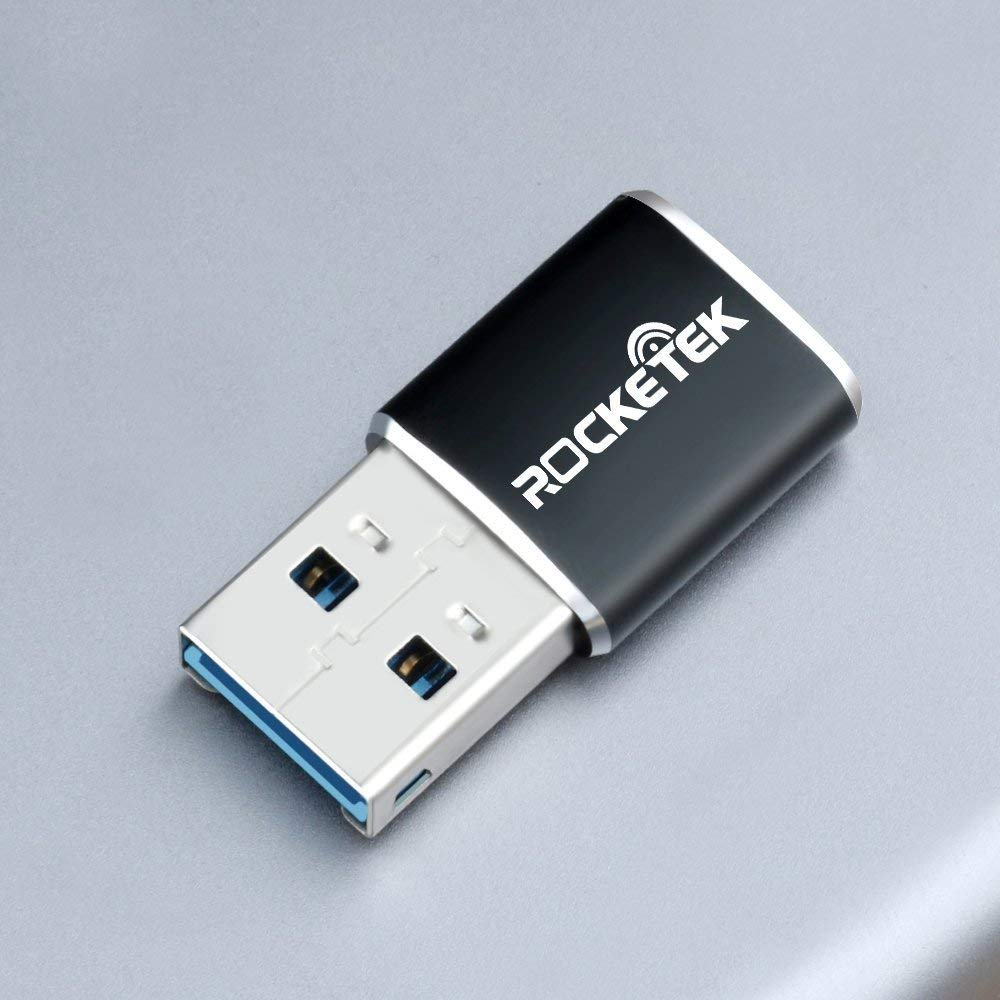
You really need to duplicate the SD card on a Linux machine so it gets done right. I use my R Pi to do this. First, I have a separate SD card with a current full graphical Raspberry OS. So I remove the AllStar Link version SD card from my Pi and install this SD card and use GPART, the graphical GUI partition manager as Pierre Martel suggested. I also have two Rocketek Aluminum USB 3.0 Portable Memory Card Reader Adapters... https://www.amazon.com/gp/product/B06XTQZS4F/ref=ppx_yo_dt_b_asin_title_o01_s00?ie=UTF8&psc=1 You can get two from Amazon for $8.99 You can then load the SD card you want to copy into one USB port on the Pi and the SD card to hold the copy into another USB port on the Pi. ================================= Tim Govin K7TPG +1.435.655.1520 ‐‐‐‐‐‐‐ Original Message ‐‐‐‐‐‐‐ On Wednesday, March 13, 2019 1:41 PM, Lu V luvencl8@gmail.com wrote:
Looking for an easy method of duplicating an SD card. I tried win32 disk imager method, but it did not seem to do the trick. Might be that I am doing something wrong. If there is perhaps another program or tips someone can pass along, I’d appreciate it. Lu Vencl KA4EPS App_rpt-users mailing list App_rpt-users@lists.allstarlink.org http://lists.allstarlink.org/cgi-bin/mailman/listinfo/app_rpt-users To unsubscribe from this list please visit http://lists.allstarlink.org/cgi-bin/mailman/listinfo/app_rpt-users and scroll down to the bottom of the page. Enter your email address and press the "Unsubscribe or edit options button" You do not need a password to unsubscribe, you can do it via email confirmation. If you have trouble unsubscribing, please send a message to the list detailing the problem.

On Wednesday, March 13, 2019 12:23:55 PM PDT Lu V wrote:
Yea I am about to do the same (dd) but I see two partitions pop up when I plug in the SD card . Which do you back up? Or is my w10 doing something odd?
Sent from my iPhone, Lu Vencl
You copy the whole disk image which includes the partition information and boot block. That does mean you need sufficient storage to image the complete disk. For me that means a minimum of 32G of memory since that's my typical card size. The initial copy takes a long time. Then you can use this script: https://github.com/Drewsif/PiShrink to shrink the image down to the minimum size needed. The end result is an image (usually about 4G in size) that when flashed to a new card will autoexpand just like the standard RPi images. ... -- Ken - N7IPB Email: n7ipb@wetnet.net JID: n7ipb@jabber.wetnet.net SvxLink Repeaters: http://pnw220.wetnet.net PGP Sig: F42B EF90 3CD3 31C7 3056 122E 993A 7B2E 5138 C42A “Contrariwise,' continued Tweedledee, 'if it was so, it might be; and if it were so, it would be; but as it isn't, it ain't. That's logic.”
participants (7)
-
 Bret Taylor
 -
 Jason
Jason -
 K7TPG
K7TPG -
 Ken Koster
 -
 Lu V
Lu V -
 Pierre Martel
 -
 Shamim Shahriar