
Hello everyone, I want to make backups for my allstar system I have several private repeaters on several mountains Is there a way to do remote backup backup( from a distance) "maybe in SSH mode" can we make a backup every week? Which method should I use? 5 NODES private Thank you for your help to you all Luc Drolet VE2LUQ

On 7/24/18 9:45 PM, Luc Drolet VE2LUQ wrote:
I want to make backups for my allstar system I have several private repeaters on several mountains Is there a way to do remote backup backup( from a distance) "maybe in SSH mode" can we make a backup every week? Which method should I use?
There's not really much to backup. I'd use a cron job to rsync the /etc/asterisk directory which is where the configs are stored. This way it's not going to copy anything unless it's changed. If you want to get advanced with rsync, it's easy to make it keep daily backups with hard links over the last n days. 73's -- Bryan Fields 727-409-1194 - Voice http://bryanfields.net

There is a backup system in app_rpt. It's documented at https://wiki.allstarlink.org/wiki/Backup On Tue, Jul 24, 2018 at 6:45 PM Luc Drolet VE2LUQ <ldrolet@cgocable.ca> wrote:
Hello everyone,
I want to make backups for my allstar system I have several private repeaters on several mountains Is there a way to do remote backup backup( from a distance) "maybe in SSH mode" can we make a backup every week? Which method should I use?
5 NODES private Thank you for your help to you all
Luc Drolet VE2LUQ _______________________________________________ App_rpt-users mailing list App_rpt-users@lists.allstarlink.org http://lists.allstarlink.org/cgi-bin/mailman/listinfo/app_rpt-users
To unsubscribe from this list please visit http://lists.allstarlink.org/cgi-bin/mailman/listinfo/app_rpt-users and scroll down to the bottom of the page. Enter your email address and press the "Unsubscribe or edit options button" You do not need a password to unsubscribe, you can do it via email confirmation. If you have trouble unsubscribing, please send a message to the list detailing the problem.
-- Tim WD6AWP
On 7/25/18 12:17 AM, Tim Sawyer wrote:
There is a backup system in app_rpt. It's documented at https://wiki.allstarlink.org/wiki/Backup
DOH! totally forgot this, thanks Tim. -- Bryan Fields 727-409-1194 - Voice http://bryanfields.net
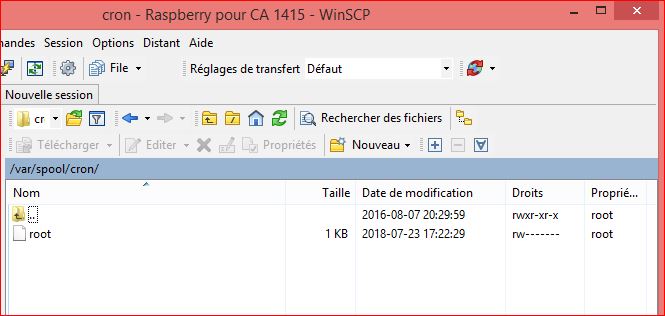
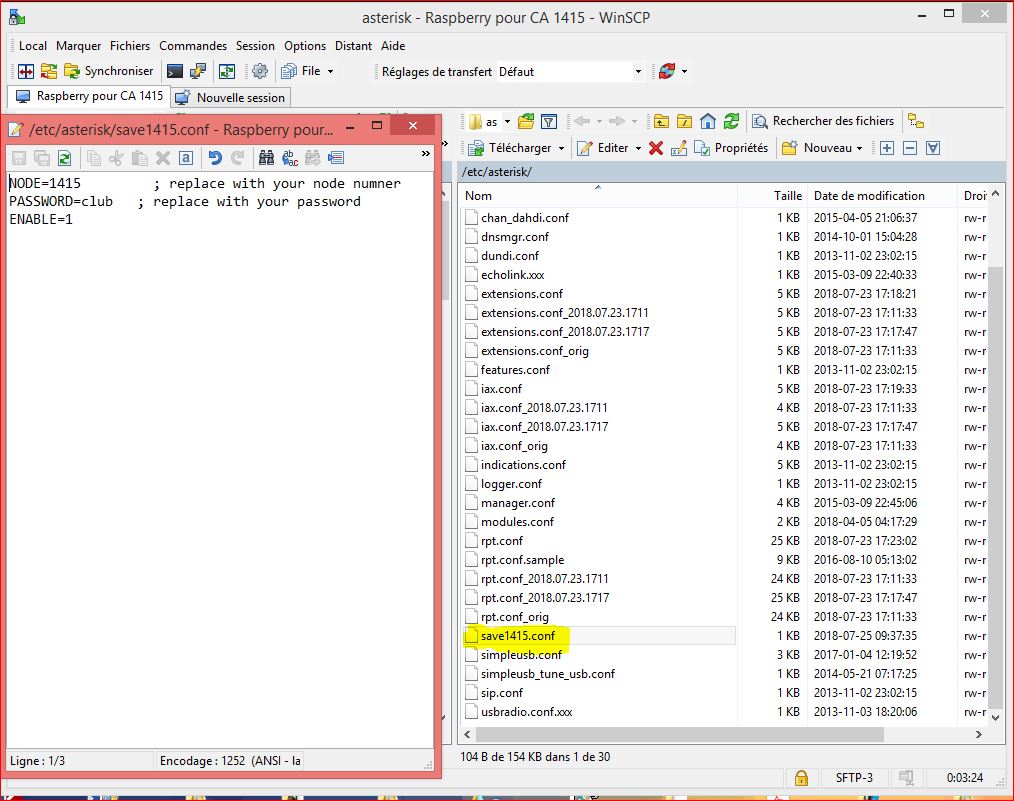
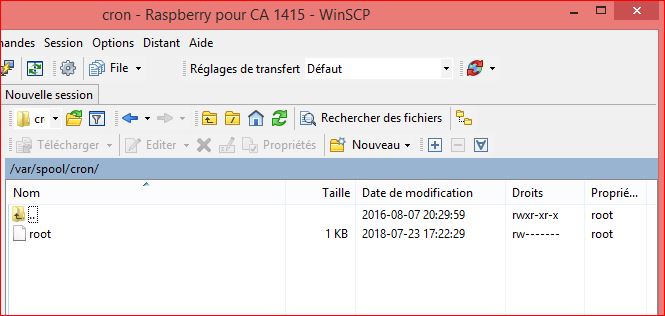
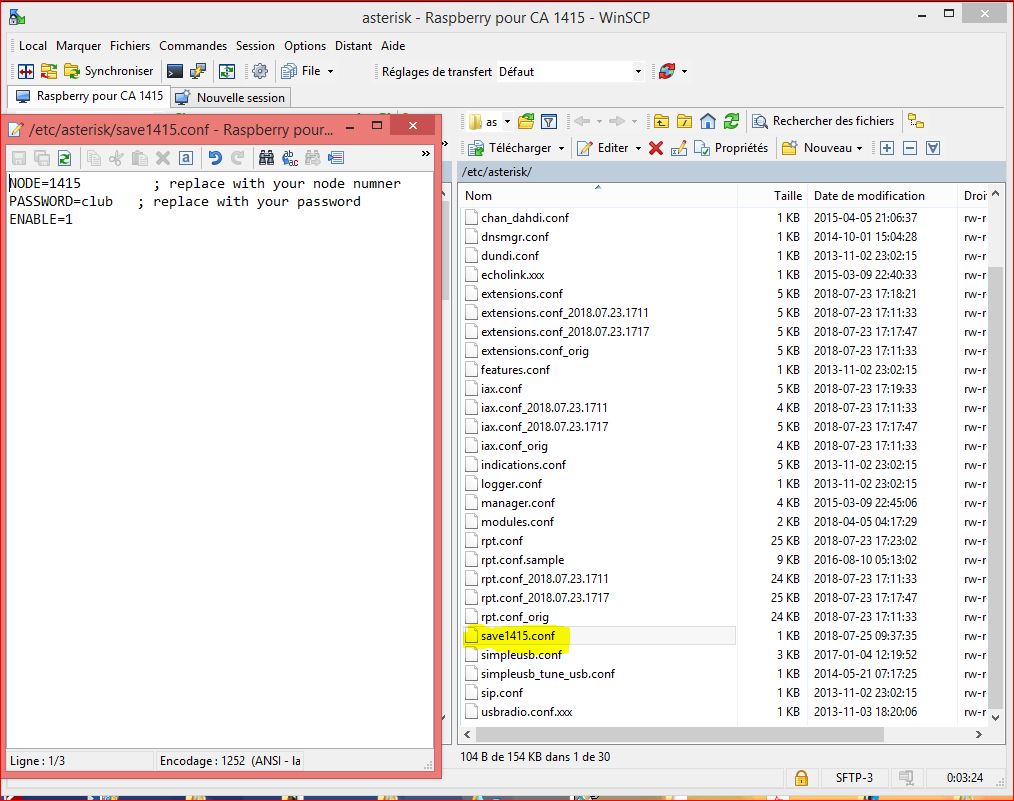
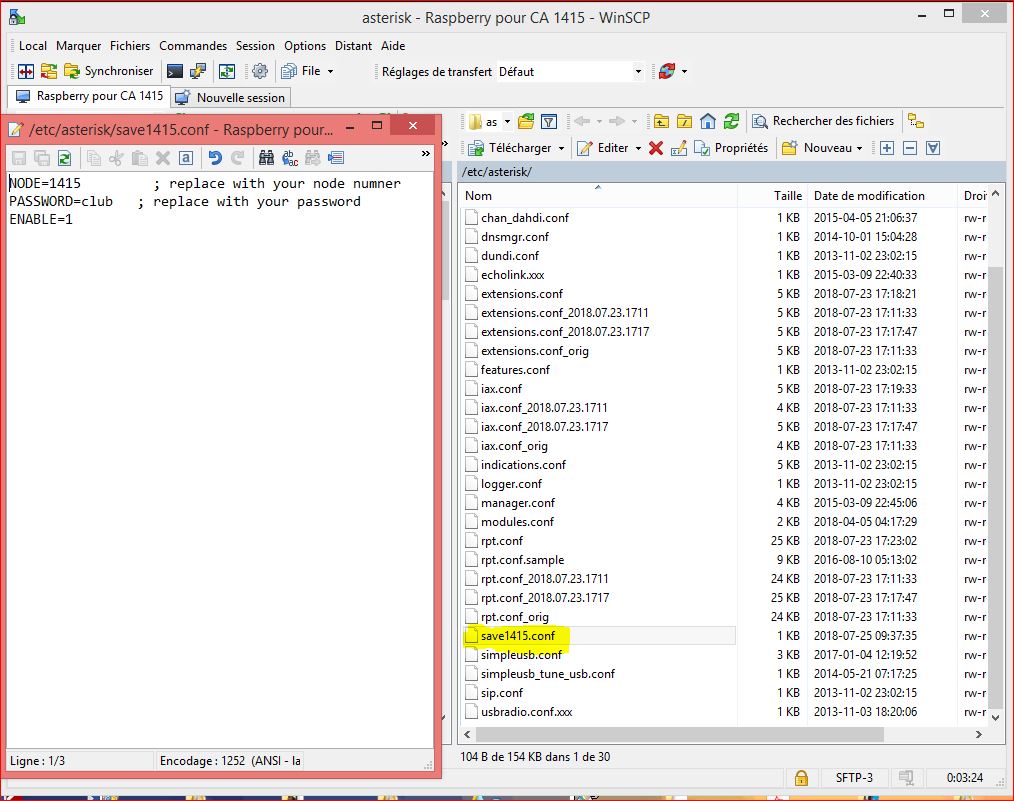
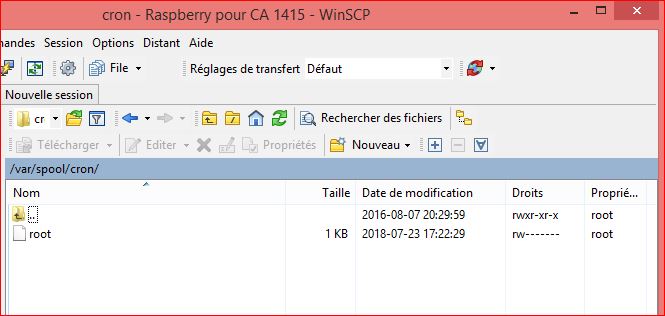
Thank you all for your help ' OK if I understand correctly. I use WINSCP and in etc / asterisk I created a new file using the right clik thereafter I past the info into this file which I added… NODE=1415 PASSWORD=club ENABLE=1 "And save" Now how can I do it with Cron job? always with WINSCP I'm going to the var / spool / cron files now how do I do the automatic execution of the backup? Thank you for your help to you all Grately appreciated 73’s Luc Drolet VE2LUQ
Le 25 juill. 2018 à 00:17, Tim Sawyer <tisawyer@gmail.com> a écrit :
There is a backup system in app_rpt. It's documented at https://wiki.allstarlink.org/wiki/Backup <https://wiki.allstarlink.org/wiki/Backup>
On Tue, Jul 24, 2018 at 6:45 PM Luc Drolet VE2LUQ <ldrolet@cgocable.ca <mailto:ldrolet@cgocable.ca>> wrote: Hello everyone,
I want to make backups for my allstar system I have several private repeaters on several mountains Is there a way to do remote backup backup( from a distance) "maybe in SSH mode" can we make a backup every week? Which method should I use?
5 NODES private Thank you for your help to you all
Luc Drolet VE2LUQ _______________________________________________ App_rpt-users mailing list App_rpt-users@lists.allstarlink.org <mailto:App_rpt-users@lists.allstarlink.org> http://lists.allstarlink.org/cgi-bin/mailman/listinfo/app_rpt-users <http://lists.allstarlink.org/cgi-bin/mailman/listinfo/app_rpt-users>
To unsubscribe from this list please visit http://lists.allstarlink.org/cgi-bin/mailman/listinfo/app_rpt-users <http://lists.allstarlink.org/cgi-bin/mailman/listinfo/app_rpt-users> and scroll down to the bottom of the page. Enter your email address and press the "Unsubscribe or edit options button" You do not need a password to unsubscribe, you can do it via email confirmation. If you have trouble unsubscribing, please send a message to the list detailing the problem.
-- Tim WD6AWP _______________________________________________ App_rpt-users mailing list App_rpt-users@lists.allstarlink.org http://lists.allstarlink.org/cgi-bin/mailman/listinfo/app_rpt-users
To unsubscribe from this list please visit http://lists.allstarlink.org/cgi-bin/mailman/listinfo/app_rpt-users and scroll down to the bottom of the page. Enter your email address and press the "Unsubscribe or edit options button" You do not need a password to unsubscribe, you can do it via email confirmation. If you have trouble unsubscribing, please send a message to the list detailing the problem.
It's unlikely you'll need to cron backups as the config files seldom change. Once you set up you node and back it up, you'll only need to subsequently backup as you make changes to your config. The node number you show 1415 is a private node number. The back up script cannot login in with that node number. You must use a registered node and it's issued password to use the backup server. However, if you have a registered node on that server and you set your backup configuration file to use that node, the backup script will back all nodes (including private ones) on that server. The file name you have chosen for you backup configuration will not work. The name must be savenode.conf. I refer you to the backup documentation on our WiKi at https://wiki.allstarlink.org/wiki/Backup If you're not all that hot about using the Linux command line, or you don't have a public node, you can simply copy all the files in /etc/asterisk to a safe place on your hard drive with winscp. That makes a perfectly adequate backup of your node(s). Also be sure to look at the asl-menu built into ASL 1.01. On Wed, Jul 25, 2018 at 7:08 AM Luc Drolet VE2LUQ <ldrolet@cgocable.ca> wrote:
Thank you all for your help '
OK if I understand correctly. I use WINSCP and in etc / asterisk I created a new file using the right clik thereafter I past the info into this file which I added… NODE=1415 PASSWORD=club ENABLE=1 "And save"
Now how can I do it with Cron job? always with WINSCP I'm going to the var / spool / cron files now how do I do the automatic execution of the backup?
Thank you for your help to you all Grately appreciated
73’s Luc Drolet VE2LUQ
Le 25 juill. 2018 à 00:17, Tim Sawyer <tisawyer@gmail.com> a écrit :
There is a backup system in app_rpt. It's documented at https://wiki.allstarlink.org/wiki/Backup
On Tue, Jul 24, 2018 at 6:45 PM Luc Drolet VE2LUQ <ldrolet@cgocable.ca> wrote:
Hello everyone,
I want to make backups for my allstar system I have several private repeaters on several mountains Is there a way to do remote backup backup( from a distance) "maybe in SSH mode" can we make a backup every week? Which method should I use?
5 NODES private Thank you for your help to you all
Luc Drolet VE2LUQ _______________________________________________ App_rpt-users mailing list App_rpt-users@lists.allstarlink.org http://lists.allstarlink.org/cgi-bin/mailman/listinfo/app_rpt-users
To unsubscribe from this list please visit http://lists.allstarlink.org/cgi-bin/mailman/listinfo/app_rpt-users and scroll down to the bottom of the page. Enter your email address and press the "Unsubscribe or edit options button" You do not need a password to unsubscribe, you can do it via email confirmation. If you have trouble unsubscribing, please send a message to the list detailing the problem.
-- Tim WD6AWP _______________________________________________ App_rpt-users mailing list App_rpt-users@lists.allstarlink.org http://lists.allstarlink.org/cgi-bin/mailman/listinfo/app_rpt-users
To unsubscribe from this list please visit http://lists.allstarlink.org/cgi-bin/mailman/listinfo/app_rpt-users and scroll down to the bottom of the page. Enter your email address and press the "Unsubscribe or edit options button" You do not need a password to unsubscribe, you can do it via email confirmation. If you have trouble unsubscribing, please send a message to the list detailing the problem.
_______________________________________________ App_rpt-users mailing list App_rpt-users@lists.allstarlink.org http://lists.allstarlink.org/cgi-bin/mailman/listinfo/app_rpt-users
To unsubscribe from this list please visit http://lists.allstarlink.org/cgi-bin/mailman/listinfo/app_rpt-users and scroll down to the bottom of the page. Enter your email address and press the "Unsubscribe or edit options button" You do not need a password to unsubscribe, you can do it via email confirmation. If you have trouble unsubscribing, please send a message to the list detailing the problem.
-- Tim WD6AWP
Hello Tim, OK, thank you there I understand a little better, it means with a private NODE that is not registered on Allstar Link, can not do backup so I have to do them manually Thank you I understand better Have a good day Luc VE2LUQ
Le 25 juill. 2018 à 23:27, Tim Sawyer <tisawyer@gmail.com> a écrit :
It's unlikely you'll need to cron backups as the config files seldom change. Once you set up you node and back it up, you'll only need to subsequently backup as you make changes to your config.
The node number you show 1415 is a private node number. The back up script cannot login in with that node number. You must use a registered node and it's issued password to use the backup server. However, if you have a registered node on that server and you set your backup configuration file to use that node, the backup script will back all nodes (including private ones) on that server.
The file name you have chosen for you backup configuration will not work. The name must be savenode.conf. I refer you to the backup documentation on our WiKi at https://wiki.allstarlink.org/wiki/Backup <https://wiki.allstarlink.org/wiki/Backup>
If you're not all that hot about using the Linux command line, or you don't have a public node, you can simply copy all the files in /etc/asterisk to a safe place on your hard drive with winscp. That makes a perfectly adequate backup of your node(s). Also be sure to look at the asl-menu built into ASL 1.01.
On Wed, Jul 25, 2018 at 7:08 AM Luc Drolet VE2LUQ <ldrolet@cgocable.ca <mailto:ldrolet@cgocable.ca>> wrote: Thank you all for your help '
OK if I understand correctly. I use WINSCP and in etc / asterisk I created a new file using the right clik thereafter I past the info into this file which I added… NODE=1415 PASSWORD=club ENABLE=1 "And save"
Now how can I do it with Cron job? always with WINSCP I'm going to the var / spool / cron files now how do I do the automatic execution of the backup?
Thank you for your help to you all Grately appreciated
73’s Luc Drolet VE2LUQ
Le 25 juill. 2018 à 00:17, Tim Sawyer <tisawyer@gmail.com <mailto:tisawyer@gmail.com>> a écrit :
There is a backup system in app_rpt. It's documented at https://wiki.allstarlink.org/wiki/Backup <https://wiki.allstarlink.org/wiki/Backup>
On Tue, Jul 24, 2018 at 6:45 PM Luc Drolet VE2LUQ <ldrolet@cgocable.ca <mailto:ldrolet@cgocable.ca>> wrote: Hello everyone,
I want to make backups for my allstar system I have several private repeaters on several mountains Is there a way to do remote backup backup( from a distance) "maybe in SSH mode" can we make a backup every week? Which method should I use?
5 NODES private Thank you for your help to you all
Luc Drolet VE2LUQ _______________________________________________ App_rpt-users mailing list App_rpt-users@lists.allstarlink.org <mailto:App_rpt-users@lists.allstarlink.org> http://lists.allstarlink.org/cgi-bin/mailman/listinfo/app_rpt-users <http://lists.allstarlink.org/cgi-bin/mailman/listinfo/app_rpt-users>
To unsubscribe from this list please visit http://lists.allstarlink.org/cgi-bin/mailman/listinfo/app_rpt-users <http://lists.allstarlink.org/cgi-bin/mailman/listinfo/app_rpt-users> and scroll down to the bottom of the page. Enter your email address and press the "Unsubscribe or edit options button" You do not need a password to unsubscribe, you can do it via email confirmation. If you have trouble unsubscribing, please send a message to the list detailing the problem.
-- Tim WD6AWP _______________________________________________ App_rpt-users mailing list App_rpt-users@lists.allstarlink.org <mailto:App_rpt-users@lists.allstarlink.org> http://lists.allstarlink.org/cgi-bin/mailman/listinfo/app_rpt-users <http://lists.allstarlink.org/cgi-bin/mailman/listinfo/app_rpt-users>
To unsubscribe from this list please visit http://lists.allstarlink.org/cgi-bin/mailman/listinfo/app_rpt-users <http://lists.allstarlink.org/cgi-bin/mailman/listinfo/app_rpt-users> and scroll down to the bottom of the page. Enter your email address and press the "Unsubscribe or edit options button" You do not need a password to unsubscribe, you can do it via email confirmation. If you have trouble unsubscribing, please send a message to the list detailing the problem.
_______________________________________________ App_rpt-users mailing list App_rpt-users@lists.allstarlink.org <mailto:App_rpt-users@lists.allstarlink.org> http://lists.allstarlink.org/cgi-bin/mailman/listinfo/app_rpt-users <http://lists.allstarlink.org/cgi-bin/mailman/listinfo/app_rpt-users>
To unsubscribe from this list please visit http://lists.allstarlink.org/cgi-bin/mailman/listinfo/app_rpt-users <http://lists.allstarlink.org/cgi-bin/mailman/listinfo/app_rpt-users> and scroll down to the bottom of the page. Enter your email address and press the "Unsubscribe or edit options button" You do not need a password to unsubscribe, you can do it via email confirmation. If you have trouble unsubscribing, please send a message to the list detailing the problem.
-- Tim WD6AWP <save1415.JPG><Cron.JPG><Cron.JPG><Cron.JPG>_______________________________________________ App_rpt-users mailing list App_rpt-users@lists.allstarlink.org http://lists.allstarlink.org/cgi-bin/mailman/listinfo/app_rpt-users
To unsubscribe from this list please visit http://lists.allstarlink.org/cgi-bin/mailman/listinfo/app_rpt-users and scroll down to the bottom of the page. Enter your email address and press the "Unsubscribe or edit options button" You do not need a password to unsubscribe, you can do it via email confirmation. If you have trouble unsubscribing, please send a message to the list detailing the problem.

Hi Luc, ici Pierre VE2PF. Peut tu me dire quel sont tes répéteurs qui sont sous Asterisk en privé? Merci! Le jeu. 26 juil. 2018 à 00:50, Luc Drolet VE2LUQ <ldrolet@cgocable.ca> a écrit :
Hello Tim,
OK, thank you there I understand a little better, it means with a private NODE that is not registered on Allstar Link, can not do backup so I have to do them manually
Thank you I understand better Have a good day
Luc VE2LUQ
Le 25 juill. 2018 à 23:27, Tim Sawyer <tisawyer@gmail.com> a écrit :
It's unlikely you'll need to cron backups as the config files seldom change. Once you set up you node and back it up, you'll only need to subsequently backup as you make changes to your config.
The node number you show 1415 is a private node number. The back up script cannot login in with that node number. You must use a registered node and it's issued password to use the backup server. However, if you have a registered node on that server and you set your backup configuration file to use that node, the backup script will back all nodes (including private ones) on that server.
The file name you have chosen for you backup configuration will not work. The name must be savenode.conf. I refer you to the backup documentation on our WiKi at https://wiki.allstarlink.org/wiki/Backup
If you're not all that hot about using the Linux command line, or you don't have a public node, you can simply copy all the files in /etc/asterisk to a safe place on your hard drive with winscp. That makes a perfectly adequate backup of your node(s). Also be sure to look at the asl-menu built into ASL 1.01.
On Wed, Jul 25, 2018 at 7:08 AM Luc Drolet VE2LUQ <ldrolet@cgocable.ca> wrote:
Thank you all for your help '
OK if I understand correctly. I use WINSCP and in etc / asterisk I created a new file using the right clik thereafter I past the info into this file which I added… NODE=1415 PASSWORD=club ENABLE=1 "And save"
Now how can I do it with Cron job? always with WINSCP I'm going to the var / spool / cron files now how do I do the automatic execution of the backup?
Thank you for your help to you all Grately appreciated
73’s Luc Drolet VE2LUQ
Le 25 juill. 2018 à 00:17, Tim Sawyer <tisawyer@gmail.com> a écrit :
There is a backup system in app_rpt. It's documented at https://wiki.allstarlink.org/wiki/Backup
On Tue, Jul 24, 2018 at 6:45 PM Luc Drolet VE2LUQ <ldrolet@cgocable.ca> wrote:
Hello everyone,
I want to make backups for my allstar system I have several private repeaters on several mountains Is there a way to do remote backup backup( from a distance) "maybe in SSH mode" can we make a backup every week? Which method should I use?
5 NODES private Thank you for your help to you all
Luc Drolet VE2LUQ _______________________________________________ App_rpt-users mailing list App_rpt-users@lists.allstarlink.org http://lists.allstarlink.org/cgi-bin/mailman/listinfo/app_rpt-users
To unsubscribe from this list please visit http://lists.allstarlink.org/cgi-bin/mailman/listinfo/app_rpt-users and scroll down to the bottom of the page. Enter your email address and press the "Unsubscribe or edit options button" You do not need a password to unsubscribe, you can do it via email confirmation. If you have trouble unsubscribing, please send a message to the list detailing the problem.
-- Tim WD6AWP _______________________________________________ App_rpt-users mailing list App_rpt-users@lists.allstarlink.org http://lists.allstarlink.org/cgi-bin/mailman/listinfo/app_rpt-users
To unsubscribe from this list please visit http://lists.allstarlink.org/cgi-bin/mailman/listinfo/app_rpt-users and scroll down to the bottom of the page. Enter your email address and press the "Unsubscribe or edit options button" You do not need a password to unsubscribe, you can do it via email confirmation. If you have trouble unsubscribing, please send a message to the list detailing the problem.
_______________________________________________ App_rpt-users mailing list App_rpt-users@lists.allstarlink.org http://lists.allstarlink.org/cgi-bin/mailman/listinfo/app_rpt-users
To unsubscribe from this list please visit http://lists.allstarlink.org/cgi-bin/mailman/listinfo/app_rpt-users and scroll down to the bottom of the page. Enter your email address and press the "Unsubscribe or edit options button" You do not need a password to unsubscribe, you can do it via email confirmation. If you have trouble unsubscribing, please send a message to the list detailing the problem.
-- Tim WD6AWP <save1415.JPG><Cron.JPG><Cron.JPG><Cron.JPG> _______________________________________________ App_rpt-users mailing list App_rpt-users@lists.allstarlink.org http://lists.allstarlink.org/cgi-bin/mailman/listinfo/app_rpt-users
To unsubscribe from this list please visit http://lists.allstarlink.org/cgi-bin/mailman/listinfo/app_rpt-users and scroll down to the bottom of the page. Enter your email address and press the "Unsubscribe or edit options button" You do not need a password to unsubscribe, you can do it via email confirmation. If you have trouble unsubscribing, please send a message to the list detailing the problem.
_______________________________________________ App_rpt-users mailing list App_rpt-users@lists.allstarlink.org http://lists.allstarlink.org/cgi-bin/mailman/listinfo/app_rpt-users
To unsubscribe from this list please visit http://lists.allstarlink.org/cgi-bin/mailman/listinfo/app_rpt-users and scroll down to the bottom of the page. Enter your email address and press the "Unsubscribe or edit options button" You do not need a password to unsubscribe, you can do it via email confirmation. If you have trouble unsubscribing, please send a message to the list detailing the problem.

Although this solution is a bit techie, I don’t think it was suggested. If you’d like though you can use Git. I think this is very appropriate for Allstar as you can version your configs, see what changes you’ve made, revert to previous configs and even create a new branch to try some new configs without messing with your production configs. You can even sign up a free bitbucket account and and store your repo there. It’ll take a little bit of effort to learn but it’s not impossible and you can use it for other things too. https://git-scm.com/downloads https://bitbucket.org/ Take care, Justin KG7FKJ
On Jul 24, 2018, at 6:45 PM, Luc Drolet VE2LUQ <ldrolet@cgocable.ca> wrote:
Hello everyone,
I want to make backups for my allstar system I have several private repeaters on several mountains Is there a way to do remote backup backup( from a distance) "maybe in SSH mode" can we make a backup every week? Which method should I use?
5 NODES private Thank you for your help to you all
Luc Drolet VE2LUQ _______________________________________________ App_rpt-users mailing list App_rpt-users@lists.allstarlink.org http://lists.allstarlink.org/cgi-bin/mailman/listinfo/app_rpt-users
To unsubscribe from this list please visit http://lists.allstarlink.org/cgi-bin/mailman/listinfo/app_rpt-users and scroll down to the bottom of the page. Enter your email address and press the "Unsubscribe or edit options button" You do not need a password to unsubscribe, you can do it via email confirmation. If you have trouble unsubscribing, please send a message to the list detailing the problem.
participants (5)
-
 Bryan Fields
 -
 Justin Harris
 -
 Luc Drolet VE2LUQ
 -
 Pierre Martel
 -
 Tim Sawyer