Yes, 'exit' works on both the CLI as well as the SSH connection. N5ZUA On 3/12/2015 1:36 AM, Luke Rohn wrote:
Hello Steve,
Thanks for pointing me in the right direction.
I just ran asterisk -R as you suggested and it put me into the command line interface.
I then ran the original command and it worked like a charm.
Thank you very much, I appreciate it. I am learning more about Allstar each day and it has been fun!
Is exit the proper command to end (CLI)?
73,
Luke
On Wed, Mar 11, 2015 at 11:13 PM, Steve Agee <n5zua@earthlink.net <mailto:n5zua@earthlink.net>> wrote:
Luke,
Most of the Linux system commands are run from the root command prompt you have listed. Most of the Allstar / app_rpt commands are run from the Asterisk Command Line Interface (CLI). Such is the case with 'rpt lstats 28806' so to get to the CLI from the root command prompt, first type [root@KK7XX ~]# asterisk -R
N5ZUA
On 3/12/2015 1:09 AM, Luke Rohn wrote:
Hello Tim,
I am relatively new to Allstar, having just got it up and running for less than a week now. I have access to the computer I am running Allstar on only through SSH. After logging in I tried the command you posted:
*CLI> rpt lstats <yournode>
And I am not having any luck.
This is what what I am getting:
[root@KK7XX ~]# rpt lstats 28806
-bash: rpt: command not found
[root@KK7XX ~]#
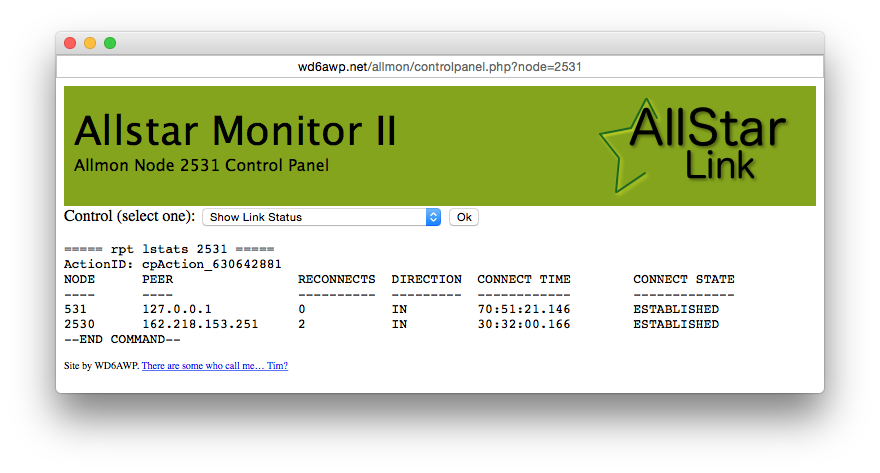
At this point, I am not sure if I am using the command correctly, or else this command is performed from some sort of web interface that I am not aware of yet. I almost think it is the later after looking at the image you have attached below.
I appreciate the help you offer and thanks for sharing your knowledge of Allstar.
Best regards,
Luke
On Tue, Mar 10, 2015 at 12:41 PM, Tim Sawyer <tim.sawyer@mac.com <mailto:tim.sawyer@mac.com>> wrote:
*CLI> rpt lstats <yournode>
Or use Allmon...
-- Tim :wq
On Mar 10, 2015, at 11:40 AM, Robert Newberry <N1XBM@amsat.org <mailto:N1XBM@amsat.org>> wrote:
I wrote it down a while back but now have lost my notes. I've tried google and I must be using the wrong terms.
Is there a way to show the IP addresses of the nodes connected to my node? I thought it could be done from the CLI?
Thank you
_______________________________________________ App_rpt-users mailing list App_rpt-users@ohnosec.org <mailto:App_rpt-users@ohnosec.org> http://ohnosec.org/cgi-bin/mailman/listinfo/app_rpt-users
To unsubscribe from this list please visit http://ohnosec.org/cgi-bin/mailman/listinfo/app_rpt-users and scroll down to the bottom of the page. Enter your email address and press the "Unsubscribe or edit options button" You do not need a password to unsubscribe, you can do it via email confirmation. If you have trouble unsubscribing, please send a message to the list detailing the problem.
_______________________________________________ App_rpt-users mailing list App_rpt-users@ohnosec.org <mailto:App_rpt-users@ohnosec.org> http://ohnosec.org/cgi-bin/mailman/listinfo/app_rpt-users
To unsubscribe from this list please visit http://ohnosec.org/cgi-bin/mailman/listinfo/app_rpt-users and scroll down to the bottom of the page. Enter your email address and press the "Unsubscribe or edit options button" You do not need a password to unsubscribe, you can do it via email confirmation. If you have trouble unsubscribing, please send a message to the list detailing the problem.
_______________________________________________ App_rpt-users mailing list App_rpt-users@ohnosec.org <mailto:App_rpt-users@ohnosec.org> http://ohnosec.org/cgi-bin/mailman/listinfo/app_rpt-users
To unsubscribe from this list please visithttp://ohnosec.org/cgi-bin/mailman/listinfo/app_rpt-users and scroll down to the bottom of the page. Enter your email address and press the "Unsubscribe or edit options button" You do not need a password to unsubscribe, you can do it via email confirmation. If you have trouble unsubscribing, please send a message to the list detailing the problem.
_______________________________________________ App_rpt-users mailing list App_rpt-users@ohnosec.org <mailto:App_rpt-users@ohnosec.org> http://ohnosec.org/cgi-bin/mailman/listinfo/app_rpt-users
To unsubscribe from this list please visit http://ohnosec.org/cgi-bin/mailman/listinfo/app_rpt-users and scroll down to the bottom of the page. Enter your email address and press the "Unsubscribe or edit options button" You do not need a password to unsubscribe, you can do it via email confirmation. If you have trouble unsubscribing, please send a message to the list detailing the problem.