
I could use some help to connect the dots here. I was trying to use a rtl-sdr to pipe a receive signal into the input or receive audio for asterisk instead of using the mic in on the usb audio fob. Heres what I got so far. I can get a rtl-sdr installed in the Arch Linux by using pacman -s rtl-sdr. Install reboot and plug in rtl-sdr. You can run lsusb to see if the computer sees it or run rtl_test. Now to get the audio piped to audio device in the computer we have to create a loopback right? So modprobe snd-aloop to get the loopbacks setup but its not the usb audio but on the card1?? Then if you run this command, it will pipe a FM 12Khz bandwidth centered on 446.160 mhz and pipe it to the loopback device which is the device name of the loopback. rtl_fm -M USB -f 446.160M -A fast -s 12K -p -0 -g 0.0 | aplay -r 12k -t raw -D default:CARD=Loopback -c 1 -f S16_LEaplay -r 12k -t raw -c 1 -f S16_LE I added these two items in rc.local so rtl-sdr input and loopbacks are setup before asterisk starts. After doing some reading. https://github.com/sm0svx/svxlink/issues/250 <----took some notes from here. I added the input and output device name in the alsa.conf In asterisk/alsa.conf define the audio ports pointing to alsa loopback devices: input_device= default:CARD=Loopback output_device=default:CARD=Device in modules.conf I enabled chan_alsa.so and after reboot with chan_alsa.so loaded I get no audio at all. My radio keys up at bootup but I get no initial greeting, no audio is coming through. Now I wasn't expecting this to work of the top, I still need to figure out how the node is going to get cos from the rtl-sdr, I could try to use ctcss but can anyone help me connect the dots on this with what I have so far. Thanks, Joe Kd2nfc

On 5/22/18 3:29 AM, KD2NFC - Joe wrote:
I was trying to use a rtl-sdr to pipe a receive signal into the input or receive audio for asterisk instead of using the mic in on the usb audio fob.
I've always done this using a usbradio or simpleusb based input, never using the chan_alsa. I don't believe alsa works for radio interfaces as there is no signaling for PTT/COR/PL/etc.
Heres what I got so far. I can get a rtl-sdr installed in the Arch Linux by using pacman -s rtl-sdr.
If you're running arch you compiled allstarlink from source, so can you post your config output?
Then if you run this command, it will pipe a FM 12Khz bandwidth centered on 446.160 mhz and pipe it to the loopback device which is the device name of the loopback.
rtl_fm -M USB -f 446.160M -A fast -s 12K -p -0 -g 0.0 | aplay -r 12k -t raw -D default:CARD=Loopback -c 1 -f S16_LEaplay -r 12k -t raw -c 1 -f S16_LE
Does this work if you just output to the local speakers?
in modules.conf I enabled chan_alsa.so and after reboot with chan_alsa.so loaded I get no audio at all. My radio keys up at bootup but I get no initial greeting, no audio is coming through. Now I wasn't expecting this to work of the top, I still need to figure out how the node is going to get cos from the rtl-sdr, I could try to use ctcss but can anyone help me connect the dots on this with what I have so far.
I don't think you'll have the signaling here to make this work. You might be able to loop this into the DSP functions of USBradio, but it's going to need some code to glue it together. This sounds like a cool project, but GNUradio isn't the easiest to work with :) 73's -- Bryan Fields 727-409-1194 - Voice http://bryanfields.net
I’m using a image. Not 100% sure where I got it. Might be David’s. I can post the config. What do want to see? Yes the rtl_rm and aplay pipe will play on default sound device. The -D in aplay command portion of the command specifies your sound device. Looks like the command I pasted had a double of the aplay command. It should read:
rtl_fm -M USB -f 446.160M -A fast -s 12K -p -0 -g 0.0 | aplay -r 12k -t raw -D default:CARD=Loopback -c 1 -f S16_LE
I use to use this with wsjtx and the rtl-SDR for receive only and it piped the audio right into the program. The thing I need to accomplish is allow asterisk to use the usb fob for audio out and make use of the PTT and then allow input from another hardware device. I read that the only way to do it is using usbaudio driver for radio and adding a Alsa.conf file pointing to the input and output device you want to use. When I enable the chan_alsa.so and reboot, the radio keys up because the PTT is high from the usb audio activating but no audio comes from asterisk. It’s certainly not behaving the way should using when using chan_alsa.so by looking in the alsa.conf file and finding its audio in and out devices. Wondering how the usbaudio.so find it’s device. Does it assume the usb audio is card 0, or the default audio. What if you had two audio fobs on the system and you wanted to specify a specific one? TBC..... Joe Kd2nfc Sent from my iPad
On May 22, 2018, at 3:44 AM, Bryan Fields <Bryan@bryanfields.net> wrote:
On 5/22/18 3:29 AM, KD2NFC - Joe wrote: I was trying to use a rtl-sdr to pipe a receive signal into the input or receive audio for asterisk instead of using the mic in on the usb audio fob.
I've always done this using a usbradio or simpleusb based input, never using the chan_alsa. I don't believe alsa works for radio interfaces as there is no signaling for PTT/COR/PL/etc.
Heres what I got so far. I can get a rtl-sdr installed in the Arch Linux by using pacman -s rtl-sdr.
If you're running arch you compiled allstarlink from source, so can you post your config output?
Then if you run this command, it will pipe a FM 12Khz bandwidth centered on 446.160 mhz and pipe it to the loopback device which is the device name of the loopback.
rtl_fm -M USB -f 446.160M -A fast -s 12K -p -0 -g 0.0 | aplay -r 12k -t raw -D default:CARD=Loopback -c 1 -f S16_LEaplay -r 12k -t raw -c 1 -f S16_LE
Does this work if you just output to the local speakers?
in modules.conf I enabled chan_alsa.so and after reboot with chan_alsa.so loaded I get no audio at all. My radio keys up at bootup but I get no initial greeting, no audio is coming through. Now I wasn't expecting this to work of the top, I still need to figure out how the node is going to get cos from the rtl-sdr, I could try to use ctcss but can anyone help me connect the dots on this with what I have so far.
I don't think you'll have the signaling here to make this work. You might be able to loop this into the DSP functions of USBradio, but it's going to need some code to glue it together.
This sounds like a cool project, but GNUradio isn't the easiest to work with :)
73's -- Bryan Fields
727-409-1194 - Voice http://bryanfields.net _______________________________________________ App_rpt-users mailing list App_rpt-users@lists.allstarlink.org http://lists.allstarlink.org/cgi-bin/mailman/listinfo/app_rpt-users
To unsubscribe from this list please visit http://lists.allstarlink.org/cgi-bin/mailman/listinfo/app_rpt-users and scroll down to the bottom of the page. Enter your email address and press the "Unsubscribe or edit options button" You do not need a password to unsubscribe, you can do it via email confirmation. If you have trouble unsubscribing, please send a message to the list detailing the problem.

Have you tried using the chan_usrp module? It’s designed to work with GNU Radio. I use it for bridging, but I’ve never tested it for this particular instance. I’m reading with interest. 😊 73 de K4SQI! Steve, K4SQI From: KD2NFC, Joe Puma Sent: Tuesday, May 22, 2018 1:23 PM To: Users of Asterisk app_rpt Subject: Re: [App_rpt-users] RTL_SDR for receive I’m using a image. Not 100% sure where I got it. Might be David’s. I can post the config. What do want to see? Yes the rtl_rm and aplay pipe will play on default sound device. The -D in aplay command portion of the command specifies your sound device. Looks like the command I pasted had a double of the aplay command. It should read: rtl_fm -M USB -f 446.160M -A fast -s 12K -p -0 -g 0.0 | aplay -r 12k -t raw -D default:CARD=Loopback -c 1 -f S16_LE I use to use this with wsjtx and the rtl-SDR for receive only and it piped the audio right into the program. The thing I need to accomplish is allow asterisk to use the usb fob for audio out and make use of the PTT and then allow input from another hardware device. I read that the only way to do it is using usbaudio driver for radio and adding a Alsa.conf file pointing to the input and output device you want to use. When I enable the chan_alsa.so and reboot, the radio keys up because the PTT is high from the usb audio activating but no audio comes from asterisk. It’s certainly not behaving the way should using when using chan_alsa.so by looking in the alsa.conf file and finding its audio in and out devices. Wondering how the usbaudio.so find it’s device. Does it assume the usb audio is card 0, or the default audio. What if you had two audio fobs on the system and you wanted to specify a specific one? TBC..... Joe Kd2nfc Sent from my iPad On May 22, 2018, at 3:44 AM, Bryan Fields <Bryan@bryanfields.net> wrote: On 5/22/18 3:29 AM, KD2NFC - Joe wrote: I was trying to use a rtl-sdr to pipe a receive signal into the input or receive audio for asterisk instead of using the mic in on the usb audio fob. I've always done this using a usbradio or simpleusb based input, never using the chan_alsa. I don't believe alsa works for radio interfaces as there is no signaling for PTT/COR/PL/etc. Heres what I got so far. I can get a rtl-sdr installed in the Arch Linux by using pacman -s rtl-sdr. If you're running arch you compiled allstarlink from source, so can you post your config output? Then if you run this command, it will pipe a FM 12Khz bandwidth centered on 446.160 mhz and pipe it to the loopback device which is the device name of the loopback. rtl_fm -M USB -f 446.160M -A fast -s 12K -p -0 -g 0.0 | aplay -r 12k -t raw -D default:CARD=Loopback -c 1 -f S16_LEaplay -r 12k -t raw -c 1 -f S16_LE Does this work if you just output to the local speakers? in modules.conf I enabled chan_alsa.so and after reboot with chan_alsa.so loaded I get no audio at all. My radio keys up at bootup but I get no initial greeting, no audio is coming through. Now I wasn't expecting this to work of the top, I still need to figure out how the node is going to get cos from the rtl-sdr, I could try to use ctcss but can anyone help me connect the dots on this with what I have so far. I don't think you'll have the signaling here to make this work. You might be able to loop this into the DSP functions of USBradio, but it's going to need some code to glue it together. This sounds like a cool project, but GNUradio isn't the easiest to work with :) 73's -- Bryan Fields 727-409-1194 - Voice http://bryanfields.net _______________________________________________ App_rpt-users mailing list App_rpt-users@lists.allstarlink.org http://lists.allstarlink.org/cgi-bin/mailman/listinfo/app_rpt-users To unsubscribe from this list please visit http://lists.allstarlink.org/cgi-bin/mailman/listinfo/app_rpt-users and scroll down to the bottom of the page. Enter your email address and press the "Unsubscribe or edit options button" You do not need a password to unsubscribe, you can do it via email confirmation. If you have trouble unsubscribing, please send a message to the list detailing the problem.

Are you trying to send RX audio to the simpleusb channel driver? You could always "force" the RPT_RXKEYED variable by issuing rpt setvar nodenumber RPT_RXKEYED=1 at the CLI to pipe audio through without having anything connected. I've done this for testing purposes to assert COS and works as intended. Not sure how you would be able to automate it however, maybe something in cron at boot? Just thinking out loud... I too am interested in the progress of this as I've been wanting to mess with chan_alsa for a while, but never got started with it. 73 Stephen K1LNX On Tue, May 22, 2018 at 1:27 PM, Steven Blackford <kb7sqi@gmail.com> wrote:
Have you tried using the chan_usrp module? It’s designed to work with GNU Radio. I use it for bridging, but I’ve never tested it for this particular instance. I’m reading with interest. 😊 73 de K4SQI!
Steve, K4SQI
*From: *KD2NFC, Joe Puma <kd2nfc@gmail.com> *Sent: *Tuesday, May 22, 2018 1:23 PM *To: *Users of Asterisk app_rpt <app_rpt-users@lists.allstarlink.org> *Subject: *Re: [App_rpt-users] RTL_SDR for receive
I’m using a image. Not 100% sure where I got it. Might be David’s. I can post the config. What do want to see?
Yes the rtl_rm and aplay pipe will play on default sound device. The -D in aplay command portion of the command specifies your sound device. Looks like the command I pasted had a double of the aplay command. It should read:
rtl_fm -M USB -f 446.160M -A fast -s 12K -p -0 -g 0.0 | aplay -r 12k -t raw
-D default:CARD=Loopback -c 1 -f S16_LE
I use to use this with wsjtx and the rtl-SDR for receive only and it piped the audio right into the program.
The thing I need to accomplish is allow asterisk to use the usb fob for audio out and make use of the PTT and then allow input from another hardware device. I read that the only way to do it is using usbaudio driver for radio and adding a Alsa.conf file pointing to the input and output device you want to use.
When I enable the chan_alsa.so and reboot, the radio keys up because the PTT is high from the usb audio activating but no audio comes from asterisk. It’s certainly not behaving the way should using when using chan_alsa.so by looking in the alsa.conf file and finding its audio in and out devices.
Wondering how the usbaudio.so find it’s device. Does it assume the usb audio is card 0, or the default audio. What if you had two audio fobs on the system and you wanted to specify a specific one?
TBC.....
Joe
Kd2nfc
Sent from my iPad
On May 22, 2018, at 3:44 AM, Bryan Fields <Bryan@bryanfields.net> wrote:
On 5/22/18 3:29 AM, KD2NFC - Joe wrote:
I was trying to use a rtl-sdr to pipe a receive signal into the input or
receive audio for asterisk instead of using the mic in on the usb audio fob.
I've always done this using a usbradio or simpleusb based input, never using the chan_alsa. I don't believe alsa works for radio interfaces as there is no signaling for PTT/COR/PL/etc.
Heres what I got so far. I can get a rtl-sdr installed in the Arch Linux by
using pacman -s rtl-sdr.
If you're running arch you compiled allstarlink from source, so can you post your config output?
Then if you run this command, it will pipe a FM 12Khz bandwidth centered on
446.160 mhz and pipe it to the loopback device which is the device name of
the loopback.
rtl_fm -M USB -f 446.160M -A fast -s 12K -p -0 -g 0.0 | aplay -r 12k -t raw
-D default:CARD=Loopback -c 1 -f S16_LEaplay -r 12k -t raw -c 1 -f S16_LE
Does this work if you just output to the local speakers?
in modules.conf I enabled chan_alsa.so and after reboot with chan_alsa.so
loaded I get no audio at all. My radio keys up at bootup but I get no
initial greeting, no audio is coming through. Now I wasn't expecting this to
work of the top, I still need to figure out how the node is going to get cos
from the rtl-sdr, I could try to use ctcss but can anyone help me connect
the dots on this with what I have so far.
I don't think you'll have the signaling here to make this work. You might be able to loop this into the DSP functions of USBradio, but it's going to need some code to glue it together.
This sounds like a cool project, but GNUradio isn't the easiest to work with :)
73's -- Bryan Fields
727-409-1194 - Voice http://bryanfields.net _______________________________________________ App_rpt-users mailing list App_rpt-users@lists.allstarlink.org http://lists.allstarlink.org/cgi-bin/mailman/listinfo/app_rpt-users
To unsubscribe from this list please visit http://lists.allstarlink.org/ cgi-bin/mailman/listinfo/app_rpt-users and scroll down to the bottom of the page. Enter your email address and press the "Unsubscribe or edit options button" You do not need a password to unsubscribe, you can do it via email confirmation. If you have trouble unsubscribing, please send a message to the list detailing the problem.
_______________________________________________ App_rpt-users mailing list App_rpt-users@lists.allstarlink.org http://lists.allstarlink.org/cgi-bin/mailman/listinfo/app_rpt-users
To unsubscribe from this list please visit http://lists.allstarlink.org/ cgi-bin/mailman/listinfo/app_rpt-users and scroll down to the bottom of the page. Enter your email address and press the "Unsubscribe or edit options button" You do not need a password to unsubscribe, you can do it via email confirmation. If you have trouble unsubscribing, please send a message to the list detailing the problem.
Stephen I’m looking to make a rtl sdr the nodes radio receiver. Right now I haven’t found a device that works with asterisk that let’s me specify a device for input and a device for output. The chan_alsa is suppose to do that and when I enable it I get no audio at all. My pipe command works when I output it to the usb fob, the radio keys up because the PTT is high and not under control of asterisk to keep it low so it transmits the audio coming from the rtlsdr. If I key up another radio on the frequency I’m set to I hear it. But that’s just a test because my aplay command can’t be in control of the usb audio fob and asterisk so I’m trying to use the alsa audio loopback so I can pipe the audio to one end of the loop back and then tell asterisk /usbaudio to use the other end of the loopback as audio input. It’s really pretty easy straight forward and kinda trivial in other alsa environments and it seems like asterisk can do it. Maybe I’m missing something in this Doug Crompton build I’m using. Joe KD2NFC Sent from my iPad
On May 22, 2018, at 1:40 PM, Stephen - K1LNX <k1lnx@k1lnx.net> wrote:
Are you trying to send RX audio to the simpleusb channel driver? You could always "force" the RPT_RXKEYED variable by issuing rpt setvar nodenumber RPT_RXKEYED=1 at the CLI to pipe audio through without having anything connected. I've done this for testing purposes to assert COS and works as intended. Not sure how you would be able to automate it however, maybe something in cron at boot?
Just thinking out loud... I too am interested in the progress of this as I've been wanting to mess with chan_alsa for a while, but never got started with it.
73 Stephen K1LNX
On Tue, May 22, 2018 at 1:27 PM, Steven Blackford <kb7sqi@gmail.com> wrote: Have you tried using the chan_usrp module? It’s designed to work with GNU Radio. I use it for bridging, but I’ve never tested it for this particular instance. I’m reading with interest. 😊 73 de K4SQI!
Steve, K4SQI
From: KD2NFC, Joe Puma Sent: Tuesday, May 22, 2018 1:23 PM To: Users of Asterisk app_rpt Subject: Re: [App_rpt-users] RTL_SDR for receive
I’m using a image. Not 100% sure where I got it. Might be David’s. I can post the config. What do want to see?
Yes the rtl_rm and aplay pipe will play on default sound device. The -D in aplay command portion of the command specifies your sound device. Looks like the command I pasted had a double of the aplay command. It should read:
rtl_fm -M USB -f 446.160M -A fast -s 12K -p -0 -g 0.0 | aplay -r 12k -t raw
-D default:CARD=Loopback -c 1 -f S16_LE
I use to use this with wsjtx and the rtl-SDR for receive only and it piped the audio right into the program.
The thing I need to accomplish is allow asterisk to use the usb fob for audio out and make use of the PTT and then allow input from another hardware device. I read that the only way to do it is using usbaudio driver for radio and adding a Alsa.conf file pointing to the input and output device you want to use.
When I enable the chan_alsa.so and reboot, the radio keys up because the PTT is high from the usb audio activating but no audio comes from asterisk. It’s certainly not behaving the way should using when using chan_alsa.so by looking in the alsa.conf file and finding its audio in and out devices.
Wondering how the usbaudio.so find it’s device. Does it assume the usb audio is card 0, or the default audio. What if you had two audio fobs on the system and you wanted to specify a specific one?
TBC.....
Joe
Kd2nfc
Sent from my iPad
On May 22, 2018, at 3:44 AM, Bryan Fields <Bryan@bryanfields.net> wrote:
On 5/22/18 3:29 AM, KD2NFC - Joe wrote:
I was trying to use a rtl-sdr to pipe a receive signal into the input or
receive audio for asterisk instead of using the mic in on the usb audio fob.
I've always done this using a usbradio or simpleusb based input, never using the chan_alsa. I don't believe alsa works for radio interfaces as there is no signaling for PTT/COR/PL/etc.
Heres what I got so far. I can get a rtl-sdr installed in the Arch Linux by
using pacman -s rtl-sdr.
If you're running arch you compiled allstarlink from source, so can you post your config output?
Then if you run this command, it will pipe a FM 12Khz bandwidth centered on
446.160 mhz and pipe it to the loopback device which is the device name of
the loopback.
rtl_fm -M USB -f 446.160M -A fast -s 12K -p -0 -g 0.0 | aplay -r 12k -t raw
-D default:CARD=Loopback -c 1 -f S16_LEaplay -r 12k -t raw -c 1 -f S16_LE
Does this work if you just output to the local speakers?
in modules.conf I enabled chan_alsa.so and after reboot with chan_alsa.so
loaded I get no audio at all. My radio keys up at bootup but I get no
initial greeting, no audio is coming through. Now I wasn't expecting this to
work of the top, I still need to figure out how the node is going to get cos
from the rtl-sdr, I could try to use ctcss but can anyone help me connect
the dots on this with what I have so far.
I don't think you'll have the signaling here to make this work. You might be able to loop this into the DSP functions of USBradio, but it's going to need some code to glue it together.
This sounds like a cool project, but GNUradio isn't the easiest to work with :)
73's -- Bryan Fields
727-409-1194 - Voice http://bryanfields.net _______________________________________________ App_rpt-users mailing list App_rpt-users@lists.allstarlink.org http://lists.allstarlink.org/cgi-bin/mailman/listinfo/app_rpt-users
To unsubscribe from this list please visit http://lists.allstarlink.org/cgi-bin/mailman/listinfo/app_rpt-users and scroll down to the bottom of the page. Enter your email address and press the "Unsubscribe or edit options button" You do not need a password to unsubscribe, you can do it via email confirmation. If you have trouble unsubscribing, please send a message to the list detailing the problem.
_______________________________________________ App_rpt-users mailing list App_rpt-users@lists.allstarlink.org http://lists.allstarlink.org/cgi-bin/mailman/listinfo/app_rpt-users
To unsubscribe from this list please visit http://lists.allstarlink.org/cgi-bin/mailman/listinfo/app_rpt-users and scroll down to the bottom of the page. Enter your email address and press the "Unsubscribe or edit options button" You do not need a password to unsubscribe, you can do it via email confirmation. If you have trouble unsubscribing, please send a message to the list detailing the problem.
_______________________________________________ App_rpt-users mailing list App_rpt-users@lists.allstarlink.org http://lists.allstarlink.org/cgi-bin/mailman/listinfo/app_rpt-users
To unsubscribe from this list please visit http://lists.allstarlink.org/cgi-bin/mailman/listinfo/app_rpt-users and scroll down to the bottom of the page. Enter your email address and press the "Unsubscribe or edit options button" You do not need a password to unsubscribe, you can do it via email confirmation. If you have trouble unsubscribing, please send a message to the list detailing the problem.
Made a little progress today… I was able to listen to the audio piped from the rtl_sdr on the node today. Well I actually had to create an extension that opens the other end of the loopback device I am piping the audio into. I made an extension and it can be called up. I’m basically using alsa as a end point. I guess for now it could be used to play noaa weather or any other frequency you want to sit it on. Rtl_fm has some cool features like you can add a few frequencies and rtl_fm will scan through them while its running. There could be an issue with squelch though, if there is a lot of noise it could keep the node keyed up and the squelch feature in the rtl_fm is quirky, it doesn’t cut the noise floor out weird. Now that I have confirmed a working setup that audio can come into ASL from the SDR and learned a little more about this beast Asterisk I can figure out next steps. It wont be this way lol, we would need a Alsa type driver we can call from rtp.conf. Mike KB8JNM mentioned look into usrp. From some brief looks at it and I found that you can split the rxchannel and txchannel in rtp.conf. so what if I txchannel = UsbRadio/usb46596 and rxchannel = USRP/127.0.0.1:34001:32001. I don’t know much about usrp so I will have to see how I can pipe the audio of the SDR into that channel. To be continued…. So if you want to add a sdr dongle to your node just follow these steps. Don’t forget to plug in your rtl-sdr dongle 😊 Install the rtl-sdr drivers like I mentioned in the original post. I compiled the keenerds version as he have some bells and whistles in his build. Add these commands to rc.local, they will setup the loopback and get rtl_sdr piping audio to the loopback. Check the frequency (-f ) to whatever you like, you can 146125000 syntax as well. modprobe snd-aloop ; <-put this before asterisk loading rtl_fm -M fm -f 145640000 -s 30000 -r 12k -g 3.0 | aplay -r 12k -D default:CARD=Loopback -c 1 -f S16_LE & ; <-put this after asterisk loads create a alsa.conf in /etc/asterisk/ add this… [general] autoanswer=yes context=local extensions=s language=de input_device=hw:1,1,0 output_device=hw:1,0,1 I’m using usbaudio for this in rpt.conf but you have to enable chan_alsa.so in modules.conf Next create a file called console.conf in the /etc/asterisk directory Add this.. [default] input_device = default output_device = default autoanswer = yes context = default extension = s callerid = Radio Console KD2NFC <(0049) 123456789> language = en overridecontext = no mohinterpret = default active = yes I can connect with my sip device by adding this to my extentions.conf [dialplan] exten => 222,1,Authenticate(1234) ; use password 1234 to connect or comment out this and the playback line below, you have to renumber the order. exten => 222,2,Playback(access-granted) exten => 222,3,Dial(Console/default) exten => 222,n,Hangup() If you add it to a dialplan context setup to work with your node you can get to it by doing a autopatch. Rpt fun <yournode#> *6222 Or dial 222 with your sip or iax endpoint. Make sure their contexts points to the dial plan with the extension you added. Joe Kd2nfc From: App_rpt-users <app_rpt-users-bounces@lists.allstarlink.org> On Behalf Of Stephen - K1LNX Sent: May 22, 2018 1:40 PM To: Users of Asterisk app_rpt <app_rpt-users@lists.allstarlink.org> Subject: Re: [App_rpt-users] RTL_SDR for receive Are you trying to send RX audio to the simpleusb channel driver? You could always "force" the RPT_RXKEYED variable by issuing rpt setvar nodenumber RPT_RXKEYED=1 at the CLI to pipe audio through without having anything connected. I've done this for testing purposes to assert COS and works as intended. Not sure how you would be able to automate it however, maybe something in cron at boot? Just thinking out loud... I too am interested in the progress of this as I've been wanting to mess with chan_alsa for a while, but never got started with it. 73 Stephen K1LNX On Tue, May 22, 2018 at 1:27 PM, Steven Blackford <kb7sqi@gmail.com <mailto:kb7sqi@gmail.com> > wrote: Have you tried using the chan_usrp module? It’s designed to work with GNU Radio. I use it for bridging, but I’ve never tested it for this particular instance. I’m reading with interest. 😊 73 de K4SQI! Steve, K4SQI From: KD2NFC, Joe Puma <mailto:kd2nfc@gmail.com> Sent: Tuesday, May 22, 2018 1:23 PM To: Users of Asterisk app_rpt <mailto:app_rpt-users@lists.allstarlink.org> Subject: Re: [App_rpt-users] RTL_SDR for receive I’m using a image. Not 100% sure where I got it. Might be David’s. I can post the config. What do want to see? Yes the rtl_rm and aplay pipe will play on default sound device. The -D in aplay command portion of the command specifies your sound device. Looks like the command I pasted had a double of the aplay command. It should read: rtl_fm -M USB -f 446.160M -A fast -s 12K -p -0 -g 0.0 | aplay -r 12k -t raw -D default:CARD=Loopback -c 1 -f S16_LE I use to use this with wsjtx and the rtl-SDR for receive only and it piped the audio right into the program. The thing I need to accomplish is allow asterisk to use the usb fob for audio out and make use of the PTT and then allow input from another hardware device. I read that the only way to do it is using usbaudio driver for radio and adding a Alsa.conf file pointing to the input and output device you want to use. When I enable the chan_alsa.so and reboot, the radio keys up because the PTT is high from the usb audio activating but no audio comes from asterisk. It’s certainly not behaving the way should using when using chan_alsa.so by looking in the alsa.conf file and finding its audio in and out devices. Wondering how the usbaudio.so find it’s device. Does it assume the usb audio is card 0, or the default audio. What if you had two audio fobs on the system and you wanted to specify a specific one? TBC..... Joe Kd2nfc Sent from my iPad On May 22, 2018, at 3:44 AM, Bryan Fields <Bryan@bryanfields.net <mailto:Bryan@bryanfields.net> > wrote: On 5/22/18 3:29 AM, KD2NFC - Joe wrote: I was trying to use a rtl-sdr to pipe a receive signal into the input or receive audio for asterisk instead of using the mic in on the usb audio fob. I've always done this using a usbradio or simpleusb based input, never using the chan_alsa. I don't believe alsa works for radio interfaces as there is no signaling for PTT/COR/PL/etc. Heres what I got so far. I can get a rtl-sdr installed in the Arch Linux by using pacman -s rtl-sdr. If you're running arch you compiled allstarlink from source, so can you post your config output? Then if you run this command, it will pipe a FM 12Khz bandwidth centered on 446.160 mhz and pipe it to the loopback device which is the device name of the loopback. rtl_fm -M USB -f 446.160M -A fast -s 12K -p -0 -g 0.0 | aplay -r 12k -t raw -D default:CARD=Loopback -c 1 -f S16_LEaplay -r 12k -t raw -c 1 -f S16_LE Does this work if you just output to the local speakers? in modules.conf I enabled chan_alsa.so and after reboot with chan_alsa.so loaded I get no audio at all. My radio keys up at bootup but I get no initial greeting, no audio is coming through. Now I wasn't expecting this to work of the top, I still need to figure out how the node is going to get cos from the rtl-sdr, I could try to use ctcss but can anyone help me connect the dots on this with what I have so far. I don't think you'll have the signaling here to make this work. You might be able to loop this into the DSP functions of USBradio, but it's going to need some code to glue it together. This sounds like a cool project, but GNUradio isn't the easiest to work with :) 73's -- Bryan Fields 727-409-1194 - Voice http://bryanfields.net _______________________________________________ App_rpt-users mailing list App_rpt-users@lists.allstarlink.org <mailto:App_rpt-users@lists.allstarlink.org> http://lists.allstarlink.org/cgi-bin/mailman/listinfo/app_rpt-users To unsubscribe from this list please visit http://lists.allstarlink.org/cgi-bin/mailman/listinfo/app_rpt-users and scroll down to the bottom of the page. Enter your email address and press the "Unsubscribe or edit options button" You do not need a password to unsubscribe, you can do it via email confirmation. If you have trouble unsubscribing, please send a message to the list detailing the problem. _______________________________________________ App_rpt-users mailing list App_rpt-users@lists.allstarlink.org <mailto:App_rpt-users@lists.allstarlink.org> http://lists.allstarlink.org/cgi-bin/mailman/listinfo/app_rpt-users To unsubscribe from this list please visit http://lists.allstarlink.org/cgi-bin/mailman/listinfo/app_rpt-users and scroll down to the bottom of the page. Enter your email address and press the "Unsubscribe or edit options button" You do not need a password to unsubscribe, you can do it via email confirmation. If you have trouble unsubscribing, please send a message to the list detailing the problem.
On 5/23/18 8:00 PM, KD2NFC - Joe wrote:
I was able to listen to the audio piped from the rtl_sdr on the node today. Well I actually had to create an extension that opens the other end of the loopback device I am piping the audio into. I made an extension and it can be called up. I’m basically using alsa as a end point.
Joe, that's great to hear. I love seeing people dig into AllStar and change things out of the ordinary, that's the power of open source.
So if you want to add a sdr dongle to your node just follow these steps. Don’t forget to plug in your rtl-sdr dongle 😊
You should add this up on the wiki, it's there so anyone can edit it and add new stuff to it. http://wiki.allstarlink.org Request an account: https://wiki.allstarlink.org/wiki/Special:RequestAccount and we'll get it approved. 73's -- Bryan Fields 727-409-1194 - Voice http://bryanfields.net
Okay thanks. Here’s a cool pic of my node. It’s just waiting to get a paint job. 😎 Sent from my iPhone
On May 23, 2018, at 10:40 PM, Bryan Fields <Bryan@bryanfields.net> wrote:
On 5/23/18 8:00 PM, KD2NFC - Joe wrote:
I was able to listen to the audio piped from the rtl_sdr on the node today. Well I actually had to create an extension that opens the other end of the loopback device I am piping the audio into. I made an extension and it can be called up. I’m basically using alsa as a end point.
Joe, that's great to hear. I love seeing people dig into AllStar and change things out of the ordinary, that's the power of open source.
So if you want to add a sdr dongle to your node just follow these steps. Don’t forget to plug in your rtl-sdr dongle 😊
You should add this up on the wiki, it's there so anyone can edit it and add new stuff to it. http://wiki.allstarlink.org
Request an account: https://wiki.allstarlink.org/wiki/Special:RequestAccount and we'll get it approved.
73's -- Bryan Fields
727-409-1194 - Voice http://bryanfields.net _______________________________________________ App_rpt-users mailing list App_rpt-users@lists.allstarlink.org http://lists.allstarlink.org/cgi-bin/mailman/listinfo/app_rpt-users
To unsubscribe from this list please visit http://lists.allstarlink.org/cgi-bin/mailman/listinfo/app_rpt-users and scroll down to the bottom of the page. Enter your email address and press the "Unsubscribe or edit options button" You do not need a password to unsubscribe, you can do it via email confirmation. If you have trouble unsubscribing, please send a message to the list detailing the problem.
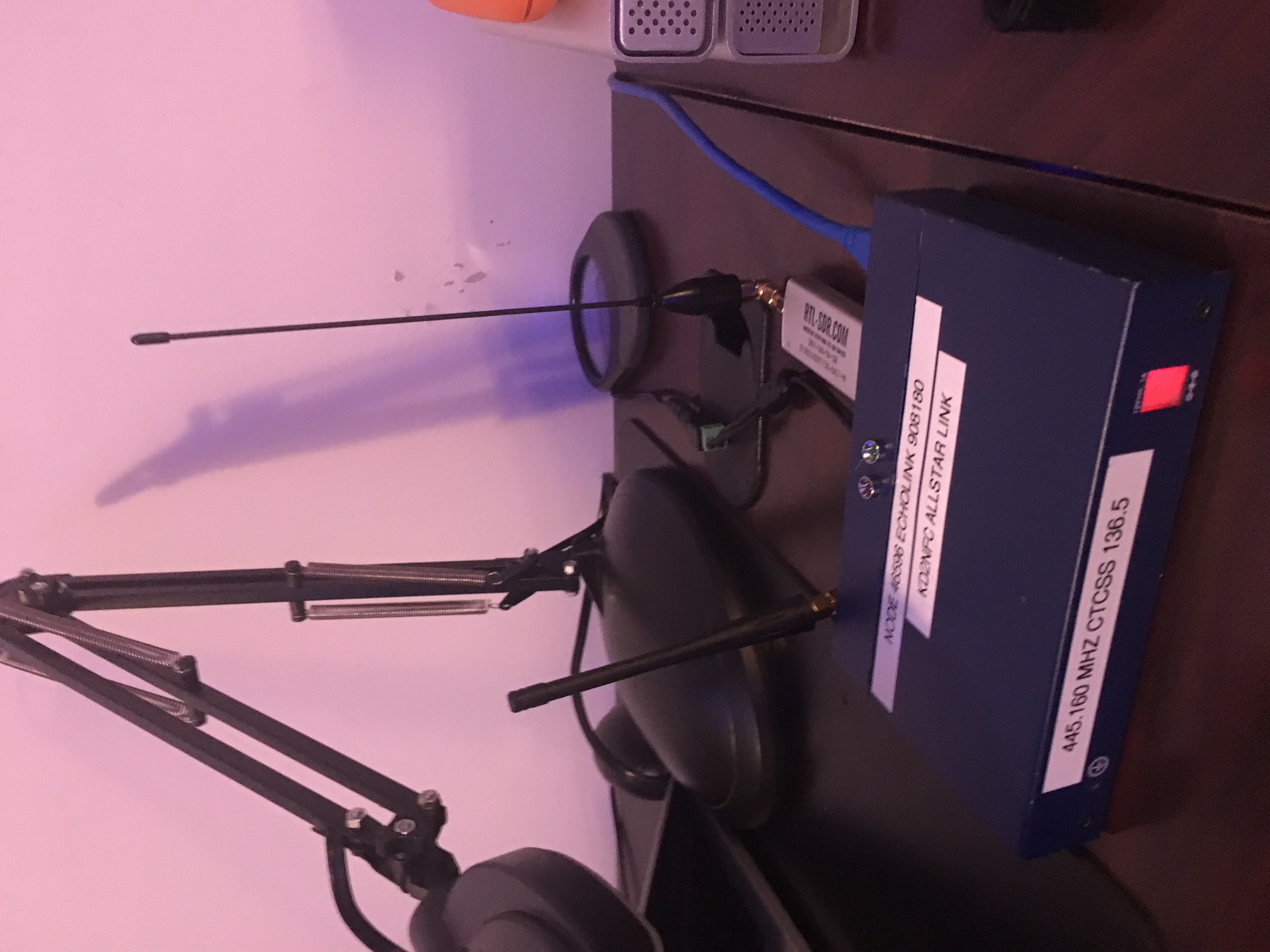
Bryan could you tell me how I need to compile this? Do I have to download the whole asterisk source? If so, which version. I am using a doug Crompton image. https://yo3iiu.ro/blog/?p=361 Joe Kd2nfc -----Original Message----- From: App_rpt-users <app_rpt-users-bounces@lists.allstarlink.org> On Behalf Of Bryan Fields Sent: May 23, 2018 10:41 PM To: Users of Asterisk app_rpt <app_rpt-users@lists.allstarlink.org> Subject: Re: [App_rpt-users] RTL_SDR for receive On 5/23/18 8:00 PM, KD2NFC - Joe wrote:
I was able to listen to the audio piped from the rtl_sdr on the node today. Well I actually had to create an extension that opens the other end of the loopback device I am piping the audio into. I made an extension and it can be called up. I’m basically using alsa as a end point.
Joe, that's great to hear. I love seeing people dig into AllStar and change things out of the ordinary, that's the power of open source.
So if you want to add a sdr dongle to your node just follow these steps. Don’t forget to plug in your rtl-sdr dongle 😊
You should add this up on the wiki, it's there so anyone can edit it and add new stuff to it. http://wiki.allstarlink.org Request an account: https://wiki.allstarlink.org/wiki/Special:RequestAccount and we'll get it approved. 73's -- Bryan Fields 727-409-1194 - Voice http://bryanfields.net _______________________________________________ App_rpt-users mailing list App_rpt-users@lists.allstarlink.org http://lists.allstarlink.org/cgi-bin/mailman/listinfo/app_rpt-users To unsubscribe from this list please visit http://lists.allstarlink.org/cgi-bin/mailman/listinfo/app_rpt-users and scroll down to the bottom of the page. Enter your email address and press the "Unsubscribe or edit options button" You do not need a password to unsubscribe, you can do it via email confirmation. If you have trouble unsubscribing, please send a message to the list detailing the problem.
On 5/23/18 11:36 PM, KD2NFC - Joe wrote:
Bryan could you tell me how I need to compile this? Do I have to download the whole asterisk source? If so, which version. I am using a doug Crompton image
Ah hamvoip, well ask them for the source, lol. The hamvoip people are in violation of the GPL and have no right to distribute any of the asterisk/app_rpt/linux/etc. code. They are perpetrators of copyright infringement on a massive scale. The real open source AllStar code is on github: https://github.com/AllStarLink/ and binaries are on the wiki under downloads https://wiki.allstarlink.org/wiki/Main_Page You should be able to pull the version of asterisk there and compile it (./configure, make, etc) just like any older asterisk. You'll need the DAHDI kernel modules, so you'll need headers. I've done it a few times, it's not that bad, takes a bit to do it on the Pi unless you cross compile :) 73's -- Bryan Fields 727-409-1194 - Voice http://bryanfields.net
Looks like there is support for alsa device and using gpio pins on a RPi. Why aren’t these features pushed out into builds and images? https://github.com/N4IRS/ASL_GPIO ; Channels noload => chan_rpiradio.so ; Simple Channel driver for ALSA interface with Rapsberry Pi GPIO controls noload => chan_alsaradio.so ; Simple Channel driver for ALSA interface oh my! Joe Kd2nfc -----Original Message----- From: App_rpt-users <app_rpt-users-bounces@lists.allstarlink.org> On Behalf Of Bryan Fields Sent: May 23, 2018 10:41 PM To: Users of Asterisk app_rpt <app_rpt-users@lists.allstarlink.org> Subject: Re: [App_rpt-users] RTL_SDR for receive On 5/23/18 8:00 PM, KD2NFC - Joe wrote:
I was able to listen to the audio piped from the rtl_sdr on the node today. Well I actually had to create an extension that opens the other end of the loopback device I am piping the audio into. I made an extension and it can be called up. I’m basically using alsa as a end point.
Joe, that's great to hear. I love seeing people dig into AllStar and change things out of the ordinary, that's the power of open source.
So if you want to add a sdr dongle to your node just follow these steps. Don’t forget to plug in your rtl-sdr dongle 😊
You should add this up on the wiki, it's there so anyone can edit it and add new stuff to it. http://wiki.allstarlink.org Request an account: https://wiki.allstarlink.org/wiki/Special:RequestAccount and we'll get it approved. 73's -- Bryan Fields 727-409-1194 - Voice http://bryanfields.net _______________________________________________ App_rpt-users mailing list App_rpt-users@lists.allstarlink.org http://lists.allstarlink.org/cgi-bin/mailman/listinfo/app_rpt-users To unsubscribe from this list please visit http://lists.allstarlink.org/cgi-bin/mailman/listinfo/app_rpt-users and scroll down to the bottom of the page. Enter your email address and press the "Unsubscribe or edit options button" You do not need a password to unsubscribe, you can do it via email confirmation. If you have trouble unsubscribing, please send a message to the list detailing the problem.
On 5/24/18 12:44 AM, KD2NFC - Joe wrote:
Looks like there is support for alsa device and using gpio pins on a RPi. Why aren’t these features pushed out into builds and images?
I think the performance and audio quality was not good. Steve did some testing with it and I think the issue was you needed an interface device to limit/cleanup audio and it just wasn't worth it. The code's there so it might be possible to improve it if you want to mess with it :) -- Bryan Fields 727-409-1194 - Voice http://bryanfields.net
Understood. I'll see where this takes me. Thank you Bryan! Joe Kd2nfc -----Original Message----- From: App_rpt-users <app_rpt-users-bounces@lists.allstarlink.org> On Behalf Of Bryan Fields Sent: May 24, 2018 12:53 AM To: Users of Asterisk app_rpt <app_rpt-users@lists.allstarlink.org> Subject: Re: [App_rpt-users] RTL_SDR for receive On 5/24/18 12:44 AM, KD2NFC - Joe wrote:
Looks like there is support for alsa device and using gpio pins on a RPi. Why aren’t these features pushed out into builds and images?
I think the performance and audio quality was not good. Steve did some testing with it and I think the issue was you needed an interface device to limit/cleanup audio and it just wasn't worth it. The code's there so it might be possible to improve it if you want to mess with it :) -- Bryan Fields 727-409-1194 - Voice http://bryanfields.net _______________________________________________ App_rpt-users mailing list App_rpt-users@lists.allstarlink.org http://lists.allstarlink.org/cgi-bin/mailman/listinfo/app_rpt-users To unsubscribe from this list please visit http://lists.allstarlink.org/cgi-bin/mailman/listinfo/app_rpt-users and scroll down to the bottom of the page. Enter your email address and press the "Unsubscribe or edit options button" You do not need a password to unsubscribe, you can do it via email confirmation. If you have trouble unsubscribing, please send a message to the list detailing the problem.
Wow, I found this….can someone help me compile it? https://yo3iiu.ro/blog/?p=361 From: App_rpt-users <app_rpt-users-bounces@lists.allstarlink.org> On Behalf Of Stephen - K1LNX Sent: May 22, 2018 1:40 PM To: Users of Asterisk app_rpt <app_rpt-users@lists.allstarlink.org> Subject: Re: [App_rpt-users] RTL_SDR for receive Are you trying to send RX audio to the simpleusb channel driver? You could always "force" the RPT_RXKEYED variable by issuing rpt setvar nodenumber RPT_RXKEYED=1 at the CLI to pipe audio through without having anything connected. I've done this for testing purposes to assert COS and works as intended. Not sure how you would be able to automate it however, maybe something in cron at boot? Just thinking out loud... I too am interested in the progress of this as I've been wanting to mess with chan_alsa for a while, but never got started with it. 73 Stephen K1LNX On Tue, May 22, 2018 at 1:27 PM, Steven Blackford <kb7sqi@gmail.com <mailto:kb7sqi@gmail.com> > wrote: Have you tried using the chan_usrp module? It’s designed to work with GNU Radio. I use it for bridging, but I’ve never tested it for this particular instance. I’m reading with interest. 😊 73 de K4SQI! Steve, K4SQI From: KD2NFC, Joe Puma <mailto:kd2nfc@gmail.com> Sent: Tuesday, May 22, 2018 1:23 PM To: Users of Asterisk app_rpt <mailto:app_rpt-users@lists.allstarlink.org> Subject: Re: [App_rpt-users] RTL_SDR for receive I’m using a image. Not 100% sure where I got it. Might be David’s. I can post the config. What do want to see? Yes the rtl_rm and aplay pipe will play on default sound device. The -D in aplay command portion of the command specifies your sound device. Looks like the command I pasted had a double of the aplay command. It should read: rtl_fm -M USB -f 446.160M -A fast -s 12K -p -0 -g 0.0 | aplay -r 12k -t raw -D default:CARD=Loopback -c 1 -f S16_LE I use to use this with wsjtx and the rtl-SDR for receive only and it piped the audio right into the program. The thing I need to accomplish is allow asterisk to use the usb fob for audio out and make use of the PTT and then allow input from another hardware device. I read that the only way to do it is using usbaudio driver for radio and adding a Alsa.conf file pointing to the input and output device you want to use. When I enable the chan_alsa.so and reboot, the radio keys up because the PTT is high from the usb audio activating but no audio comes from asterisk. It’s certainly not behaving the way should using when using chan_alsa.so by looking in the alsa.conf file and finding its audio in and out devices. Wondering how the usbaudio.so find it’s device. Does it assume the usb audio is card 0, or the default audio. What if you had two audio fobs on the system and you wanted to specify a specific one? TBC..... Joe Kd2nfc Sent from my iPad On May 22, 2018, at 3:44 AM, Bryan Fields <Bryan@bryanfields.net <mailto:Bryan@bryanfields.net> > wrote: On 5/22/18 3:29 AM, KD2NFC - Joe wrote: I was trying to use a rtl-sdr to pipe a receive signal into the input or receive audio for asterisk instead of using the mic in on the usb audio fob. I've always done this using a usbradio or simpleusb based input, never using the chan_alsa. I don't believe alsa works for radio interfaces as there is no signaling for PTT/COR/PL/etc. Heres what I got so far. I can get a rtl-sdr installed in the Arch Linux by using pacman -s rtl-sdr. If you're running arch you compiled allstarlink from source, so can you post your config output? Then if you run this command, it will pipe a FM 12Khz bandwidth centered on 446.160 mhz and pipe it to the loopback device which is the device name of the loopback. rtl_fm -M USB -f 446.160M -A fast -s 12K -p -0 -g 0.0 | aplay -r 12k -t raw -D default:CARD=Loopback -c 1 -f S16_LEaplay -r 12k -t raw -c 1 -f S16_LE Does this work if you just output to the local speakers? in modules.conf I enabled chan_alsa.so and after reboot with chan_alsa.so loaded I get no audio at all. My radio keys up at bootup but I get no initial greeting, no audio is coming through. Now I wasn't expecting this to work of the top, I still need to figure out how the node is going to get cos from the rtl-sdr, I could try to use ctcss but can anyone help me connect the dots on this with what I have so far. I don't think you'll have the signaling here to make this work. You might be able to loop this into the DSP functions of USBradio, but it's going to need some code to glue it together. This sounds like a cool project, but GNUradio isn't the easiest to work with :) 73's -- Bryan Fields 727-409-1194 - Voice http://bryanfields.net _______________________________________________ App_rpt-users mailing list App_rpt-users@lists.allstarlink.org <mailto:App_rpt-users@lists.allstarlink.org> http://lists.allstarlink.org/cgi-bin/mailman/listinfo/app_rpt-users To unsubscribe from this list please visit http://lists.allstarlink.org/cgi-bin/mailman/listinfo/app_rpt-users and scroll down to the bottom of the page. Enter your email address and press the "Unsubscribe or edit options button" You do not need a password to unsubscribe, you can do it via email confirmation. If you have trouble unsubscribing, please send a message to the list detailing the problem. _______________________________________________ App_rpt-users mailing list App_rpt-users@lists.allstarlink.org <mailto:App_rpt-users@lists.allstarlink.org> http://lists.allstarlink.org/cgi-bin/mailman/listinfo/app_rpt-users To unsubscribe from this list please visit http://lists.allstarlink.org/cgi-bin/mailman/listinfo/app_rpt-users and scroll down to the bottom of the page. Enter your email address and press the "Unsubscribe or edit options button" You do not need a password to unsubscribe, you can do it via email confirmation. If you have trouble unsubscribing, please send a message to the list detailing the problem.
Hmm. I will look into it. Gotta see how that module works. Thanks Steve Sent from my iPad
On May 22, 2018, at 1:27 PM, Steven Blackford <kb7sqi@gmail.com> wrote:
Have you tried using the chan_usrp module? It’s designed to work with GNU Radio. I use it for bridging, but I’ve never tested it for this particular instance. I’m reading with interest. 😊 73 de K4SQI!
Steve, K4SQI
From: KD2NFC, Joe Puma Sent: Tuesday, May 22, 2018 1:23 PM To: Users of Asterisk app_rpt Subject: Re: [App_rpt-users] RTL_SDR for receive
I’m using a image. Not 100% sure where I got it. Might be David’s. I can post the config. What do want to see?
Yes the rtl_rm and aplay pipe will play on default sound device. The -D in aplay command portion of the command specifies your sound device. Looks like the command I pasted had a double of the aplay command. It should read:
rtl_fm -M USB -f 446.160M -A fast -s 12K -p -0 -g 0.0 | aplay -r 12k -t raw
-D default:CARD=Loopback -c 1 -f S16_LE
I use to use this with wsjtx and the rtl-SDR for receive only and it piped the audio right into the program.
The thing I need to accomplish is allow asterisk to use the usb fob for audio out and make use of the PTT and then allow input from another hardware device. I read that the only way to do it is using usbaudio driver for radio and adding a Alsa.conf file pointing to the input and output device you want to use.
When I enable the chan_alsa.so and reboot, the radio keys up because the PTT is high from the usb audio activating but no audio comes from asterisk. It’s certainly not behaving the way should using when using chan_alsa.so by looking in the alsa.conf file and finding its audio in and out devices.
Wondering how the usbaudio.so find it’s device. Does it assume the usb audio is card 0, or the default audio. What if you had two audio fobs on the system and you wanted to specify a specific one?
TBC.....
Joe Kd2nfc
Sent from my iPad
On May 22, 2018, at 3:44 AM, Bryan Fields <Bryan@bryanfields.net> wrote:
On 5/22/18 3:29 AM, KD2NFC - Joe wrote:
I was trying to use a rtl-sdr to pipe a receive signal into the input or receive audio for asterisk instead of using the mic in on the usb audio fob.
I've always done this using a usbradio or simpleusb based input, never using the chan_alsa. I don't believe alsa works for radio interfaces as there is no signaling for PTT/COR/PL/etc.
Heres what I got so far. I can get a rtl-sdr installed in the Arch Linux by using pacman -s rtl-sdr.
If you're running arch you compiled allstarlink from source, so can you post your config output?
Then if you run this command, it will pipe a FM 12Khz bandwidth centered on 446.160 mhz and pipe it to the loopback device which is the device name of the loopback.
rtl_fm -M USB -f 446.160M -A fast -s 12K -p -0 -g 0.0 | aplay -r 12k -t raw -D default:CARD=Loopback -c 1 -f S16_LEaplay -r 12k -t raw -c 1 -f S16_LE
Does this work if you just output to the local speakers?
in modules.conf I enabled chan_alsa.so and after reboot with chan_alsa.so loaded I get no audio at all. My radio keys up at bootup but I get no initial greeting, no audio is coming through. Now I wasn't expecting this to work of the top, I still need to figure out how the node is going to get cos from the rtl-sdr, I could try to use ctcss but can anyone help me connect the dots on this with what I have so far.
I don't think you'll have the signaling here to make this work. You might be able to loop this into the DSP functions of USBradio, but it's going to need some code to glue it together.
This sounds like a cool project, but GNUradio isn't the easiest to work with :)
73's -- Bryan Fields
727-409-1194 - Voice http://bryanfields.net _______________________________________________ App_rpt-users mailing list App_rpt-users@lists.allstarlink.org http://lists.allstarlink.org/cgi-bin/mailman/listinfo/app_rpt-users
To unsubscribe from this list please visit http://lists.allstarlink.org/cgi-bin/mailman/listinfo/app_rpt-users and scroll down to the bottom of the page. Enter your email address and press the "Unsubscribe or edit options button" You do not need a password to unsubscribe, you can do it via email confirmation. If you have trouble unsubscribing, please send a message to the list detailing the problem.
_______________________________________________ App_rpt-users mailing list App_rpt-users@lists.allstarlink.org http://lists.allstarlink.org/cgi-bin/mailman/listinfo/app_rpt-users
To unsubscribe from this list please visit http://lists.allstarlink.org/cgi-bin/mailman/listinfo/app_rpt-users and scroll down to the bottom of the page. Enter your email address and press the "Unsubscribe or edit options button" You do not need a password to unsubscribe, you can do it via email confirmation. If you have trouble unsubscribing, please send a message to the list detailing the problem.
participants (6)
-
 Bryan Fields
 -
 Joe Puma
 -
KD2NFC - Joe
-
KD2NFC, Joe Puma
-
 Stephen - K1LNX
 -
 Steven Blackford