
Interesting thoughts Tim... perhaps worth documenting on the wiki? Even though it was just "in theory", what kind of sync error was it? Were we talking microseconds or even more? I have a receiver on a yagi pointed at a distant simulcasted site. I have noticed on occasion, I can hear the distant simulcasted site start to send audio underneath the carrier of the site that is closest (and strongest to me). The distant site is also the master site, and has the lowest latency, but I'm talking two words worth of audio is send before my other site starts sending audio. Once they are both transmitting, I have not noticed any timing issues (i.e. distortion etc). I'm not sure if this issue was related to what I posted previously about the variable audio delay on unkey. I'm running app_rpt on a Raspberry Pi using a cut down image we use here in VK. http://vklink.com.au "When simulcasting the audio from all (non captured) transmitters needs to arrive at the receiver with in an acceptable time frame (80 us). The DAC theory was that it didn't start sending audio at correct clock cycle every time. That would cause the audio to be out of sync between RTCMs causing simulcast distortion. As I said, that was the theory. The new theory is that the external clock source was causing the DAC to trigger inappropriately. I spoke with someone I met here on the list (Kevin I think its was) who is using a different external clock and reports perfect simulcast operations"

Hey, What radios are you using for the Tx? Jesse On Tue, Feb 13, 2018 at 1:43 AM, Hayden Honeywood <haydenph91@gmail.com> wrote:
Interesting thoughts Tim... perhaps worth documenting on the wiki? Even though it was just "in theory", what kind of sync error was it? Were we talking microseconds or even more?
I have a receiver on a yagi pointed at a distant simulcasted site. I have noticed on occasion, I can hear the distant simulcasted site start to send audio underneath the carrier of the site that is closest (and strongest to me). The distant site is also the master site, and has the lowest latency, but I'm talking two words worth of audio is send before my other site starts sending audio. Once they are both transmitting, I have not noticed any timing issues (i.e. distortion etc). I'm not sure if this issue was related to what I posted previously about the variable audio delay on unkey.
I'm running app_rpt on a Raspberry Pi using a cut down image we use here in VK.
"When simulcasting the audio from all (non captured) transmitters needs to arrive at the receiver with in an acceptable time frame (80 us). The DAC theory was that it didn't start sending audio at correct clock cycle every time. That would cause the audio to be out of sync between RTCMs causing simulcast distortion.
As I said, that was the theory. The new theory is that the external clock source was causing the DAC to trigger inappropriately. I spoke with someone I met here on the list (Kevin I think its was) who is using a different external clock and reports perfect simulcast operations"
_______________________________________________ App_rpt-users mailing list App_rpt-users@lists.allstarlink.org http://lists.allstarlink.org/cgi-bin/mailman/listinfo/app_rpt-users
To unsubscribe from this list please visit http://lists.allstarlink.org/ cgi-bin/mailman/listinfo/app_rpt-users and scroll down to the bottom of the page. Enter your email address and press the "Unsubscribe or edit options button" You do not need a password to unsubscribe, you can do it via email confirmation. If you have trouble unsubscribing, please send a message to the list detailing the problem.
In response to Jeff's issue - make sure your RTCM's 9.6MHz clock is GPS locked. Both Joe KC2IRV and myself have confirmed that, although using OCXO's by themselves work, they aren't perfect and move around. If you still have the little crystal in there, that will be the major source of your issues, it is nowhere near stable enough. Fix the overlap issues to where a majority of your users are, don't worry about mobiles, it will just sound mostly like multipathing to them, if done right. Fixed stations really suffer the most in bad overlap areas. Jesse - I use a radio base called Unilab/Stanillite KL series. They come in KL70 (can be modded to 50MHz), KL150 (for 2m), KL450 (for 70cm) and KL850. I'm pretty sure they were exclusive to the Australian market. I've got all my audios set up the same, straight into the modulator diode. All freq response is exactly the same, and levels set the same. The issue doesn't appear to be audio related but software related as per Tim's post earlier. My Pi does run at 100mbps though, perhaps I should be forcing that down to 10mbps as a start. I'm just not sure why changing the simulcast launch delay causes the issue, at least on the surface to be worse when that's on a per board basis back at the TX sites. Hayden
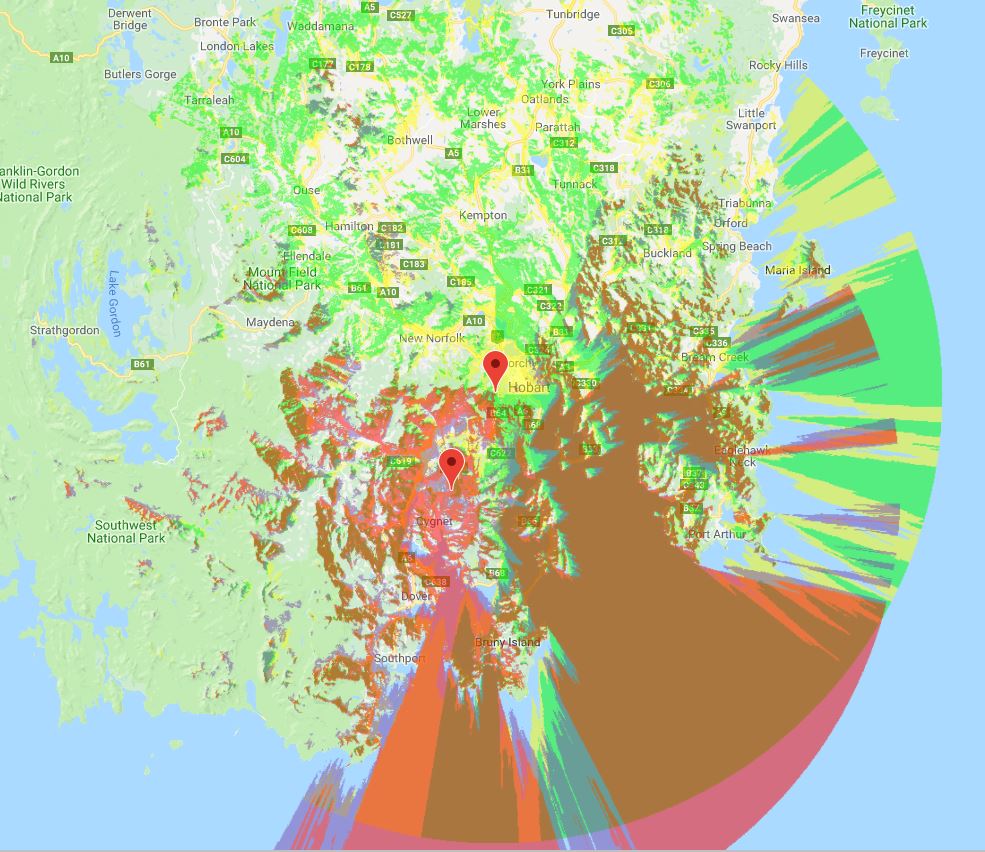
Starting to drift off topic.... however... Attached are my simulcast Radio Mobile plots for the two site system I have. Sam - I'm currently using the BG7TBL GPSDO's that are readily available on eBay. They give both a 10MHz output and a 1PPS. I then use a board that Joe KC2IRV developed that uses a 10MHz signal from the GPS to control the VTune pin on a 9.6MHz OCXO. http://rtcmsimulcast.wikifoundry.com/page/9.6+MHz+PLL+Circuit+for+RTCM Back to the one of the topics of the thread - I was driving home within the overlap area of the sites again, and noticed that extra "audio delay" to my secondary site. The audio starts first on the main site, few words later, the audio starts on the secondary site... it's quite weird... Can I attach MP3's to the list here? I might try to obtain an example. The variable delay on unkeying is still a problem too.

Very good, Hayden. Yes, I've been in touch with Joe about his project from when he ordered the RTCMs. I was inquiring as to what Jeff was running. Didn't mean to veer off topic. On Thu, Feb 15, 2018 at 1:36 PM Hayden Honeywood <haydenph91@gmail.com> wrote:
Starting to drift off topic.... however...
Attached are my simulcast Radio Mobile plots for the two site system I have.
Sam - I'm currently using the BG7TBL GPSDO's that are readily available on eBay. They give both a 10MHz output and a 1PPS. I then use a board that Joe KC2IRV developed that uses a 10MHz signal from the GPS to control the VTune pin on a 9.6MHz OCXO.
http://rtcmsimulcast.wikifoundry.com/page/9.6+MHz+PLL+Circuit+for+RTCM
Back to the one of the topics of the thread - I was driving home within the overlap area of the sites again, and noticed that extra "audio delay" to my secondary site. The audio starts first on the main site, few words later, the audio starts on the secondary site... it's quite weird... Can I attach MP3's to the list here? I might try to obtain an example.
The variable delay on unkeying is still a problem too.
_______________________________________________ App_rpt-users mailing list App_rpt-users@lists.allstarlink.org http://lists.allstarlink.org/cgi-bin/mailman/listinfo/app_rpt-users
To unsubscribe from this list please visit http://lists.allstarlink.org/cgi-bin/mailman/listinfo/app_rpt-users and scroll down to the bottom of the page. Enter your email address and press the "Unsubscribe or edit options button" You do not need a password to unsubscribe, you can do it via email confirmation. If you have trouble unsubscribing, please send a message to the list detailing the problem.
-- KJ6QFS Sam Skolfield

It appears that sip.allstarlink.org is no longer a valid DNS hostname. I am able to SIP connect using the .178 IP address. 73 Danny K5CG

On 2/15/18 5:44 PM, K5CG wrote:
It appears that sip.allstarlink.org is no longer a valid DNS hostname. I am able to SIP connect using the .178 IP address.
Don't reply and change the subject to something unrelated. I didn't see this till now due to it. sip.allstarlink.org has been gone for close to a year since DNS migrated. -- Bryan Fields 727-409-1194 - Voice http://bryanfields.net
Hi Brian, I was expecting the new subject line to start a new topic but it didn't. Apologies. So the support page isn't current. 73 Danny K5CG
From: "Bryan Fields" <Bryan@bryanfields.net> To: "Users of Asterisk app_rpt" <app_rpt-users@lists.allstarlink.org> Sent: Friday, February 16, 2018 1:12:12 PM Subject: Re: [App_rpt-users] sip.allstarlink.org A record
On 2/15/18 5:44 PM, K5CG wrote:
It appears that sip.allstarlink.org is no longer a valid DNS hostname. I am able to SIP connect using the .178 IP address.
Don't reply and change the subject to something unrelated. I didn't see this till now due to it.
sip.allstarlink.org has been gone for close to a year since DNS migrated.
-- Bryan Fields
727-409-1194 - Voice http://bryanfields.net _______________________________________________ App_rpt-users mailing list App_rpt-users@lists.allstarlink.org http://lists.allstarlink.org/cgi-bin/mailman/listinfo/app_rpt-users
To unsubscribe from this list please visit http://lists.allstarlink.org/cgi-bin/mailman/listinfo/app_rpt-users and scroll down to the bottom of the page. Enter your email address and press the "Unsubscribe or edit options button" You do not need a password to unsubscribe, you can do it via email confirmation. If you have trouble unsubscribing, please send a message to the list detailing the problem.
No worries Jeff and Sam. It would be great to get a forum type discussion happening for simulcast. The mailing list I guess is still sufficient. What are you using to lock your RTCM's to 9.6MHz? If it's just the internal crystal still in there, then this is nowhere near sufficient, and will cause the audio to drift around like crazy. You need some form of stable frequency reference that is the same between sites (i.e. GPS, OCXO etc) I think from a previous posting the PCGM's had issues with creating a whole lot of noise and crud, could be wrong. Although mounting in a shielded enclosure probably helps. The board Joe came up with only requires a handful of parts and an OCXO.... he was also experimenting with the Leo Bondar programmable GPS unit, although this doesn't give out the 1PPS, so you'd effectively need two GPS units at the site. The network I run on my simulcast system is via the internet, not via direct links as we don't have a path between sites. The internet is a business grade connection with low (<35mS) latency to the slowest site.
Joe's video is a good starting point to describe what is going on - https://www.youtube.com/watch?v=PvTafTx189M
Hi Tim, Yes, they are all connected to the same node number. I'll get recording of what it sounds like and post here. That is issue 1) Issue 2) is the variable delay on ALL the RTCM's as you describe. I might start talking on the repeater with a little echo delay on unkey, then a few overs later the delay might have ballooned out to 1-2 seconds.
Where in Radio Mobile online is the ability to select the delay? It might be right in front of my eyes, but I can't see it.

If you provide me with your site information I can run a study in EDX, which is a commercial product. Kevin J. Babich 219.406.9707 Mobile ***Mobile EMail*** Please excuse any typos and brevity.
On Feb 15, 2018, at 5:53 PM, Hayden Honeywood <haydenph91@gmail.com> wrote:
Where in Radio Mobile online is the ability to select the delay? It might be right in front of my eyes, but I can't see it.
_______________________________________________ App_rpt-users mailing list App_rpt-users@lists.allstarlink.org http://lists.allstarlink.org/cgi-bin/mailman/listinfo/app_rpt-users
To unsubscribe from this list please visit http://lists.allstarlink.org/cgi-bin/mailman/listinfo/app_rpt-users and scroll down to the bottom of the page. Enter your email address and press the "Unsubscribe or edit options button" You do not need a password to unsubscribe, you can do it via email confirmation. If you have trouble unsubscribing, please send a message to the list detailing the problem.

The on line version does not have it. In the PC version I think you choose an "interferance" plot... maybe, it's bee a long time. On Thu, Feb 15, 2018 at 3:53 PM, Hayden Honeywood <haydenph91@gmail.com> wrote:
Where in Radio Mobile online is the ability to select the delay? It might be right in front of my eyes, but I can't see it.
_______________________________________________ App_rpt-users mailing list App_rpt-users@lists.allstarlink.org http://lists.allstarlink.org/cgi-bin/mailman/listinfo/app_rpt-users
To unsubscribe from this list please visit http://lists.allstarlink.org/ cgi-bin/mailman/listinfo/app_rpt-users and scroll down to the bottom of the page. Enter your email address and press the "Unsubscribe or edit options button" You do not need a password to unsubscribe, you can do it via email confirmation. If you have trouble unsubscribing, please send a message to the list detailing the problem.
-- Tim WD6AWP
I've made a YouTube video with clips from a single conversation I had this morning on the repeater. The audio was recorded on my dashcam. As can be heard in the video, when I start the conversation, the audio delay is nil, or very little when unkeying. However, by the time I'm finished (I think the conversation lasted about 20 minutes) the audio delay is out to 4 or 5 words! We were both using the same repeater. We have a repeater linked in from another location. I've noticed when talking to someone via that method, the audio delay issue does not build up so quickly. Hopefully this explains a bit better the issue I'm having. https://youtu.be/KG3GgaHVWbI Regards Hayden VK7HH

That's probably a latency in the audio section of the PC being used. A buddy had the same issues while operating his HF station, remote. After a few minutes, the latency grew and grew.... He used WWV (he lives in West Central OK) as a time base... His solution was to get a more "robust" (read: Turtle Beach) sound card. This was in his desktop at the house. It might not be a software problem, as much as a Hardware issue. I don't remember if you said this was on an RTCM or not but I know one is involved. I believe I would check more on all audio devices involved. On Feb 22, 2018 12:11 AM, "Hayden Honeywood" <haydenph91@gmail.com> wrote:
I've made a YouTube video with clips from a single conversation I had this morning on the repeater. The audio was recorded on my dashcam.
As can be heard in the video, when I start the conversation, the audio delay is nil, or very little when unkeying. However, by the time I'm finished (I think the conversation lasted about 20 minutes) the audio delay is out to 4 or 5 words!
We were both using the same repeater. We have a repeater linked in from another location. I've noticed when talking to someone via that method, the audio delay issue does not build up so quickly.
Hopefully this explains a bit better the issue I'm having.
Regards Hayden VK7HH
_______________________________________________ App_rpt-users mailing list App_rpt-users@lists.allstarlink.org http://lists.allstarlink.org/cgi-bin/mailman/listinfo/app_rpt-users
To unsubscribe from this list please visit http://lists.allstarlink.org/ cgi-bin/mailman/listinfo/app_rpt-users and scroll down to the bottom of the page. Enter your email address and press the "Unsubscribe or edit options button" You do not need a password to unsubscribe, you can do it via email confirmation. If you have trouble unsubscribing, please send a message to the list detailing the problem.
Ya, To me this seems like a server horsepower related problem. Using RTCM's I don't think the soundcard is used at all, its all handled by the cpu. I use this guy (Quad Core Atom) on 5 of my deployments and it has enough hardware to run a 5rx and 2tx system: http://asrock.pc.cdn.bitgravity.com/Download/e-catalog/iBOX-210.pdf Cheers, Jesse
On Feb 22, 2018, at 6:43 AM, ARS W5OMR <ars.w5omr@gmail.com> wrote:
That's probably a latency in the audio section of the PC being used.
A buddy had the same issues while operating his HF station, remote. After a few minutes, the latency grew and grew.... He used WWV (he lives in West Central OK) as a time base...
His solution was to get a more "robust" (read: Turtle Beach) sound card. This was in his desktop at the house.
It might not be a software problem, as much as a Hardware issue.
I don't remember if you said this was on an RTCM or not but I know one is involved.
I believe I would check more on all audio devices involved.
On Feb 22, 2018 12:11 AM, "Hayden Honeywood" <haydenph91@gmail.com> wrote: I've made a YouTube video with clips from a single conversation I had this morning on the repeater. The audio was recorded on my dashcam.
As can be heard in the video, when I start the conversation, the audio delay is nil, or very little when unkeying. However, by the time I'm finished (I think the conversation lasted about 20 minutes) the audio delay is out to 4 or 5 words!
We were both using the same repeater. We have a repeater linked in from another location. I've noticed when talking to someone via that method, the audio delay issue does not build up so quickly.
Hopefully this explains a bit better the issue I'm having.
Regards Hayden VK7HH
_______________________________________________ App_rpt-users mailing list App_rpt-users@lists.allstarlink.org http://lists.allstarlink.org/cgi-bin/mailman/listinfo/app_rpt-users
To unsubscribe from this list please visit http://lists.allstarlink.org/cgi-bin/mailman/listinfo/app_rpt-users and scroll down to the bottom of the page. Enter your email address and press the "Unsubscribe or edit options button" You do not need a password to unsubscribe, you can do it via email confirmation. If you have trouble unsubscribing, please send a message to the list detailing the problem.
App_rpt-users mailing list App_rpt-users@lists.allstarlink.org http://lists.allstarlink.org/cgi-bin/mailman/listinfo/app_rpt-users
To unsubscribe from this list please visit http://lists.allstarlink.org/cgi-bin/mailman/listinfo/app_rpt-users and scroll down to the bottom of the page. Enter your email address and press the "Unsubscribe or edit options button" You do not need a password to unsubscribe, you can do it via email confirmation. If you have trouble unsubscribing, please send a message to the list detailing the problem.

I have been battling a similar issue with 3 RTCM units in mixed mode, not voted, miles apart on different frequencies. It's not a sound card issue. The sound card doesn't come into play on a voted system. What seemed to fix mine, was to move the buflen command into the node stanza in voter.conf. I haven't confirmed it yet but it seems to be the case. Not even sure if that is even an issue on voted systems but I thought I'd put in my whole two cents. Sam k8sn On Feb 22, 2018 09:43, "ARS W5OMR" <ars.w5omr@gmail.com> wrote:
That's probably a latency in the audio section of the PC being used.
A buddy had the same issues while operating his HF station, remote. After a few minutes, the latency grew and grew.... He used WWV (he lives in West Central OK) as a time base...
His solution was to get a more "robust" (read: Turtle Beach) sound card. This was in his desktop at the house.
It might not be a software problem, as much as a Hardware issue.
I don't remember if you said this was on an RTCM or not but I know one is involved.
I believe I would check more on all audio devices involved.
On Feb 22, 2018 12:11 AM, "Hayden Honeywood" <haydenph91@gmail.com> wrote:
I've made a YouTube video with clips from a single conversation I had this morning on the repeater. The audio was recorded on my dashcam.
As can be heard in the video, when I start the conversation, the audio delay is nil, or very little when unkeying. However, by the time I'm finished (I think the conversation lasted about 20 minutes) the audio delay is out to 4 or 5 words!
We were both using the same repeater. We have a repeater linked in from another location. I've noticed when talking to someone via that method, the audio delay issue does not build up so quickly.
Hopefully this explains a bit better the issue I'm having.
Regards Hayden VK7HH
_______________________________________________ App_rpt-users mailing list App_rpt-users@lists.allstarlink.org http://lists.allstarlink.org/cgi-bin/mailman/listinfo/app_rpt-users
To unsubscribe from this list please visit http://lists.allstarlink.org/c gi-bin/mailman/listinfo/app_rpt-users and scroll down to the bottom of the page. Enter your email address and press the "Unsubscribe or edit options button" You do not need a password to unsubscribe, you can do it via email confirmation. If you have trouble unsubscribing, please send a message to the list detailing the problem.
_______________________________________________ App_rpt-users mailing list App_rpt-users@lists.allstarlink.org http://lists.allstarlink.org/cgi-bin/mailman/listinfo/app_rpt-users
To unsubscribe from this list please visit http://lists.allstarlink.org/ cgi-bin/mailman/listinfo/app_rpt-users and scroll down to the bottom of the page. Enter your email address and press the "Unsubscribe or edit options button" You do not need a password to unsubscribe, you can do it via email confirmation. If you have trouble unsubscribing, please send a message to the list detailing the problem.
I should add to my last post that I use a dual NIC server. One RTCM is connected directly to the server to provide timing only. The other NIC ties to the network with the other RTCM's that have radios attached. Cheers, Jesse
On Feb 22, 2018, at 6:43 AM, ARS W5OMR <ars.w5omr@gmail.com> wrote:
That's probably a latency in the audio section of the PC being used.
A buddy had the same issues while operating his HF station, remote. After a few minutes, the latency grew and grew.... He used WWV (he lives in West Central OK) as a time base...
His solution was to get a more "robust" (read: Turtle Beach) sound card. This was in his desktop at the house.
It might not be a software problem, as much as a Hardware issue.
I don't remember if you said this was on an RTCM or not but I know one is involved.
I believe I would check more on all audio devices involved.
On Feb 22, 2018 12:11 AM, "Hayden Honeywood" <haydenph91@gmail.com> wrote: I've made a YouTube video with clips from a single conversation I had this morning on the repeater. The audio was recorded on my dashcam.
As can be heard in the video, when I start the conversation, the audio delay is nil, or very little when unkeying. However, by the time I'm finished (I think the conversation lasted about 20 minutes) the audio delay is out to 4 or 5 words!
We were both using the same repeater. We have a repeater linked in from another location. I've noticed when talking to someone via that method, the audio delay issue does not build up so quickly.
Hopefully this explains a bit better the issue I'm having.
Regards Hayden VK7HH
_______________________________________________ App_rpt-users mailing list App_rpt-users@lists.allstarlink.org http://lists.allstarlink.org/cgi-bin/mailman/listinfo/app_rpt-users
To unsubscribe from this list please visit http://lists.allstarlink.org/cgi-bin/mailman/listinfo/app_rpt-users and scroll down to the bottom of the page. Enter your email address and press the "Unsubscribe or edit options button" You do not need a password to unsubscribe, you can do it via email confirmation. If you have trouble unsubscribing, please send a message to the list detailing the problem.
App_rpt-users mailing list App_rpt-users@lists.allstarlink.org http://lists.allstarlink.org/cgi-bin/mailman/listinfo/app_rpt-users
To unsubscribe from this list please visit http://lists.allstarlink.org/cgi-bin/mailman/listinfo/app_rpt-users and scroll down to the bottom of the page. Enter your email address and press the "Unsubscribe or edit options button" You do not need a password to unsubscribe, you can do it via email confirmation. If you have trouble unsubscribing, please send a message to the list detailing the problem.

I do not think server horsepower is the issue. I am running three TX/RX simulcast sites off of a Pi3 and when I look at the system resources used it isn't working very hard. On Thu, Feb 22, 2018 at 10:47 AM, Jesse Lloyd <ve7lyd@gmail.com> wrote:
I should add to my last post that I use a dual NIC server. One RTCM is connected directly to the server to provide timing only. The other NIC ties to the network with the other RTCM's that have radios attached.
Cheers, Jesse
On Feb 22, 2018, at 6:43 AM, ARS W5OMR <ars.w5omr@gmail.com> wrote:
That's probably a latency in the audio section of the PC being used.
A buddy had the same issues while operating his HF station, remote. After a few minutes, the latency grew and grew.... He used WWV (he lives in West Central OK) as a time base...
His solution was to get a more "robust" (read: Turtle Beach) sound card. This was in his desktop at the house.
It might not be a software problem, as much as a Hardware issue.
I don't remember if you said this was on an RTCM or not but I know one is involved.
I believe I would check more on all audio devices involved.
On Feb 22, 2018 12:11 AM, "Hayden Honeywood" <haydenph91@gmail.com> wrote:
I've made a YouTube video with clips from a single conversation I had this morning on the repeater. The audio was recorded on my dashcam.
As can be heard in the video, when I start the conversation, the audio delay is nil, or very little when unkeying. However, by the time I'm finished (I think the conversation lasted about 20 minutes) the audio delay is out to 4 or 5 words!
We were both using the same repeater. We have a repeater linked in from another location. I've noticed when talking to someone via that method, the audio delay issue does not build up so quickly.
Hopefully this explains a bit better the issue I'm having.
Regards Hayden VK7HH
_______________________________________________ App_rpt-users mailing list App_rpt-users@lists.allstarlink.org http://lists.allstarlink.org/cgi-bin/mailman/listinfo/app_rpt-users
To unsubscribe from this list please visit http://lists.allstarlink.org/c gi-bin/mailman/listinfo/app_rpt-users and scroll down to the bottom of the page. Enter your email address and press the "Unsubscribe or edit options button" You do not need a password to unsubscribe, you can do it via email confirmation. If you have trouble unsubscribing, please send a message to the list detailing the problem.
_______________________________________________ App_rpt-users mailing list App_rpt-users@lists.allstarlink.org http://lists.allstarlink.org/cgi-bin/mailman/listinfo/app_rpt-users
To unsubscribe from this list please visit http://lists.allstarlink.org/ cgi-bin/mailman/listinfo/app_rpt-users and scroll down to the bottom of the page. Enter your email address and press the "Unsubscribe or edit options button" You do not need a password to unsubscribe, you can do it via email confirmation. If you have trouble unsubscribing, please send a message to the list detailing the problem.
_______________________________________________ App_rpt-users mailing list App_rpt-users@lists.allstarlink.org http://lists.allstarlink.org/cgi-bin/mailman/listinfo/app_rpt-users
To unsubscribe from this list please visit http://lists.allstarlink.org/ cgi-bin/mailman/listinfo/app_rpt-users and scroll down to the bottom of the page. Enter your email address and press the "Unsubscribe or edit options button" You do not need a password to unsubscribe, you can do it via email confirmation. If you have trouble unsubscribing, please send a message to the list detailing the problem.
DIAL or Hamvoip? On Feb 22, 2018 10:52, "Joe Moskalski" <kc2irv@gmail.com> wrote:
I do not think server horsepower is the issue. I am running three TX/RX simulcast sites off of a Pi3 and when I look at the system resources used it isn't working very hard.
On Thu, Feb 22, 2018 at 10:47 AM, Jesse Lloyd <ve7lyd@gmail.com> wrote:
I should add to my last post that I use a dual NIC server. One RTCM is connected directly to the server to provide timing only. The other NIC ties to the network with the other RTCM's that have radios attached.
Cheers, Jesse
On Feb 22, 2018, at 6:43 AM, ARS W5OMR <ars.w5omr@gmail.com> wrote:
That's probably a latency in the audio section of the PC being used.
A buddy had the same issues while operating his HF station, remote. After a few minutes, the latency grew and grew.... He used WWV (he lives in West Central OK) as a time base...
His solution was to get a more "robust" (read: Turtle Beach) sound card. This was in his desktop at the house.
It might not be a software problem, as much as a Hardware issue.
I don't remember if you said this was on an RTCM or not but I know one is involved.
I believe I would check more on all audio devices involved.
On Feb 22, 2018 12:11 AM, "Hayden Honeywood" <haydenph91@gmail.com> wrote:
I've made a YouTube video with clips from a single conversation I had this morning on the repeater. The audio was recorded on my dashcam.
As can be heard in the video, when I start the conversation, the audio delay is nil, or very little when unkeying. However, by the time I'm finished (I think the conversation lasted about 20 minutes) the audio delay is out to 4 or 5 words!
We were both using the same repeater. We have a repeater linked in from another location. I've noticed when talking to someone via that method, the audio delay issue does not build up so quickly.
Hopefully this explains a bit better the issue I'm having.
Regards Hayden VK7HH
_______________________________________________ App_rpt-users mailing list App_rpt-users@lists.allstarlink.org http://lists.allstarlink.org/cgi-bin/mailman/listinfo/app_rpt-users
To unsubscribe from this list please visit http://lists.allstarlink.org/cgi-bin/mailman/listinfo/app_rpt-users and scroll down to the bottom of the page. Enter your email address and press the "Unsubscribe or edit options button" You do not need a password to unsubscribe, you can do it via email confirmation. If you have trouble unsubscribing, please send a message to the list detailing the problem.
_______________________________________________ App_rpt-users mailing list App_rpt-users@lists.allstarlink.org http://lists.allstarlink.org/cgi-bin/mailman/listinfo/app_rpt-users
To unsubscribe from this list please visit http://lists.allstarlink.org/c gi-bin/mailman/listinfo/app_rpt-users and scroll down to the bottom of the page. Enter your email address and press the "Unsubscribe or edit options button" You do not need a password to unsubscribe, you can do it via email confirmation. If you have trouble unsubscribing, please send a message to the list detailing the problem.
_______________________________________________ App_rpt-users mailing list App_rpt-users@lists.allstarlink.org http://lists.allstarlink.org/cgi-bin/mailman/listinfo/app_rpt-users
To unsubscribe from this list please visit http://lists.allstarlink.org/c gi-bin/mailman/listinfo/app_rpt-users and scroll down to the bottom of the page. Enter your email address and press the "Unsubscribe or edit options button" You do not need a password to unsubscribe, you can do it via email confirmation. If you have trouble unsubscribing, please send a message to the list detailing the problem.
_______________________________________________ App_rpt-users mailing list App_rpt-users@lists.allstarlink.org http://lists.allstarlink.org/cgi-bin/mailman/listinfo/app_rpt-users
To unsubscribe from this list please visit http://lists.allstarlink.org/ cgi-bin/mailman/listinfo/app_rpt-users and scroll down to the bottom of the page. Enter your email address and press the "Unsubscribe or edit options button" You do not need a password to unsubscribe, you can do it via email confirmation. If you have trouble unsubscribing, please send a message to the list detailing the problem.
Hamvoip On Feb 22, 2018 11:48 AM, "Sam Nabkey" <sam.nabkey@gmail.com> wrote:
DIAL or Hamvoip?
On Feb 22, 2018 10:52, "Joe Moskalski" <kc2irv@gmail.com> wrote:
I do not think server horsepower is the issue. I am running three TX/RX simulcast sites off of a Pi3 and when I look at the system resources used it isn't working very hard.
On Thu, Feb 22, 2018 at 10:47 AM, Jesse Lloyd <ve7lyd@gmail.com> wrote:
I should add to my last post that I use a dual NIC server. One RTCM is connected directly to the server to provide timing only. The other NIC ties to the network with the other RTCM's that have radios attached.
Cheers, Jesse
On Feb 22, 2018, at 6:43 AM, ARS W5OMR <ars.w5omr@gmail.com> wrote:
That's probably a latency in the audio section of the PC being used.
A buddy had the same issues while operating his HF station, remote. After a few minutes, the latency grew and grew.... He used WWV (he lives in West Central OK) as a time base...
His solution was to get a more "robust" (read: Turtle Beach) sound card. This was in his desktop at the house.
It might not be a software problem, as much as a Hardware issue.
I don't remember if you said this was on an RTCM or not but I know one is involved.
I believe I would check more on all audio devices involved.
On Feb 22, 2018 12:11 AM, "Hayden Honeywood" <haydenph91@gmail.com> wrote:
I've made a YouTube video with clips from a single conversation I had this morning on the repeater. The audio was recorded on my dashcam.
As can be heard in the video, when I start the conversation, the audio delay is nil, or very little when unkeying. However, by the time I'm finished (I think the conversation lasted about 20 minutes) the audio delay is out to 4 or 5 words!
We were both using the same repeater. We have a repeater linked in from another location. I've noticed when talking to someone via that method, the audio delay issue does not build up so quickly.
Hopefully this explains a bit better the issue I'm having.
Regards Hayden VK7HH
_______________________________________________ App_rpt-users mailing list App_rpt-users@lists.allstarlink.org http://lists.allstarlink.org/cgi-bin/mailman/listinfo/app_rpt-users
To unsubscribe from this list please visit http://lists.allstarlink.org/cgi-bin/mailman/listinfo/app_rpt-users and scroll down to the bottom of the page. Enter your email address and press the "Unsubscribe or edit options button" You do not need a password to unsubscribe, you can do it via email confirmation. If you have trouble unsubscribing, please send a message to the list detailing the problem.
_______________________________________________ App_rpt-users mailing list App_rpt-users@lists.allstarlink.org http://lists.allstarlink.org/cgi-bin/mailman/listinfo/app_rpt-users
To unsubscribe from this list please visit http://lists.allstarlink.org/cgi-bin/mailman/listinfo/app_rpt-users and scroll down to the bottom of the page. Enter your email address and press the "Unsubscribe or edit options button" You do not need a password to unsubscribe, you can do it via email confirmation. If you have trouble unsubscribing, please send a message to the list detailing the problem.
_______________________________________________ App_rpt-users mailing list App_rpt-users@lists.allstarlink.org http://lists.allstarlink.org/cgi-bin/mailman/listinfo/app_rpt-users
To unsubscribe from this list please visit http://lists.allstarlink.org/cgi-bin/mailman/listinfo/app_rpt-users and scroll down to the bottom of the page. Enter your email address and press the "Unsubscribe or edit options button" You do not need a password to unsubscribe, you can do it via email confirmation. If you have trouble unsubscribing, please send a message to the list detailing the problem.
_______________________________________________ App_rpt-users mailing list App_rpt-users@lists.allstarlink.org http://lists.allstarlink.org/cgi-bin/mailman/listinfo/app_rpt-users
To unsubscribe from this list please visit http://lists.allstarlink.org/c gi-bin/mailman/listinfo/app_rpt-users and scroll down to the bottom of the page. Enter your email address and press the "Unsubscribe or edit options button" You do not need a password to unsubscribe, you can do it via email confirmation. If you have trouble unsubscribing, please send a message to the list detailing the problem.
_______________________________________________ App_rpt-users mailing list App_rpt-users@lists.allstarlink.org http://lists.allstarlink.org/cgi-bin/mailman/listinfo/app_rpt-users
To unsubscribe from this list please visit http://lists.allstarlink.org/ cgi-bin/mailman/listinfo/app_rpt-users and scroll down to the bottom of the page. Enter your email address and press the "Unsubscribe or edit options button" You do not need a password to unsubscribe, you can do it via email confirmation. If you have trouble unsubscribing, please send a message to the list detailing the problem.
Seems it works a bit better.. I came from Hamvoip back to DIAL. On Feb 22, 2018 11:52, "Joe Moskalski" <kc2irv@gmail.com> wrote:
Hamvoip
On Feb 22, 2018 11:48 AM, "Sam Nabkey" <sam.nabkey@gmail.com> wrote:
DIAL or Hamvoip?
On Feb 22, 2018 10:52, "Joe Moskalski" <kc2irv@gmail.com> wrote:
I do not think server horsepower is the issue. I am running three TX/RX simulcast sites off of a Pi3 and when I look at the system resources used it isn't working very hard.
On Thu, Feb 22, 2018 at 10:47 AM, Jesse Lloyd <ve7lyd@gmail.com> wrote:
I should add to my last post that I use a dual NIC server. One RTCM is connected directly to the server to provide timing only. The other NIC ties to the network with the other RTCM's that have radios attached.
Cheers, Jesse
On Feb 22, 2018, at 6:43 AM, ARS W5OMR <ars.w5omr@gmail.com> wrote:
That's probably a latency in the audio section of the PC being used.
A buddy had the same issues while operating his HF station, remote. After a few minutes, the latency grew and grew.... He used WWV (he lives in West Central OK) as a time base...
His solution was to get a more "robust" (read: Turtle Beach) sound card. This was in his desktop at the house.
It might not be a software problem, as much as a Hardware issue.
I don't remember if you said this was on an RTCM or not but I know one is involved.
I believe I would check more on all audio devices involved.
On Feb 22, 2018 12:11 AM, "Hayden Honeywood" <haydenph91@gmail.com> wrote:
I've made a YouTube video with clips from a single conversation I had this morning on the repeater. The audio was recorded on my dashcam.
As can be heard in the video, when I start the conversation, the audio delay is nil, or very little when unkeying. However, by the time I'm finished (I think the conversation lasted about 20 minutes) the audio delay is out to 4 or 5 words!
We were both using the same repeater. We have a repeater linked in from another location. I've noticed when talking to someone via that method, the audio delay issue does not build up so quickly.
Hopefully this explains a bit better the issue I'm having.
Regards Hayden VK7HH
_______________________________________________ App_rpt-users mailing list App_rpt-users@lists.allstarlink.org http://lists.allstarlink.org/cgi-bin/mailman/listinfo/app_rpt-users
To unsubscribe from this list please visit http://lists.allstarlink.org/cgi-bin/mailman/listinfo/app_rpt-users and scroll down to the bottom of the page. Enter your email address and press the "Unsubscribe or edit options button" You do not need a password to unsubscribe, you can do it via email confirmation. If you have trouble unsubscribing, please send a message to the list detailing the problem.
_______________________________________________ App_rpt-users mailing list App_rpt-users@lists.allstarlink.org http://lists.allstarlink.org/cgi-bin/mailman/listinfo/app_rpt-users
To unsubscribe from this list please visit http://lists.allstarlink.org/cgi-bin/mailman/listinfo/app_rpt-users and scroll down to the bottom of the page. Enter your email address and press the "Unsubscribe or edit options button" You do not need a password to unsubscribe, you can do it via email confirmation. If you have trouble unsubscribing, please send a message to the list detailing the problem.
_______________________________________________ App_rpt-users mailing list App_rpt-users@lists.allstarlink.org http://lists.allstarlink.org/cgi-bin/mailman/listinfo/app_rpt-users
To unsubscribe from this list please visit http://lists.allstarlink.org/cgi-bin/mailman/listinfo/app_rpt-users and scroll down to the bottom of the page. Enter your email address and press the "Unsubscribe or edit options button" You do not need a password to unsubscribe, you can do it via email confirmation. If you have trouble unsubscribing, please send a message to the list detailing the problem.
_______________________________________________ App_rpt-users mailing list App_rpt-users@lists.allstarlink.org http://lists.allstarlink.org/cgi-bin/mailman/listinfo/app_rpt-users
To unsubscribe from this list please visit http://lists.allstarlink.org/cgi-bin/mailman/listinfo/app_rpt-users and scroll down to the bottom of the page. Enter your email address and press the "Unsubscribe or edit options button" You do not need a password to unsubscribe, you can do it via email confirmation. If you have trouble unsubscribing, please send a message to the list detailing the problem.
_______________________________________________ App_rpt-users mailing list App_rpt-users@lists.allstarlink.org http://lists.allstarlink.org/cgi-bin/mailman/listinfo/app_rpt-users
To unsubscribe from this list please visit http://lists.allstarlink.org/c gi-bin/mailman/listinfo/app_rpt-users and scroll down to the bottom of the page. Enter your email address and press the "Unsubscribe or edit options button" You do not need a password to unsubscribe, you can do it via email confirmation. If you have trouble unsubscribing, please send a message to the list detailing the problem.
_______________________________________________ App_rpt-users mailing list App_rpt-users@lists.allstarlink.org http://lists.allstarlink.org/cgi-bin/mailman/listinfo/app_rpt-users
To unsubscribe from this list please visit http://lists.allstarlink.org/ cgi-bin/mailman/listinfo/app_rpt-users and scroll down to the bottom of the page. Enter your email address and press the "Unsubscribe or edit options button" You do not need a password to unsubscribe, you can do it via email confirmation. If you have trouble unsubscribing, please send a message to the list detailing the problem.
I've never heard one transmitter come up before another. I seen long delays but on all RTCMs at the same. Are your RTCMs connected to the same node number? On Thu, Feb 15, 2018 at 1:36 PM, Hayden Honeywood <haydenph91@gmail.com> wrote:
Starting to drift off topic.... however...
Attached are my simulcast Radio Mobile plots for the two site system I have.
Sam - I'm currently using the BG7TBL GPSDO's that are readily available on eBay. They give both a 10MHz output and a 1PPS. I then use a board that Joe KC2IRV developed that uses a 10MHz signal from the GPS to control the VTune pin on a 9.6MHz OCXO.
http://rtcmsimulcast.wikifoundry.com/page/9.6+MHz+PLL+Circuit+for+RTCM
Back to the one of the topics of the thread - I was driving home within the overlap area of the sites again, and noticed that extra "audio delay" to my secondary site. The audio starts first on the main site, few words later, the audio starts on the secondary site... it's quite weird... Can I attach MP3's to the list here? I might try to obtain an example.
The variable delay on unkeying is still a problem too.
_______________________________________________ App_rpt-users mailing list App_rpt-users@lists.allstarlink.org http://lists.allstarlink.org/cgi-bin/mailman/listinfo/app_rpt-users
To unsubscribe from this list please visit http://lists.allstarlink.org/ cgi-bin/mailman/listinfo/app_rpt-users and scroll down to the bottom of the page. Enter your email address and press the "Unsubscribe or edit options button" You do not need a password to unsubscribe, you can do it via email confirmation. If you have trouble unsubscribing, please send a message to the list detailing the problem.
-- Tim WD6AWP
On 2/14/18 5:09 PM, Hayden Honeywood wrote:
In response to Jeff's issue - make sure your RTCM's 9.6MHz clock is GPS locked. Both Joe KC2IRV and myself have confirmed that, although using OCXO's by themselves work, they aren't perfect and move around. If you still have the little crystal in there, that will be the major source of your issues, it is nowhere near stable enough.
I have a few PCGM's that I never used, if anyone needs a few please send me a direct email. Thank you, -- Bryan Fields 727-409-1194 - Voice http://bryanfields.net
Sorry to say this, but those are the bad external clock source I mentioned in another post.They are also very dirty. I know one person who's equipment was turned off by the site manager due to PCGM interferance. On Thu, Feb 15, 2018 at 3:12 PM, Bryan Fields <Bryan@bryanfields.net> wrote:
On 2/14/18 5:09 PM, Hayden Honeywood wrote:
In response to Jeff's issue - make sure your RTCM's 9.6MHz clock is GPS locked. Both Joe KC2IRV and myself have confirmed that, although using OCXO's by themselves work, they aren't perfect and move around. If you still have the little crystal in there, that will be the major source of your issues, it is nowhere near stable enough.
I have a few PCGM's that I never used, if anyone needs a few please send me a direct email.
Thank you, -- Bryan Fields
727-409-1194 - Voice http://bryanfields.net _______________________________________________ App_rpt-users mailing list App_rpt-users@lists.allstarlink.org http://lists.allstarlink.org/cgi-bin/mailman/listinfo/app_rpt-users
To unsubscribe from this list please visit http://lists.allstarlink.org/ cgi-bin/mailman/listinfo/app_rpt-users and scroll down to the bottom of the page. Enter your email address and press the "Unsubscribe or edit options button" You do not need a password to unsubscribe, you can do it via email confirmation. If you have trouble unsubscribing, please send a message to the list detailing the problem.
-- Tim WD6AWP
On 2/15/18 6:30 PM, Tim Sawyer wrote:
Sorry to say this, but those are the bad external clock source I mentioned in another post.They are also very dirty. I know one person who's equipment was turned off by the site manager due to PCGM interferance.
Well for setting the 9.6 MHz clock onthe RTCM, it's likely ok. Using it for the PLL reference would not be advised unless you look at it and it's clean. I've never used them for that. -- Bryan Fields 727-409-1194 - Voice http://bryanfields.net
It was only being used for clocking the RTCM. I believe the problem is power circuitry radiates bunches of hash and trash. It was interfering with something on VHF high band, like 173.050.. somewhere near there. On Thu, Feb 15, 2018 at 3:41 PM, Bryan Fields <Bryan@bryanfields.net> wrote:
On 2/15/18 6:30 PM, Tim Sawyer wrote:
Sorry to say this, but those are the bad external clock source I mentioned in another post.They are also very dirty. I know one person who's equipment was turned off by the site manager due to PCGM interferance.
Well for setting the 9.6 MHz clock onthe RTCM, it's likely ok. Using it for the PLL reference would not be advised unless you look at it and it's clean.
I've never used them for that.
-- Bryan Fields
727-409-1194 - Voice http://bryanfields.net _______________________________________________ App_rpt-users mailing list App_rpt-users@lists.allstarlink.org http://lists.allstarlink.org/cgi-bin/mailman/listinfo/app_rpt-users
To unsubscribe from this list please visit http://lists.allstarlink.org/ cgi-bin/mailman/listinfo/app_rpt-users and scroll down to the bottom of the page. Enter your email address and press the "Unsubscribe or edit options button" You do not need a password to unsubscribe, you can do it via email confirmation. If you have trouble unsubscribing, please send a message to the list detailing the problem.
-- Tim WD6AWP
participants (10)
-
 ARS W5OMR
 -
 Bryan Fields
 -
 Hayden Honeywood
 -
 Jesse Lloyd
 -
 Joe Moskalski
 -
 K5CG
K5CG -
 Kevin Babich
 -
 Sam Nabkey
 -
 Sam Skolfield
 -
 Tim Sawyer