
Hello Steve and the group, I want to try using DMRGateway in dongle mode. I’ve browsed thru all the mailing list topics to recuperate all the needed infos, and will try to set it up next weekend on a spare Raspberry PI 2. I also have a ThumbDV AMBE dongle. I’ve checked your “Digital Voice Switch” website, and in the files section, the link for the DMRGui app to control DMRGateway does not work. Is it still available to test and try ? I’ll surely have other questions along the way, but I think I should have almost everything I need to experiment for now. I mainly want to connect to Brandmeister, and try the french canadian talkgroup. Thanks and 73s from Guy VE2VAG Quebec, Canada

As some of you know, Cort N0MJS has made major improvements to DMRlink. At some point the changes broke ambe_audio. ambe_audio is needed to get AMBE in and out of the DMR network. Last week Cort made a change to ambe_audio. We do not know if this fixed all issues. I am going to write a step by step document on getting DMRGateway / DMRlink running from dead start. I will start with a Raspberry Pi 2 and a DV3000u. The base image with be DIAL RC1. I will start with verifying communications with the DV300u. I will try to go step by step to get the individual modules running. Once DV3000u, DMRGateway, DMRlink and ambe_audio are running, I'll make the rpt.conf to connect ASL to DMRGateway. The primarily reference will be the DMRGatewayDiagram.pdf document on github and dvswitch.net. I expect this will take about a week to complete. The changes to DMRlink do not effect the installation of the other modules. If I run into bugs, we will fix them before going forward. The order of install will be DV3000u, DMRGateway, DMRlink / ambe_audio, ASL. For DVSwitch, 73 Steve N4IRS

Thanks Steve, looking forward to this. 73 Peter G7RPG On 03/04/2017 14:54, Steve Zingman wrote:
As some of you know, Cort N0MJS has made major improvements to DMRlink. At some point the changes broke ambe_audio. ambe_audio is needed to get AMBE in and out of the DMR network. Last week Cort made a change to ambe_audio. We do not know if this fixed all issues.
I am going to write a step by step document on getting DMRGateway / DMRlink running from dead start. I will start with a Raspberry Pi 2 and a DV3000u. The base image with be DIAL RC1. I will start with verifying communications with the DV300u. I will try to go step by step to get the individual modules running. Once DV3000u, DMRGateway, DMRlink and ambe_audio are running, I'll make the rpt.conf to connect ASL to DMRGateway. The primarily reference will be the DMRGatewayDiagram.pdf document on github and dvswitch.net.
I expect this will take about a week to complete. The changes to DMRlink do not effect the installation of the other modules. If I run into bugs, we will fix them before going forward. The order of install will be DV3000u, DMRGateway, DMRlink / ambe_audio, ASL.
For DVSwitch, 73 Steve N4IRS
_______________________________________________ Allstar-Digital mailing list Allstar-Digital@lists.keekles.org http://lists.keekles.org/cgi-bin/mailman/listinfo/allstar-digital
I have posted a draft of the first half of install document. Please comment. <https://github.com/N4IRS/DMRGateway/blob/master/Draft%20DMRGateway%20Install%20notes.odt> Steve

Thanks . Received my DV3000 for that project. And I am struggling with the installation on Rpi3. Your work is appréciated. .. Richard Ve2dje Le 4 avr. 2017 7:25 AM, "Peter" <g7rpg@hotmail.com> a écrit :
Thanks Steve, looking forward to this.
73 Peter G7RPG
On 03/04/2017 14:54, Steve Zingman wrote:
As some of you know, Cort N0MJS has made major improvements to DMRlink. At some point the changes broke ambe_audio. ambe_audio is needed to get AMBE in and out of the DMR network. Last week Cort made a change to ambe_audio. We do not know if this fixed all issues.
I am going to write a step by step document on getting DMRGateway / DMRlink running from dead start. I will start with a Raspberry Pi 2 and a DV3000u. The base image with be DIAL RC1. I will start with verifying communications with the DV300u. I will try to go step by step to get the individual modules running. Once DV3000u, DMRGateway, DMRlink and ambe_audio are running, I'll make the rpt.conf to connect ASL to DMRGateway. The primarily reference will be the DMRGatewayDiagram.pdf document on github and dvswitch.net.
I expect this will take about a week to complete. The changes to DMRlink do not effect the installation of the other modules. If I run into bugs, we will fix them before going forward. The order of install will be DV3000u, DMRGateway, DMRlink / ambe_audio, ASL.
For DVSwitch, 73 Steve N4IRS
_______________________________________________ Allstar-Digital mailing list Allstar-Digital@lists.keekles.org http://lists.keekles.org/cgi-bin/mailman/listinfo/allstar-digital
_______________________________________________ Allstar-Digital mailing list Allstar-Digital@lists.keekles.org http://lists.keekles.org/cgi-bin/mailman/listinfo/allstar-digital
The DRAFT document "Draft DMRGateway Install notes.odt" Is complete. This will take you through installing and testing the hardware and software for DMRGateway. I will now start on the "Draft DMRGateway Configuration notes.odt" PLEASE look at the document and comment. It is still a draft and subject to edits. You can follow it from start to end to do the initial install of DMRGateway. Try to follow it. Let me know if something does not work or you don't understand a section. DO NOT jump around. If you do not get the same results, STOP, don't guess ASK. <https://github.com/N4IRS/DMRGateway> Draft DMRGateway Install notes.odt 73, Steve N4IRS
Tried the first part to check the ThumbDv connection . I can not get it to answer it’s’ Product Id and Version number . The file /dev/ttyUSB0 is present when ThumbDV plugged and disapears when unplugged…. Tried all USB ports The ThumbDv green led flashes when the command is sent I only get the query from the AMBEtest3.py…. I am using RPI3 a 2 amp power supply . Checked with DIAL Allstar Debian version for RPi3 Checked with a new Rasbpian Jessie loaded from scratch….. Checked with compasslinux image…. same All the apt-get update, apt-get upgrade -y , reboot , instructions where done toroughly.. Tried without -n switch ( 230400 serial baud) no luck Checked with a different Rpi3 still the same Any one tested on a RPi3 ????? Checked my ThumbDV with Thumbtest.exe on Windows , It answers OK , same version than the one found in Draft DMRGateway Install notes.odt ANY CLUE ????? Richard VE2DJE Provenance : Courrier pour Windows 10 De : Steve Zingman Envoyé le :mardi 4 avril 2017 11:25 À : Digital linking using Asterisk and app_rpt Objet :[Allstar Digital] DMRGateway / DMRGui / DMRLink /ambe_audio / DV3000u/PiDV The DRAFT document "Draft DMRGateway Install notes.odt" Is complete. This will take you through installing and testing the hardware and software for DMRGateway. I will now start on the "Draft DMRGateway Configuration notes.odt" PLEASE look at the document and comment. It is still a draft and subject to edits. You can follow it from start to end to do the initial install of DMRGateway. Try to follow it. Let me know if something does not work or you don't understand a section. DO NOT jump around. If you do not get the same results, STOP, don't guess ASK. <https://github.com/N4IRS/DMRGateway> Draft DMRGateway Install notes.odt 73, Steve N4IRS _______________________________________________ Allstar-Digital mailing list Allstar-Digital@lists.keekles.org http://lists.keekles.org/cgi-bin/mailman/listinfo/allstar-digital
You can try John's suggestion from a few weeks ago. <https://nw-digital-radio.groups.io/g/ambe/wiki/AMBEserver-Addendum#Quick-Build-on-Linux> Since you are comfortable with Compass, try AMBEserver there. and let us know the results. Steve On 04/04/2017 06:32 PM, ve2dje@gmail.com wrote:
Tried the first part to check the ThumbDv connection . I can not get it to answer it’s’ Product Id and
Version number .
The file /dev/ttyUSB0 is present when ThumbDV plugged and disapears when unplugged….
Tried all USB ports
The ThumbDv green led flashes when the command is sent
I only get the query from the AMBEtest3.py….
I am using
RPI3 a 2 amp power supply .
Checked with DIAL Allstar Debian version for RPi3
Checked with a new Rasbpian Jessie loaded from scratch…..
Checked with compasslinux image…. same
All the apt-get update, apt-get upgrade -y , reboot , instructions where done toroughly..
Tried without -n switch ( 230400 serial baud) no luck
Checked with a different Rpi3 still the same
Any one tested on a RPi3 ?????
Checked my ThumbDV with Thumbtest.exe on Windows , It answers OK , same version than the one found in Draft DMRGateway Install notes.odt
ANY CLUE ?????
Richard VE2DJE
Provenance : Courrier <https://go.microsoft.com/fwlink/?LinkId=550986> pour Windows 10
*De : *Steve Zingman <mailto:szingman@msgstor.com> *Envoyé le :*mardi 4 avril 2017 11:25 *À : *Digital linking using Asterisk and app_rpt <mailto:allstar-digital@lists.keekles.org> *Objet :*[Allstar Digital] DMRGateway / DMRGui / DMRLink /ambe_audio / DV3000u/PiDV
The DRAFT document "Draft DMRGateway Install notes.odt" Is complete.
This will take you through installing and testing the hardware and
software for DMRGateway.
I will now start on the "Draft DMRGateway Configuration notes.odt"
PLEASE look at the document and comment. It is still a draft and subject
to edits. You can follow it from start to end to do the initial install
of DMRGateway.
Try to follow it. Let me know if something does not work or you don't
understand a section. DO NOT jump around. If you do not get the same
results, STOP, don't guess ASK.
<https://github.com/N4IRS/DMRGateway> Draft DMRGateway Install notes.odt
73, Steve N4IRS
_______________________________________________
Allstar-Digital mailing list
Allstar-Digital@lists.keekles.org
http://lists.keekles.org/cgi-bin/mailman/listinfo/allstar-digital
Found out that the ALLSTAR DIAL version of Linux can not communicate with the ThumbDV . Neither the Raspbian Jessie when using Steve’s procedure . The DIAL RAT RC-1 from the newest procedure works OK . Good to see that mc is already installed in RAT RC1. It’s my workhorse. The rest went like a breeze . Will continue with Configuration .... Thanks Richard VE2DJE Provenance : Courrier pour Windows 10 De : Steve Zingman Envoyé le :mardi 4 avril 2017 11:25 À : Digital linking using Asterisk and app_rpt Objet :[Allstar Digital] DMRGateway / DMRGui / DMRLink /ambe_audio / DV3000u/PiDV The DRAFT document "Draft DMRGateway Install notes.odt" Is complete. This will take you through installing and testing the hardware and software for DMRGateway. I will now start on the "Draft DMRGateway Configuration notes.odt" PLEASE look at the document and comment. It is still a draft and subject to edits. You can follow it from start to end to do the initial install of DMRGateway. Try to follow it. Let me know if something does not work or you don't understand a section. DO NOT jump around. If you do not get the same results, STOP, don't guess ASK. <https://github.com/N4IRS/DMRGateway> Draft DMRGateway Install notes.odt 73, Steve N4IRS _______________________________________________ Allstar-Digital mailing list Allstar-Digital@lists.keekles.org http://lists.keekles.org/cgi-bin/mailman/listinfo/allstar-digital
That's interesting. I'm doing all my work on The Release Candidate (Raspbian Allstar Test) = RAT Interesting on bare Raspbian it does not work. On 4/6/2017 10:49 AM, ve2dje@gmail.com wrote:
Found out that the ALLSTAR DIAL version of Linux can not communicate with the ThumbDV .
Neither the Raspbian Jessie when using Steve’s procedure .
The DIAL RAT RC-1 from the newest procedure works OK . Good to see that mc is already installed in RAT RC1.
It’s my workhorse.
The rest went like a breeze .
Will continue with Configuration ....
Thanks
Richard VE2DJE
Provenance : Courrier <https://go.microsoft.com/fwlink/?LinkId=550986> pour Windows 10
*De : *Steve Zingman <mailto:szingman@msgstor.com> *Envoyé le :*mardi 4 avril 2017 11:25 *À : *Digital linking using Asterisk and app_rpt <mailto:allstar-digital@lists.keekles.org> *Objet :*[Allstar Digital] DMRGateway / DMRGui / DMRLink /ambe_audio / DV3000u/PiDV
The DRAFT document "Draft DMRGateway Install notes.odt" Is complete.
This will take you through installing and testing the hardware and
software for DMRGateway.
I will now start on the "Draft DMRGateway Configuration notes.odt"
PLEASE look at the document and comment. It is still a draft and subject
to edits. You can follow it from start to end to do the initial install
of DMRGateway.
Try to follow it. Let me know if something does not work or you don't
understand a section. DO NOT jump around. If you do not get the same
results, STOP, don't guess ASK.
<https://github.com/N4IRS/DMRGateway> Draft DMRGateway Install notes.odt
73, Steve N4IRS
_______________________________________________
Allstar-Digital mailing list
Allstar-Digital@lists.keekles.org
http://lists.keekles.org/cgi-bin/mailman/listinfo/allstar-digital
Steve, Think I've made some progress, have it almost running, when I push the PTT on my linked ASL box, DMRLink crashed and ambe_audio generates an error. Is this being caused by the problem with ambe-audio you told us about ? root@mmdvm0:/opt/DMRGateway# ./DMRGateway DMRGateway.ini DMRLink Gateway Setting [GENERAL] outputAudioDevice -> /dev/null Setting [GENERAL] inputAudioDevice -> /dev/null Setting [GENERAL] decoderFallBack -> false Setting [GENERAL] useMicrophone -> false Setting [GENERAL] useVox -> true Setting [GENERAL] voxDecay -> 2 Setting [GENERAL] voxTrigger -> 200 Setting [AMBE_AUDIO] server -> 127.0.0.1 Setting [AMBE_AUDIO] fromDMRPort -> 31000 Setting [AMBE_AUDIO] toDMRPort -> 31003 Setting [USRP] server -> 192.168.168.10 Setting [USRP] toASLPort -> 32001 Setting [USRP] fromASLPort -> 34001 Setting [USRP] aslAudio -> AUDIO_USE_AGC Setting [USRP] agcGain -> -20 Setting [USRP] dmrAudio -> AUDIO_USE_BPF Setting [USRP] dmrGain -> 0.35 Setting [DV3000] server -> /dev/ttyUSB0 Setting [DV3000] port -> 460800 Setting [DV3000] serial -> true ioctl reset error ioctl speed error ioctl stereo error ioctl setfmt error Audio In/Out Device: /dev/null Open UDP listener on 127.0.0.1:31000 Open USRP on 192.168.168.10:32001 Begin DV3000 decode Using hardware AMBE decoder Starting DMRLink --> USRP thread Open UDP listener on 192.168.168.10:34001 Starting USRP --> DMRLink thread Connected (PTT asserted) root@mmdvm0:/opt/DMRGateway# root@mmdvm0:/opt/dmrlink/ambe_audio# python ambe_audio.py INFO DMRlink 'ambe_audio.py' (c) 2015 N0MJS & the K0USY Group - SYSTEM STARTING... INFO ID ALIAS MAPPER: 'peer_ids.csv' is current, not downloaded INFO ID ALIAS MAPPER: 'subscriber_ids.csv' is current, not downloaded INFO ID ALIAS MAPPER: peer_ids dictionary is available INFO ID ALIAS MAPPER: subscriber_ids dictionary is available INFO ID ALIAS MAPPER: talkgroup_ids dictionary is available INFO (BM) IPSC Instance Created: 2351832, 0.0.0.0:50000 INFO section = BM INFO debug = False INFO outToFile = False INFO outToUDP = True INFO gateway = 127.0.0.1 INFO toGatewayPort = 31000 INFO remoteControlPort = 31002 INFO fromGatewayPort = 31003 INFO gatewayDmrId = 2342425 INFO tgFilter = 23520 INFO txTg = 23520 INFO txTs = 2 INFO DMRLink ambe server INFO Send UDP frames to DMR gateway 127.0.0.1:31000 INFO (BM) Registering with the Master: 91.121.101.163:55001 INFO Remote control is listening on mmdvm0.localdomain:31002 WARNING (BM) Registration response (we requested reg) from the Master: 2342, 91.121.101.163:55001 (1 peers) INFO (BM), No Peer List - Requesting One From the Master Unhandled exception in thread started by <bound method ambeIPSC.launchUDP of <__main__.ambeIPSC instance at 0x7643ce68>> Traceback (most recent call last): File "ambe_audio.py", line 280, in launchUDP self.playbackFromUDP(_sock, self._system) TypeError: playbackFromUDP() takes exactly 2 arguments (3 given) ^CINFO *** DMRLINK IS TERMINATING WITH SIGNAL 2 *** INFO De-Registering from IPSC BM root@mmdvm0:/opt/dmrlink/ambe_audio# On 04/04/2017 12:25, Peter wrote:
Thanks Steve, looking forward to this.
73 Peter G7RPG
On 03/04/2017 14:54, Steve Zingman wrote:
As some of you know, Cort N0MJS has made major improvements to DMRlink. At some point the changes broke ambe_audio. ambe_audio is needed to get AMBE in and out of the DMR network. Last week Cort made a change to ambe_audio. We do not know if this fixed all issues.
I am going to write a step by step document on getting DMRGateway / DMRlink running from dead start. I will start with a Raspberry Pi 2 and a DV3000u. The base image with be DIAL RC1. I will start with verifying communications with the DV300u. I will try to go step by step to get the individual modules running. Once DV3000u, DMRGateway, DMRlink and ambe_audio are running, I'll make the rpt.conf to connect ASL to DMRGateway. The primarily reference will be the DMRGatewayDiagram.pdf document on github and dvswitch.net.
I expect this will take about a week to complete. The changes to DMRlink do not effect the installation of the other modules. If I run into bugs, we will fix them before going forward. The order of install will be DV3000u, DMRGateway, DMRlink / ambe_audio, ASL.
For DVSwitch, 73 Steve N4IRS
_______________________________________________ Allstar-Digital mailing list Allstar-Digital@lists.keekles.org http://lists.keekles.org/cgi-bin/mailman/listinfo/allstar-digital
Allstar-Digital mailing list Allstar-Digital@lists.keekles.org http://lists.keekles.org/cgi-bin/mailman/listinfo/allstar-digital
Based on what I saw yesterday, I would say yes it's a bug in ambe_audio.py. I have not done the actual connection test yet. From What I see, I think I can fix the bug without testing. Stand by and I'll let you know when to do a git pull and copy ambe_audio.py into /opt/dmrlink/ambe_audio Steve On 4/5/2017 9:28 AM, Peter wrote:
Steve,
Think I've made some progress, have it almost running, when I push the PTT on my linked ASL box, DMRLink crashed and ambe_audio generates an error.
Is this being caused by the problem with ambe-audio you told us about ?
root@mmdvm0:/opt/DMRGateway# ./DMRGateway DMRGateway.ini DMRLink Gateway Setting [GENERAL] outputAudioDevice -> /dev/null Setting [GENERAL] inputAudioDevice -> /dev/null Setting [GENERAL] decoderFallBack -> false Setting [GENERAL] useMicrophone -> false Setting [GENERAL] useVox -> true Setting [GENERAL] voxDecay -> 2 Setting [GENERAL] voxTrigger -> 200 Setting [AMBE_AUDIO] server -> 127.0.0.1 Setting [AMBE_AUDIO] fromDMRPort -> 31000 Setting [AMBE_AUDIO] toDMRPort -> 31003 Setting [USRP] server -> 192.168.168.10 Setting [USRP] toASLPort -> 32001 Setting [USRP] fromASLPort -> 34001 Setting [USRP] aslAudio -> AUDIO_USE_AGC Setting [USRP] agcGain -> -20 Setting [USRP] dmrAudio -> AUDIO_USE_BPF Setting [USRP] dmrGain -> 0.35 Setting [DV3000] server -> /dev/ttyUSB0 Setting [DV3000] port -> 460800 Setting [DV3000] serial -> true ioctl reset error ioctl speed error ioctl stereo error ioctl setfmt error Audio In/Out Device: /dev/null Open UDP listener on 127.0.0.1:31000 Open USRP on 192.168.168.10:32001 Begin DV3000 decode Using hardware AMBE decoder Starting DMRLink --> USRP thread Open UDP listener on 192.168.168.10:34001 Starting USRP --> DMRLink thread Connected (PTT asserted) root@mmdvm0:/opt/DMRGateway#
root@mmdvm0:/opt/dmrlink/ambe_audio# python ambe_audio.py INFO DMRlink 'ambe_audio.py' (c) 2015 N0MJS & the K0USY Group - SYSTEM STARTING... INFO ID ALIAS MAPPER: 'peer_ids.csv' is current, not downloaded INFO ID ALIAS MAPPER: 'subscriber_ids.csv' is current, not downloaded INFO ID ALIAS MAPPER: peer_ids dictionary is available INFO ID ALIAS MAPPER: subscriber_ids dictionary is available INFO ID ALIAS MAPPER: talkgroup_ids dictionary is available INFO (BM) IPSC Instance Created: 2351832, 0.0.0.0:50000 INFO section = BM INFO debug = False INFO outToFile = False INFO outToUDP = True INFO gateway = 127.0.0.1 INFO toGatewayPort = 31000 INFO remoteControlPort = 31002 INFO fromGatewayPort = 31003 INFO gatewayDmrId = 2342425 INFO tgFilter = 23520 INFO txTg = 23520 INFO txTs = 2 INFO DMRLink ambe server INFO Send UDP frames to DMR gateway 127.0.0.1:31000 INFO (BM) Registering with the Master: 91.121.101.163:55001 INFO Remote control is listening on mmdvm0.localdomain:31002 WARNING (BM) Registration response (we requested reg) from the Master: 2342, 91.121.101.163:55001 (1 peers) INFO (BM), No Peer List - Requesting One From the Master Unhandled exception in thread started by <bound method ambeIPSC.launchUDP of <__main__.ambeIPSC instance at 0x7643ce68>> Traceback (most recent call last): File "ambe_audio.py", line 280, in launchUDP self.playbackFromUDP(_sock, self._system) TypeError: playbackFromUDP() takes exactly 2 arguments (3 given) ^CINFO *** DMRLINK IS TERMINATING WITH SIGNAL 2 *** INFO De-Registering from IPSC BM root@mmdvm0:/opt/dmrlink/ambe_audio#
On 04/04/2017 12:25, Peter wrote:
Thanks Steve, looking forward to this.
73 Peter G7RPG
On 03/04/2017 14:54, Steve Zingman wrote:
As some of you know, Cort N0MJS has made major improvements to DMRlink. At some point the changes broke ambe_audio. ambe_audio is needed to get AMBE in and out of the DMR network. Last week Cort made a change to ambe_audio. We do not know if this fixed all issues.
I am going to write a step by step document on getting DMRGateway / DMRlink running from dead start. I will start with a Raspberry Pi 2 and a DV3000u. The base image with be DIAL RC1. I will start with verifying communications with the DV300u. I will try to go step by step to get the individual modules running. Once DV3000u, DMRGateway, DMRlink and ambe_audio are running, I'll make the rpt.conf to connect ASL to DMRGateway. The primarily reference will be the DMRGatewayDiagram.pdf document on github and dvswitch.net.
I expect this will take about a week to complete. The changes to DMRlink do not effect the installation of the other modules. If I run into bugs, we will fix them before going forward. The order of install will be DV3000u, DMRGateway, DMRlink / ambe_audio, ASL.
For DVSwitch, 73 Steve N4IRS
_______________________________________________ Allstar-Digital mailing list Allstar-Digital@lists.keekles.org http://lists.keekles.org/cgi-bin/mailman/listinfo/allstar-digital
Allstar-Digital mailing list Allstar-Digital@lists.keekles.org http://lists.keekles.org/cgi-bin/mailman/listinfo/allstar-digital
Allstar-Digital mailing list Allstar-Digital@lists.keekles.org http://lists.keekles.org/cgi-bin/mailman/listinfo/allstar-digital
Peter, Do the following cd /srv/DMRlink git pull You should see it update ambe_audio.py Make sure ambe_audio.py is not running. cp ambe_audio.py /opt/dmrlink/ambe_audio/ambe_audio.py Try agan and PLEASE report. Steve On 4/5/2017 9:28 AM, Peter wrote:
Steve,
Think I've made some progress, have it almost running, when I push the PTT on my linked ASL box, DMRLink crashed and ambe_audio generates an error.
Is this being caused by the problem with ambe-audio you told us about ?
root@mmdvm0:/opt/DMRGateway# ./DMRGateway DMRGateway.ini DMRLink Gateway Setting [GENERAL] outputAudioDevice -> /dev/null Setting [GENERAL] inputAudioDevice -> /dev/null Setting [GENERAL] decoderFallBack -> false Setting [GENERAL] useMicrophone -> false Setting [GENERAL] useVox -> true Setting [GENERAL] voxDecay -> 2 Setting [GENERAL] voxTrigger -> 200 Setting [AMBE_AUDIO] server -> 127.0.0.1 Setting [AMBE_AUDIO] fromDMRPort -> 31000 Setting [AMBE_AUDIO] toDMRPort -> 31003 Setting [USRP] server -> 192.168.168.10 Setting [USRP] toASLPort -> 32001 Setting [USRP] fromASLPort -> 34001 Setting [USRP] aslAudio -> AUDIO_USE_AGC Setting [USRP] agcGain -> -20 Setting [USRP] dmrAudio -> AUDIO_USE_BPF Setting [USRP] dmrGain -> 0.35 Setting [DV3000] server -> /dev/ttyUSB0 Setting [DV3000] port -> 460800 Setting [DV3000] serial -> true ioctl reset error ioctl speed error ioctl stereo error ioctl setfmt error Audio In/Out Device: /dev/null Open UDP listener on 127.0.0.1:31000 Open USRP on 192.168.168.10:32001 Begin DV3000 decode Using hardware AMBE decoder Starting DMRLink --> USRP thread Open UDP listener on 192.168.168.10:34001 Starting USRP --> DMRLink thread Connected (PTT asserted) root@mmdvm0:/opt/DMRGateway#
root@mmdvm0:/opt/dmrlink/ambe_audio# python ambe_audio.py INFO DMRlink 'ambe_audio.py' (c) 2015 N0MJS & the K0USY Group - SYSTEM STARTING... INFO ID ALIAS MAPPER: 'peer_ids.csv' is current, not downloaded INFO ID ALIAS MAPPER: 'subscriber_ids.csv' is current, not downloaded INFO ID ALIAS MAPPER: peer_ids dictionary is available INFO ID ALIAS MAPPER: subscriber_ids dictionary is available INFO ID ALIAS MAPPER: talkgroup_ids dictionary is available INFO (BM) IPSC Instance Created: 2351832, 0.0.0.0:50000 INFO section = BM INFO debug = False INFO outToFile = False INFO outToUDP = True INFO gateway = 127.0.0.1 INFO toGatewayPort = 31000 INFO remoteControlPort = 31002 INFO fromGatewayPort = 31003 INFO gatewayDmrId = 2342425 INFO tgFilter = 23520 INFO txTg = 23520 INFO txTs = 2 INFO DMRLink ambe server INFO Send UDP frames to DMR gateway 127.0.0.1:31000 INFO (BM) Registering with the Master: 91.121.101.163:55001 INFO Remote control is listening on mmdvm0.localdomain:31002 WARNING (BM) Registration response (we requested reg) from the Master: 2342, 91.121.101.163:55001 (1 peers) INFO (BM), No Peer List - Requesting One From the Master Unhandled exception in thread started by <bound method ambeIPSC.launchUDP of <__main__.ambeIPSC instance at 0x7643ce68>> Traceback (most recent call last): File "ambe_audio.py", line 280, in launchUDP self.playbackFromUDP(_sock, self._system) TypeError: playbackFromUDP() takes exactly 2 arguments (3 given) ^CINFO *** DMRLINK IS TERMINATING WITH SIGNAL 2 *** INFO De-Registering from IPSC BM root@mmdvm0:/opt/dmrlink/ambe_audio#
On 04/04/2017 12:25, Peter wrote:
Thanks Steve, looking forward to this.
73 Peter G7RPG
On 03/04/2017 14:54, Steve Zingman wrote:
As some of you know, Cort N0MJS has made major improvements to DMRlink. At some point the changes broke ambe_audio. ambe_audio is needed to get AMBE in and out of the DMR network. Last week Cort made a change to ambe_audio. We do not know if this fixed all issues.
I am going to write a step by step document on getting DMRGateway / DMRlink running from dead start. I will start with a Raspberry Pi 2 and a DV3000u. The base image with be DIAL RC1. I will start with verifying communications with the DV300u. I will try to go step by step to get the individual modules running. Once DV3000u, DMRGateway, DMRlink and ambe_audio are running, I'll make the rpt.conf to connect ASL to DMRGateway. The primarily reference will be the DMRGatewayDiagram.pdf document on github and dvswitch.net.
I expect this will take about a week to complete. The changes to DMRlink do not effect the installation of the other modules. If I run into bugs, we will fix them before going forward. The order of install will be DV3000u, DMRGateway, DMRlink / ambe_audio, ASL.
For DVSwitch, 73 Steve N4IRS
_______________________________________________ Allstar-Digital mailing list Allstar-Digital@lists.keekles.org http://lists.keekles.org/cgi-bin/mailman/listinfo/allstar-digital
Allstar-Digital mailing list Allstar-Digital@lists.keekles.org http://lists.keekles.org/cgi-bin/mailman/listinfo/allstar-digital
Allstar-Digital mailing list Allstar-Digital@lists.keekles.org http://lists.keekles.org/cgi-bin/mailman/listinfo/allstar-digital
Thanks Steve, Ok getting this now when I PTT on ASL INFO (BM), No Peer List - Requesting One From the Master Unhandled exception in thread started by <bound method ambeIPSC.launchUDP of <__main__.ambeIPSC instance at 0x7651fe68>> Traceback (most recent call last): File "ambe_audio.py", line 280, in launchUDP self.playbackFromUDP(_sock) # SSZ was here. File "ambe_audio.py", line 289, in playbackFromUDP _src_peer = NETWORK[self._system]['LOCAL']['RADIO_ID'] # Use this peers ID as the source repeater NameError: global name 'NETWORK' is not defined On 05/04/2017 14:50, Steve Zingman wrote:
cp ambe_audio.py /opt/dmrlink/ambe_audio/ambe_audio.py
OK, This is where we stop and I run it on the test machine, I'll debug and when I'm ready you can do another git pull. Steve On 4/5/2017 9:55 AM, Peter wrote:
Thanks Steve,
Ok getting this now when I PTT on ASL
INFO (BM), No Peer List - Requesting One From the Master Unhandled exception in thread started by <bound method ambeIPSC.launchUDP of <__main__.ambeIPSC instance at 0x7651fe68>> Traceback (most recent call last): File "ambe_audio.py", line 280, in launchUDP self.playbackFromUDP(_sock) # SSZ was here. File "ambe_audio.py", line 289, in playbackFromUDP _src_peer = NETWORK[self._system]['LOCAL']['RADIO_ID'] # Use this peers ID as the source repeater NameError: global name 'NETWORK' is not defined
On 05/04/2017 14:50, Steve Zingman wrote:
cp ambe_audio.py /opt/dmrlink/ambe_audio/ambe_audio.py
Allstar-Digital mailing list Allstar-Digital@lists.keekles.org http://lists.keekles.org/cgi-bin/mailman/listinfo/allstar-digital
Much appreciated. On 05/04/2017 15:00, Steve Zingman wrote:
OK, This is where we stop and I run it on the test machine, I'll debug and when I'm ready you can do another git pull.
Steve
On 4/5/2017 9:55 AM, Peter wrote:
Thanks Steve,
Ok getting this now when I PTT on ASL
INFO (BM), No Peer List - Requesting One From the Master Unhandled exception in thread started by <bound method ambeIPSC.launchUDP of <__main__.ambeIPSC instance at 0x7651fe68>> Traceback (most recent call last): File "ambe_audio.py", line 280, in launchUDP self.playbackFromUDP(_sock) # SSZ was here. File "ambe_audio.py", line 289, in playbackFromUDP _src_peer = NETWORK[self._system]['LOCAL']['RADIO_ID'] # Use this peers ID as the source repeater NameError: global name 'NETWORK' is not defined
On 05/04/2017 14:50, Steve Zingman wrote:
cp ambe_audio.py /opt/dmrlink/ambe_audio/ambe_audio.py
Allstar-Digital mailing list Allstar-Digital@lists.keekles.org http://lists.keekles.org/cgi-bin/mailman/listinfo/allstar-digital
_______________________________________________ Allstar-Digital mailing list Allstar-Digital@lists.keekles.org http://lists.keekles.org/cgi-bin/mailman/listinfo/allstar-digital
I see there have been a few changes by Mike, I grabbed the latest ambe_audio and I now have audio flowing quite nicely from ASL to BM TG23520. However, it only works in one direction, if I reply back on DMR TG2350 via my repeater on the same master I don't see anything in the logging or hear anything on ASL. Any suggestions? Thanks Peter On 05/04/2017 15:04, Peter wrote:
Much appreciated.
On 05/04/2017 15:00, Steve Zingman wrote:
OK, This is where we stop and I run it on the test machine, I'll debug and when I'm ready you can do another git pull.
Steve
On 4/5/2017 9:55 AM, Peter wrote:
Thanks Steve,
Ok getting this now when I PTT on ASL
INFO (BM), No Peer List - Requesting One From the Master Unhandled exception in thread started by <bound method ambeIPSC.launchUDP of <__main__.ambeIPSC instance at 0x7651fe68>> Traceback (most recent call last): File "ambe_audio.py", line 280, in launchUDP self.playbackFromUDP(_sock) # SSZ was here. File "ambe_audio.py", line 289, in playbackFromUDP _src_peer = NETWORK[self._system]['LOCAL']['RADIO_ID'] # Use this peers ID as the source repeater NameError: global name 'NETWORK' is not defined
On 05/04/2017 14:50, Steve Zingman wrote:
cp ambe_audio.py /opt/dmrlink/ambe_audio/ambe_audio.py
Allstar-Digital mailing list Allstar-Digital@lists.keekles.org http://lists.keekles.org/cgi-bin/mailman/listinfo/allstar-digital
Allstar-Digital mailing list Allstar-Digital@lists.keekles.org http://lists.keekles.org/cgi-bin/mailman/listinfo/allstar-digital
Allstar-Digital mailing list Allstar-Digital@lists.keekles.org http://lists.keekles.org/cgi-bin/mailman/listinfo/allstar-digital
Yes, Wait, we are still squashing bugs. You can play along by doing git pulls when you see updates. Steve On 4/6/2017 7:05 AM, Peter wrote:
I see there have been a few changes by Mike, I grabbed the latest ambe_audio and I now have audio flowing quite nicely from ASL to BM TG23520. However, it only works in one direction, if I reply back on DMR TG2350 via my repeater on the same master I don't see anything in the logging or hear anything on ASL.
Any suggestions?
Thanks
Peter
On 05/04/2017 15:04, Peter wrote:
Much appreciated.
On 05/04/2017 15:00, Steve Zingman wrote:
OK, This is where we stop and I run it on the test machine, I'll debug and when I'm ready you can do another git pull.
Steve
On 4/5/2017 9:55 AM, Peter wrote:
Thanks Steve,
Ok getting this now when I PTT on ASL
INFO (BM), No Peer List - Requesting One From the Master Unhandled exception in thread started by <bound method ambeIPSC.launchUDP of <__main__.ambeIPSC instance at 0x7651fe68>> Traceback (most recent call last): File "ambe_audio.py", line 280, in launchUDP self.playbackFromUDP(_sock) # SSZ was here. File "ambe_audio.py", line 289, in playbackFromUDP _src_peer = NETWORK[self._system]['LOCAL']['RADIO_ID'] # Use this peers ID as the source repeater NameError: global name 'NETWORK' is not defined
On 05/04/2017 14:50, Steve Zingman wrote:
cp ambe_audio.py /opt/dmrlink/ambe_audio/ambe_audio.py
Allstar-Digital mailing list Allstar-Digital@lists.keekles.org http://lists.keekles.org/cgi-bin/mailman/listinfo/allstar-digital
Allstar-Digital mailing list Allstar-Digital@lists.keekles.org http://lists.keekles.org/cgi-bin/mailman/listinfo/allstar-digital
Allstar-Digital mailing list Allstar-Digital@lists.keekles.org http://lists.keekles.org/cgi-bin/mailman/listinfo/allstar-digital
Allstar-Digital mailing list Allstar-Digital@lists.keekles.org http://lists.keekles.org/cgi-bin/mailman/listinfo/allstar-digital
As peter has mentioned, Mike and I have been working on updating ambe_audio to work with the current version of DMRlink. Right now traffic from ASL is passing to DMR without error. Mike has a capture of the latest error when passing traffic from DMR to analog. Due to the nature of DMRlink, we have to squash a bug and move on to the next. This does take time. Stay tuned. 73, Steve N4IRS
Been doing a bit more experimenting with this, something weird is going on. My source ID is 2342425 and the destination ID should be TG234525 But, see attached, any ideas? Peter On 06/04/2017 13:23, Steve Zingman wrote:
As peter has mentioned, Mike and I have been working on updating ambe_audio to work with the current version of DMRlink. Right now traffic from ASL is passing to DMR without error. Mike has a capture of the latest error when passing traffic from DMR to analog. Due to the nature of DMRlink, we have to squash a bug and move on to the next. This does take time. Stay tuned.
73, Steve N4IRS
_______________________________________________ Allstar-Digital mailing list Allstar-Digital@lists.keekles.org http://lists.keekles.org/cgi-bin/mailman/listinfo/allstar-digital
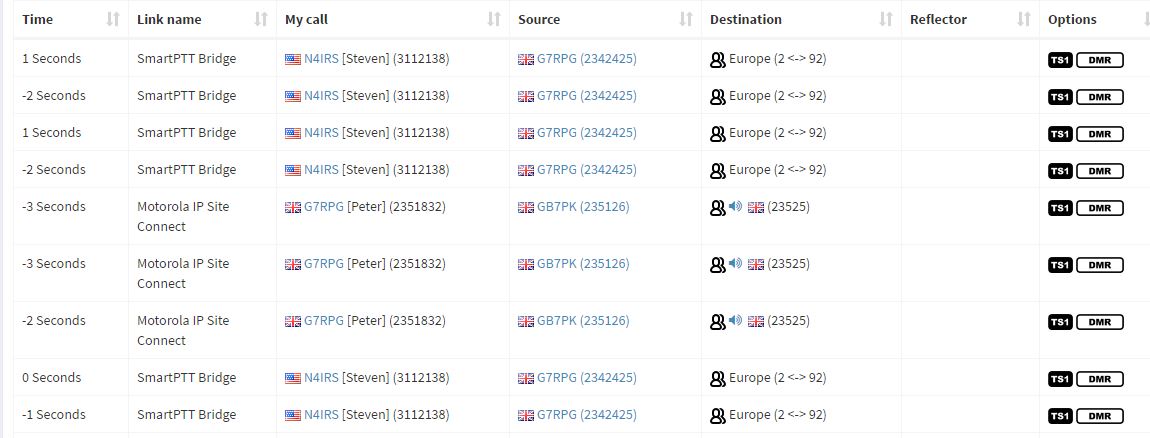
Post your ambe_audio.cfg On 04/10/2017 07:20 PM, Peter wrote:
Been doing a bit more experimenting with this, something weird is going on.
My source ID is 2342425 and the destination ID should be TG234525
But, see attached, any ideas?
Peter
On 06/04/2017 13:23, Steve Zingman wrote:
As peter has mentioned, Mike and I have been working on updating ambe_audio to work with the current version of DMRlink. Right now traffic from ASL is passing to DMR without error. Mike has a capture of the latest error when passing traffic from DMR to analog. Due to the nature of DMRlink, we have to squash a bug and move on to the next. This does take time. Stay tuned.
73, Steve N4IRS
_______________________________________________ Allstar-Digital mailing list Allstar-Digital@lists.keekles.org http://lists.keekles.org/cgi-bin/mailman/listinfo/allstar-digital
_______________________________________________ Allstar-Digital mailing list Allstar-Digital@lists.keekles.org http://lists.keekles.org/cgi-bin/mailman/listinfo/allstar-digital
################################################ # ambe_audio configuration file. ################################################ # DEFAULTS - General settings. These values are # inherited in each subsequent section (defined by section value). [DEFAULTS] debug = False # Debug output for each VOICE frame outToFile = False # Write each AMBE frame to a file called ambe.bin outToUDP = True # Send each AMBE frame to the _sock object (turn on/off DMRGateway operation) gateway = 127.0.0.1 # IP address of DMRGateway app toGatewayPort = 31000 # Port DMRGateway is listening on for AMBE frames to decode remoteControlPort = 31002 # Port that ambe_audio is listening on for remote control commands fromGatewayPort = 31003 # Port to listen on for AMBE frames to transmit to all peers gatewayDmrId = 2342425 # id to use when transmitting from the gateway tgFilter = 23525 # A list of TG IDs to monitor. All TGs will be passed to DMRGateway txTg = 23525 # TG to use for all frames received from DMRGateway -> IPSC txTs = 2 # Slot to use for frames received from DMRGateway -> IPSC # # The section setting defines the current section to use. By default, the ‘ENABLED’ section in dmrlink.cfg is used. # Any values in the named section override the values from the DEFAULTS section. For example, if the BM section # has a value for gatewayDmrId it would override the value above. Only one section should be set here. Think # of this as an easy way to switch between several different configurations with a single line. # section = BM # Use BM section values # section = Sandbox # Use SANDBOX section values [BM] # BrandMeister tgFilter = 23525 # A list of TG IDs to monitor. All TGs will be passed to DMRGateway txTg = 23525 # TG to use for all frames received from DMRGateway -> IPSC txTs = 1 # Slot to use for frames received from DMRGateway -> IPSC On 11/04/2017 00:22, Steve Zingman wrote: Post your ambe_audio.cfg On 04/10/2017 07:20 PM, Peter wrote: Been doing a bit more experimenting with this, something weird is going on. My source ID is 2342425 and the destination ID should be TG234525 But, see attached, any ideas? Peter On 06/04/2017 13:23, Steve Zingman wrote: As peter has mentioned, Mike and I have been working on updating ambe_audio to work with the current version of DMRlink. Right now traffic from ASL is passing to DMR without error. Mike has a capture of the latest error when passing traffic from DMR to analog. Due to the nature of DMRlink, we have to squash a bug and move on to the next. This does take time. Stay tuned. 73, Steve N4IRS _______________________________________________ Allstar-Digital mailing list Allstar-Digital@lists.keekles.org<mailto:Allstar-Digital@lists.keekles.org> http://lists.keekles.org/cgi-bin/mailman/listinfo/allstar-digital _______________________________________________ Allstar-Digital mailing list Allstar-Digital@lists.keekles.org<mailto:Allstar-Digital@lists.keekles.org> http://lists.keekles.org/cgi-bin/mailman/listinfo/allstar-digital _______________________________________________ Allstar-Digital mailing list Allstar-Digital@lists.keekles.org<mailto:Allstar-Digital@lists.keekles.org> http://lists.keekles.org/cgi-bin/mailman/listinfo/allstar-digital
Post your dmrlink.cfg On 04/10/2017 07:26 PM, Peter wrote:
################################################ # ambe_audio configuration file. ################################################
# DEFAULTS - General settings. These values are # inherited in each subsequent section (defined by section value).
[DEFAULTS] debug = False # Debug output for each VOICE frame outToFile = False # Write each AMBE frame to a file called ambe.bin outToUDP = True # Send each AMBE frame to the _sock object (turn on/off DMRGateway operation) gateway = 127.0.0.1 # IP address of DMRGateway app toGatewayPort = 31000 # Port DMRGateway is listening on for AMBE frames to decode remoteControlPort = 31002 # Port that ambe_audio is listening on for remote control commands fromGatewayPort = 31003 # Port to listen on for AMBE frames to transmit to all peers gatewayDmrId = 2342425 # id to use when transmitting from the gateway tgFilter = 23525 # A list of TG IDs to monitor. All TGs will be passed to DMRGateway txTg = 23525 # TG to use for all frames received from DMRGateway -> IPSC txTs = 2 # Slot to use for frames received from DMRGateway -> IPSC # # The section setting defines the current section to use. By default, the ‘ENABLED’ section in dmrlink.cfg is used. # Any values in the named section override the values from the DEFAULTS section. For example, if the BM section # has a value for gatewayDmrId it would override the value above. Only one section should be set here. Think # of this as an easy way to switch between several different configurations with a single line. # section = BM # Use BM section values # section = Sandbox # Use SANDBOX section values
[BM] # BrandMeister tgFilter = 23525 # A list of TG IDs to monitor. All TGs will be passed to DMRGateway txTg = 23525 # TG to use for all frames received from DMRGateway -> IPSC txTs = 1 # Slot to use for frames received from DMRGateway -> IPSC
On 11/04/2017 00:22, Steve Zingman wrote:
Post your ambe_audio.cfg
On 04/10/2017 07:20 PM, Peter wrote:
Been doing a bit more experimenting with this, something weird is going on.
My source ID is 2342425 and the destination ID should be TG234525
But, see attached, any ideas?
Peter
On 06/04/2017 13:23, Steve Zingman wrote:
As peter has mentioned, Mike and I have been working on updating ambe_audio to work with the current version of DMRlink. Right now traffic from ASL is passing to DMR without error. Mike has a capture of the latest error when passing traffic from DMR to analog. Due to the nature of DMRlink, we have to squash a bug and move on to the next. This does take time. Stay tuned.
73, Steve N4IRS
_______________________________________________ Allstar-Digital mailing list Allstar-Digital@lists.keekles.org http://lists.keekles.org/cgi-bin/mailman/listinfo/allstar-digital
_______________________________________________ Allstar-Digital mailing list Allstar-Digital@lists.keekles.org http://lists.keekles.org/cgi-bin/mailman/listinfo/allstar-digital
_______________________________________________ Allstar-Digital mailing list Allstar-Digital@lists.keekles.org http://lists.keekles.org/cgi-bin/mailman/listinfo/allstar-digital
_______________________________________________ Allstar-Digital mailing list Allstar-Digital@lists.keekles.org http://lists.keekles.org/cgi-bin/mailman/listinfo/allstar-digital
# DMRLink SAMPLE CONFIGURATION FILE # # Rename to dmrlink.cfg and add your information # # minor tweaks to match install for use by DMRGateway # N4IRS # # # GLOBAL CONFIGURATION ITEMS # [GLOBAL] PATH: /opt/dmrlink/ # NETWORK REPORTING CONFIGURATION # Enabling "REPORT_NETWORKS" will cause a reporting action for # IPSC each time the periodic reporting loop runs, that period is # specifiec by "REPORT_INTERVAL" in seconds. Possible values # for "REPORT_NETWORKS" are: # PICKLE - a Python pickle file of the network's data structure # (JSON DOES NOT WORK RNIGHT NOW) JSON - a JSON file of the network's data structure # (REDIS DOES NOT WORK RIGHT NOW) REDIS - send JSON format data structure to a local|remote # redis server # PRINT - a pretty print (STDOUT) of the data structure # "PRINT_PEERS_INC_MODE" - Boolean to include mode bits # "PRINT_PEERS_INC_FLAGS" - Boolean to include flag bits # # PRINT is the odd man out because it sends prettily formatted stuff # to STDOUT. The others send the internal data structure of the IPSC # instance and let some program on the other end sort it out. # # REPORT_INTERVAL - Seconds between reports # REPORT_PATH - Absolute path save data (pickle and json) # [REPORTS] REPORT_NETWORKS: REPORT_INTERVAL: 60 REPORT_PATH: PRINT_PEERS_INC_MODE: 0 PRINT_PEERS_INC_FLAGS: 0 # SYSTEM LOGGER CONFIGURAITON # This allows the logger to be configured without chaning the individual # python logger stuff in dmrlink.py. LOG_FILE should be a complete # path/filename for *your* system -- use /dev/null for non-file handlers. # LOG_HANDERLS may be any of the following, please, no spaces in the # list if you use several: # null # console # console-timed # file # file-timed # syslog # LOG_LEVEL may be any of the standard syslog logging levels, though # as of now, DEBUG, INFO, WARNING and CRITICAL are the only ones # used. # [LOGGER] LOG_FILE: /var/log/dmrlink/dmrlink.log LOG_HANDLERS: console LOG_LEVEL: DEBUG LOG_NAME: DMRlink # DOWNLOAD AND IMPORT SUBSCRIBER, PEER and TGID ALIASES # Ok, not the TGID, there's no master list I know of to download # This is intended as a facility for other applcations built on top of # DMRlink to use, and will NOT be used in DMRlink directly. # STALE_DAYS is the number of days since the last download before we # download again. Don't be an ass and change this to less than a few days. [ALIASES] TRY_DOWNLOAD: True PATH: ../ PEER_FILE: peer_ids.csv SUBSCRIBER_FILE: subscriber_ids.csv TGID_FILE: talkgroup_ids.csv PEER_URL: http://www.dmr-marc.net/cgi-bin/trbo-database/datadump.cgi?table=repeaters&format=csv&header=0 SUBSCRIBER_URL: http://www.dmr-marc.net/cgi-bin/trbo-database/datadump.cgi?table=users&format=csv&header=0 STALE_DAYS: 7 # CONFIGURATION FOR IPSC NETWORKS # Please read these closely - catastrophic results could result by setting # certain flags for things DMRlink cannot do. # # [NAME] The name you want to use to identify the IPSC instance (use # something better than "IPSC1"...) # ENABLED: Should we communiate with this network? Handy if you need to # shut one down but don't want to lose the config # RADIO_ID: This is the radio ID that DMRLink should use to communicate # IP: This is the local IPv4 address to listen on. It may be left # blank if you do not need or wish to specify. It is mostly # useful when DMRlink uses multiple interfaces to serve as an # application gatway/proxy from private and/or VPN networks # to the real world. # PORT: This is the UDP source port for DMRLink to use for this # PSC network, must be unique!!! # ALIVE_TIMER: Seconds between keep-alive transmissions # MAX_MISSED: How many missed keep-alives before we remove a peer # PEER_OPER: This signals the master and peers whether or not we are # operational. True is the only thing that makes sense. # IPSC_MODE: May be 'DIGITAL', 'ANALOG', or 'NONE'. Digital is really the # only thing that makes sense. # TSx_LINK: Is this time slot linked? # CSBK_CALL: Should be False, we cannot process these, but may be useful # for debugging. # RCM: Repeater Call Monitoring - don't unable unless you plan to # actually use it, this craetes extra network traffic. # CON_APP: Third Party Console App - exactly what DMRlink is, should # be set to True. # XNL_CALL: Can cause problems if not set to False, DMRlink does not # process XCMP/XNL calls. # XNL_MASTER: Obviously, should also be False, see XNL_CALL. # DATA_CALL: Process data calls. True if you want to process data calls # VOICE_CALL: Process voice calls. True if you want to process voice calls # MASTER_PEER: True if DMRlink will be the master, False if we're a peer # AUTH_ENABLED: Do we use authenticated IPSC? # AUTH_KEY: The Authentication key (up to 40 hex characters) # MASTER_IP: IP address of the IPSC master (ignored if DMRlink is the master) # MASTER_PORT: UDP port of the IPSC master (ignored if DMRlinkn is the master) # GROUP_HANGTIME: Group hangtime, per DMR configuration # # ...Repeat the block for each IPSC network to join. # [BM] ENABLED: True RADIO_ID: 2342425 IP: PORT: 50000 ALIVE_TIMER: 5 MAX_MISSED: 20 PEER_OPER: True IPSC_MODE: DIGITAL TS1_LINK: True TS2_LINK: True CSBK_CALL: False RCM: True CON_APP: True XNL_CALL: False XNL_MASTER: False DATA_CALL: True VOICE_CALL: True MASTER_PEER: False AUTH_ENABLED: False AUTH_KEY: 1A2B3C MASTER_IP: 91.121.101.163 MASTER_PORT: 55001 GROUP_HANGTIME: 5 [SAMPLE_MASTER] ENABLED: False RADIO_ID: 54321 IP: 192.168.1.1 PORT: 50000 ALIVE_TIMER: 5 MAX_MISSED: 20 PEER_OPER: True IPSC_MODE: DIGITAL TS1_LINK: True TS2_LINK: True CSBK_CALL: False RCM: True CON_APP: True XNL_CALL: False XNL_MASTER: False DATA_CALL: True VOICE_CALL: True MASTER_PEER: True AUTH_ENABLED: True AUTH_KEY: 1A2B3C # Below not used for a Master # MASTER_IP: 1.2.3.4 # MASTER_PORT: 50000 GROUP_HANGTIME: 5 On 11/04/2017 00:28, Steve Zingman wrote: Post your dmrlink.cfg On 04/10/2017 07:26 PM, Peter wrote: ################################################ # ambe_audio configuration file. ################################################ # DEFAULTS - General settings. These values are # inherited in each subsequent section (defined by section value). [DEFAULTS] debug = False # Debug output for each VOICE frame outToFile = False # Write each AMBE frame to a file called ambe.bin outToUDP = True # Send each AMBE frame to the _sock object (turn on/off DMRGateway operation) gateway = 127.0.0.1 # IP address of DMRGateway app toGatewayPort = 31000 # Port DMRGateway is listening on for AMBE frames to decode remoteControlPort = 31002 # Port that ambe_audio is listening on for remote control commands fromGatewayPort = 31003 # Port to listen on for AMBE frames to transmit to all peers gatewayDmrId = 2342425 # id to use when transmitting from the gateway tgFilter = 23525 # A list of TG IDs to monitor. All TGs will be passed to DMRGateway txTg = 23525 # TG to use for all frames received from DMRGateway -> IPSC txTs = 2 # Slot to use for frames received from DMRGateway -> IPSC # # The section setting defines the current section to use. By default, the ‘ENABLED’ section in dmrlink.cfg is used. # Any values in the named section override the values from the DEFAULTS section. For example, if the BM section # has a value for gatewayDmrId it would override the value above. Only one section should be set here. Think # of this as an easy way to switch between several different configurations with a single line. # section = BM # Use BM section values # section = Sandbox # Use SANDBOX section values [BM] # BrandMeister tgFilter = 23525 # A list of TG IDs to monitor. All TGs will be passed to DMRGateway txTg = 23525 # TG to use for all frames received from DMRGateway -> IPSC txTs = 1 # Slot to use for frames received from DMRGateway -> IPSC On 11/04/2017 00:22, Steve Zingman wrote: Post your ambe_audio.cfg On 04/10/2017 07:20 PM, Peter wrote: Been doing a bit more experimenting with this, something weird is going on. My source ID is 2342425 and the destination ID should be TG234525 But, see attached, any ideas? Peter On 06/04/2017 13:23, Steve Zingman wrote: As peter has mentioned, Mike and I have been working on updating ambe_audio to work with the current version of DMRlink. Right now traffic from ASL is passing to DMR without error. Mike has a capture of the latest error when passing traffic from DMR to analog. Due to the nature of DMRlink, we have to squash a bug and move on to the next. This does take time. Stay tuned. 73, Steve N4IRS _______________________________________________ Allstar-Digital mailing list Allstar-Digital@lists.keekles.org<mailto:Allstar-Digital@lists.keekles.org> http://lists.keekles.org/cgi-bin/mailman/listinfo/allstar-digital _______________________________________________ Allstar-Digital mailing list Allstar-Digital@lists.keekles.org<mailto:Allstar-Digital@lists.keekles.org> http://lists.keekles.org/cgi-bin/mailman/listinfo/allstar-digital _______________________________________________ Allstar-Digital mailing list Allstar-Digital@lists.keekles.org<mailto:Allstar-Digital@lists.keekles.org> http://lists.keekles.org/cgi-bin/mailman/listinfo/allstar-digital _______________________________________________ Allstar-Digital mailing list Allstar-Digital@lists.keekles.org<mailto:Allstar-Digital@lists.keekles.org> http://lists.keekles.org/cgi-bin/mailman/listinfo/allstar-digital _______________________________________________ Allstar-Digital mailing list Allstar-Digital@lists.keekles.org<mailto:Allstar-Digital@lists.keekles.org> http://lists.keekles.org/cgi-bin/mailman/listinfo/allstar-digital
OK, I'm confused too. On 04/10/2017 07:30 PM, Peter wrote:
# DMRLink SAMPLE CONFIGURATION FILE # # Rename to dmrlink.cfg and add your information # # minor tweaks to match install for use by DMRGateway # N4IRS # #
# GLOBAL CONFIGURATION ITEMS # [GLOBAL] PATH: /opt/dmrlink/
# NETWORK REPORTING CONFIGURATION # Enabling "REPORT_NETWORKS" will cause a reporting action for # IPSC each time the periodic reporting loop runs, that period is # specifiec by "REPORT_INTERVAL" in seconds. Possible values # for "REPORT_NETWORKS" are: # PICKLE - a Python pickle file of the network's data structure # (JSON DOES NOT WORK RNIGHT NOW) JSON - a JSON file of the network's data structure # (REDIS DOES NOT WORK RIGHT NOW) REDIS - send JSON format data structure to a local|remote # redis server # PRINT - a pretty print (STDOUT) of the data structure # "PRINT_PEERS_INC_MODE" - Boolean to include mode bits # "PRINT_PEERS_INC_FLAGS" - Boolean to include flag bits # # PRINT is the odd man out because it sends prettily formatted stuff # to STDOUT. The others send the internal data structure of the IPSC # instance and let some program on the other end sort it out. # # REPORT_INTERVAL - Seconds between reports # REPORT_PATH - Absolute path save data (pickle and json) # [REPORTS] REPORT_NETWORKS: REPORT_INTERVAL: 60 REPORT_PATH: PRINT_PEERS_INC_MODE: 0 PRINT_PEERS_INC_FLAGS: 0
# SYSTEM LOGGER CONFIGURAITON # This allows the logger to be configured without chaning the individual # python logger stuff in dmrlink.py. LOG_FILE should be a complete # path/filename for *your* system -- use /dev/null for non-file handlers. # LOG_HANDERLS may be any of the following, please, no spaces in the # list if you use several: # null # console # console-timed # file # file-timed # syslog # LOG_LEVEL may be any of the standard syslog logging levels, though # as of now, DEBUG, INFO, WARNING and CRITICAL are the only ones # used. # [LOGGER] LOG_FILE: /var/log/dmrlink/dmrlink.log LOG_HANDLERS: console LOG_LEVEL: DEBUG LOG_NAME: DMRlink
# DOWNLOAD AND IMPORT SUBSCRIBER, PEER and TGID ALIASES # Ok, not the TGID, there's no master list I know of to download # This is intended as a facility for other applcations built on top of # DMRlink to use, and will NOT be used in DMRlink directly. # STALE_DAYS is the number of days since the last download before we # download again. Don't be an ass and change this to less than a few days. [ALIASES] TRY_DOWNLOAD: True PATH: ../ PEER_FILE: peer_ids.csv SUBSCRIBER_FILE: subscriber_ids.csv TGID_FILE: talkgroup_ids.csv PEER_URL: http://www.dmr-marc.net/cgi-bin/trbo-database/datadump.cgi?table=repeaters&format=csv&header=0 SUBSCRIBER_URL: http://www.dmr-marc.net/cgi-bin/trbo-database/datadump.cgi?table=users&format=csv&header=0 STALE_DAYS: 7
# CONFIGURATION FOR IPSC NETWORKS # Please read these closely - catastrophic results could result by setting # certain flags for things DMRlink cannot do. # # [NAME] The name you want to use to identify the IPSC instance (use # something better than "IPSC1"...) # ENABLED: Should we communiate with this network? Handy if you need to # shut one down but don't want to lose the config # RADIO_ID: This is the radio ID that DMRLink should use to communicate # IP: This is the local IPv4 address to listen on. It may be left # blank if you do not need or wish to specify. It is mostly # useful when DMRlink uses multiple interfaces to serve as an # application gatway/proxy from private and/or VPN networks # to the real world. # PORT: This is the UDP source port for DMRLink to use for this # PSC network, must be unique!!! # ALIVE_TIMER: Seconds between keep-alive transmissions # MAX_MISSED: How many missed keep-alives before we remove a peer # PEER_OPER: This signals the master and peers whether or not we are # operational. True is the only thing that makes sense. # IPSC_MODE: May be 'DIGITAL', 'ANALOG', or 'NONE'. Digital is really the # only thing that makes sense. # TSx_LINK: Is this time slot linked? # CSBK_CALL: Should be False, we cannot process these, but may be useful # for debugging. # RCM: Repeater Call Monitoring - don't unable unless you plan to # actually use it, this craetes extra network traffic. # CON_APP: Third Party Console App - exactly what DMRlink is, should # be set to True. # XNL_CALL: Can cause problems if not set to False, DMRlink does not # process XCMP/XNL calls. # XNL_MASTER: Obviously, should also be False, see XNL_CALL. # DATA_CALL: Process data calls. True if you want to process data calls # VOICE_CALL: Process voice calls. True if you want to process voice calls # MASTER_PEER: True if DMRlink will be the master, False if we're a peer # AUTH_ENABLED: Do we use authenticated IPSC? # AUTH_KEY: The Authentication key (up to 40 hex characters) # MASTER_IP: IP address of the IPSC master (ignored if DMRlink is the master) # MASTER_PORT: UDP port of the IPSC master (ignored if DMRlinkn is the master) # GROUP_HANGTIME: Group hangtime, per DMR configuration # # ...Repeat the block for each IPSC network to join. #
[BM] ENABLED: True RADIO_ID: 2342425 IP: PORT: 50000 ALIVE_TIMER: 5 MAX_MISSED: 20 PEER_OPER: True IPSC_MODE: DIGITAL TS1_LINK: True TS2_LINK: True CSBK_CALL: False RCM: True CON_APP: True XNL_CALL: False XNL_MASTER: False DATA_CALL: True VOICE_CALL: True MASTER_PEER: False AUTH_ENABLED: False AUTH_KEY: 1A2B3C MASTER_IP: 91.121.101.163 MASTER_PORT: 55001 GROUP_HANGTIME: 5
[SAMPLE_MASTER] ENABLED: False RADIO_ID: 54321 IP: 192.168.1.1 PORT: 50000 ALIVE_TIMER: 5 MAX_MISSED: 20 PEER_OPER: True IPSC_MODE: DIGITAL TS1_LINK: True TS2_LINK: True CSBK_CALL: False RCM: True CON_APP: True XNL_CALL: False XNL_MASTER: False DATA_CALL: True VOICE_CALL: True MASTER_PEER: True AUTH_ENABLED: True AUTH_KEY: 1A2B3C # Below not used for a Master # MASTER_IP: 1.2.3.4 # MASTER_PORT: 50000 GROUP_HANGTIME: 5
On 11/04/2017 00:28, Steve Zingman wrote:
Post your dmrlink.cfg
On 04/10/2017 07:26 PM, Peter wrote:
################################################ # ambe_audio configuration file. ################################################
# DEFAULTS - General settings. These values are # inherited in each subsequent section (defined by section value).
[DEFAULTS] debug = False # Debug output for each VOICE frame outToFile = False # Write each AMBE frame to a file called ambe.bin outToUDP = True # Send each AMBE frame to the _sock object (turn on/off DMRGateway operation) gateway = 127.0.0.1 # IP address of DMRGateway app toGatewayPort = 31000 # Port DMRGateway is listening on for AMBE frames to decode remoteControlPort = 31002 # Port that ambe_audio is listening on for remote control commands fromGatewayPort = 31003 # Port to listen on for AMBE frames to transmit to all peers gatewayDmrId = 2342425 # id to use when transmitting from the gateway tgFilter = 23525 # A list of TG IDs to monitor. All TGs will be passed to DMRGateway txTg = 23525 # TG to use for all frames received from DMRGateway -> IPSC txTs = 2 # Slot to use for frames received from DMRGateway -> IPSC # # The section setting defines the current section to use. By default, the ‘ENABLED’ section in dmrlink.cfg is used. # Any values in the named section override the values from the DEFAULTS section. For example, if the BM section # has a value for gatewayDmrId it would override the value above. Only one section should be set here. Think # of this as an easy way to switch between several different configurations with a single line. # section = BM # Use BM section values # section = Sandbox # Use SANDBOX section values
[BM] # BrandMeister tgFilter = 23525 # A list of TG IDs to monitor. All TGs will be passed to DMRGateway txTg = 23525 # TG to use for all frames received from DMRGateway -> IPSC txTs = 1 # Slot to use for frames received from DMRGateway -> IPSC
On 11/04/2017 00:22, Steve Zingman wrote:
Post your ambe_audio.cfg
On 04/10/2017 07:20 PM, Peter wrote:
Been doing a bit more experimenting with this, something weird is going on.
My source ID is 2342425 and the destination ID should be TG234525
But, see attached, any ideas?
Peter
On 06/04/2017 13:23, Steve Zingman wrote:
As peter has mentioned, Mike and I have been working on updating ambe_audio to work with the current version of DMRlink. Right now traffic from ASL is passing to DMR without error. Mike has a capture of the latest error when passing traffic from DMR to analog. Due to the nature of DMRlink, we have to squash a bug and move on to the next. This does take time. Stay tuned.
73, Steve N4IRS
_______________________________________________ Allstar-Digital mailing list Allstar-Digital@lists.keekles.org http://lists.keekles.org/cgi-bin/mailman/listinfo/allstar-digital
_______________________________________________ Allstar-Digital mailing list Allstar-Digital@lists.keekles.org http://lists.keekles.org/cgi-bin/mailman/listinfo/allstar-digital
_______________________________________________ Allstar-Digital mailing list Allstar-Digital@lists.keekles.org http://lists.keekles.org/cgi-bin/mailman/listinfo/allstar-digital
_______________________________________________ Allstar-Digital mailing list Allstar-Digital@lists.keekles.org http://lists.keekles.org/cgi-bin/mailman/listinfo/allstar-digital
_______________________________________________ Allstar-Digital mailing list Allstar-Digital@lists.keekles.org http://lists.keekles.org/cgi-bin/mailman/listinfo/allstar-digital
_______________________________________________ Allstar-Digital mailing list Allstar-Digital@lists.keekles.org http://lists.keekles.org/cgi-bin/mailman/listinfo/allstar-digital
I'm using the latest code from github that Mike submitted 4 days ago. How is your ID showing up as the source? I've searched the files for 3112138 but can't find any mention of it. On 11/04/2017 00:32, Steve Zingman wrote: OK, I'm confused too. On 04/10/2017 07:30 PM, Peter wrote: # DMRLink SAMPLE CONFIGURATION FILE # # Rename to dmrlink.cfg and add your information # # minor tweaks to match install for use by DMRGateway # N4IRS # # # GLOBAL CONFIGURATION ITEMS # [GLOBAL] PATH: /opt/dmrlink/ # NETWORK REPORTING CONFIGURATION # Enabling "REPORT_NETWORKS" will cause a reporting action for # IPSC each time the periodic reporting loop runs, that period is # specifiec by "REPORT_INTERVAL" in seconds. Possible values # for "REPORT_NETWORKS" are: # PICKLE - a Python pickle file of the network's data structure # (JSON DOES NOT WORK RNIGHT NOW) JSON - a JSON file of the network's data structure # (REDIS DOES NOT WORK RIGHT NOW) REDIS - send JSON format data structure to a local|remote # redis server # PRINT - a pretty print (STDOUT) of the data structure # "PRINT_PEERS_INC_MODE" - Boolean to include mode bits # "PRINT_PEERS_INC_FLAGS" - Boolean to include flag bits # # PRINT is the odd man out because it sends prettily formatted stuff # to STDOUT. The others send the internal data structure of the IPSC # instance and let some program on the other end sort it out. # # REPORT_INTERVAL - Seconds between reports # REPORT_PATH - Absolute path save data (pickle and json) # [REPORTS] REPORT_NETWORKS: REPORT_INTERVAL: 60 REPORT_PATH: PRINT_PEERS_INC_MODE: 0 PRINT_PEERS_INC_FLAGS: 0 # SYSTEM LOGGER CONFIGURAITON # This allows the logger to be configured without chaning the individual # python logger stuff in dmrlink.py. LOG_FILE should be a complete # path/filename for *your* system -- use /dev/null for non-file handlers. # LOG_HANDERLS may be any of the following, please, no spaces in the # list if you use several: # null # console # console-timed # file # file-timed # syslog # LOG_LEVEL may be any of the standard syslog logging levels, though # as of now, DEBUG, INFO, WARNING and CRITICAL are the only ones # used. # [LOGGER] LOG_FILE: /var/log/dmrlink/dmrlink.log LOG_HANDLERS: console LOG_LEVEL: DEBUG LOG_NAME: DMRlink # DOWNLOAD AND IMPORT SUBSCRIBER, PEER and TGID ALIASES # Ok, not the TGID, there's no master list I know of to download # This is intended as a facility for other applcations built on top of # DMRlink to use, and will NOT be used in DMRlink directly. # STALE_DAYS is the number of days since the last download before we # download again. Don't be an ass and change this to less than a few days. [ALIASES] TRY_DOWNLOAD: True PATH: ../ PEER_FILE: peer_ids.csv SUBSCRIBER_FILE: subscriber_ids.csv TGID_FILE: talkgroup_ids.csv PEER_URL: http://www.dmr-marc.net/cgi-bin/trbo-database/datadump.cgi?table=repeaters&format=csv&header=0 SUBSCRIBER_URL: http://www.dmr-marc.net/cgi-bin/trbo-database/datadump.cgi?table=users&format=csv&header=0 STALE_DAYS: 7 # CONFIGURATION FOR IPSC NETWORKS # Please read these closely - catastrophic results could result by setting # certain flags for things DMRlink cannot do. # # [NAME] The name you want to use to identify the IPSC instance (use # something better than "IPSC1"...) # ENABLED: Should we communiate with this network? Handy if you need to # shut one down but don't want to lose the config # RADIO_ID: This is the radio ID that DMRLink should use to communicate # IP: This is the local IPv4 address to listen on. It may be left # blank if you do not need or wish to specify. It is mostly # useful when DMRlink uses multiple interfaces to serve as an # application gatway/proxy from private and/or VPN networks # to the real world. # PORT: This is the UDP source port for DMRLink to use for this # PSC network, must be unique!!! # ALIVE_TIMER: Seconds between keep-alive transmissions # MAX_MISSED: How many missed keep-alives before we remove a peer # PEER_OPER: This signals the master and peers whether or not we are # operational. True is the only thing that makes sense. # IPSC_MODE: May be 'DIGITAL', 'ANALOG', or 'NONE'. Digital is really the # only thing that makes sense. # TSx_LINK: Is this time slot linked? # CSBK_CALL: Should be False, we cannot process these, but may be useful # for debugging. # RCM: Repeater Call Monitoring - don't unable unless you plan to # actually use it, this craetes extra network traffic. # CON_APP: Third Party Console App - exactly what DMRlink is, should # be set to True. # XNL_CALL: Can cause problems if not set to False, DMRlink does not # process XCMP/XNL calls. # XNL_MASTER: Obviously, should also be False, see XNL_CALL. # DATA_CALL: Process data calls. True if you want to process data calls # VOICE_CALL: Process voice calls. True if you want to process voice calls # MASTER_PEER: True if DMRlink will be the master, False if we're a peer # AUTH_ENABLED: Do we use authenticated IPSC? # AUTH_KEY: The Authentication key (up to 40 hex characters) # MASTER_IP: IP address of the IPSC master (ignored if DMRlink is the master) # MASTER_PORT: UDP port of the IPSC master (ignored if DMRlinkn is the master) # GROUP_HANGTIME: Group hangtime, per DMR configuration # # ...Repeat the block for each IPSC network to join. # [BM] ENABLED: True RADIO_ID: 2342425 IP: PORT: 50000 ALIVE_TIMER: 5 MAX_MISSED: 20 PEER_OPER: True IPSC_MODE: DIGITAL TS1_LINK: True TS2_LINK: True CSBK_CALL: False RCM: True CON_APP: True XNL_CALL: False XNL_MASTER: False DATA_CALL: True VOICE_CALL: True MASTER_PEER: False AUTH_ENABLED: False AUTH_KEY: 1A2B3C MASTER_IP: 91.121.101.163 MASTER_PORT: 55001 GROUP_HANGTIME: 5 [SAMPLE_MASTER] ENABLED: False RADIO_ID: 54321 IP: 192.168.1.1 PORT: 50000 ALIVE_TIMER: 5 MAX_MISSED: 20 PEER_OPER: True IPSC_MODE: DIGITAL TS1_LINK: True TS2_LINK: True CSBK_CALL: False RCM: True CON_APP: True XNL_CALL: False XNL_MASTER: False DATA_CALL: True VOICE_CALL: True MASTER_PEER: True AUTH_ENABLED: True AUTH_KEY: 1A2B3C # Below not used for a Master # MASTER_IP: 1.2.3.4 # MASTER_PORT: 50000 GROUP_HANGTIME: 5 On 11/04/2017 00:28, Steve Zingman wrote: Post your dmrlink.cfg On 04/10/2017 07:26 PM, Peter wrote: ################################################ # ambe_audio configuration file. ################################################ # DEFAULTS - General settings. These values are # inherited in each subsequent section (defined by section value). [DEFAULTS] debug = False # Debug output for each VOICE frame outToFile = False # Write each AMBE frame to a file called ambe.bin outToUDP = True # Send each AMBE frame to the _sock object (turn on/off DMRGateway operation) gateway = 127.0.0.1 # IP address of DMRGateway app toGatewayPort = 31000 # Port DMRGateway is listening on for AMBE frames to decode remoteControlPort = 31002 # Port that ambe_audio is listening on for remote control commands fromGatewayPort = 31003 # Port to listen on for AMBE frames to transmit to all peers gatewayDmrId = 2342425 # id to use when transmitting from the gateway tgFilter = 23525 # A list of TG IDs to monitor. All TGs will be passed to DMRGateway txTg = 23525 # TG to use for all frames received from DMRGateway -> IPSC txTs = 2 # Slot to use for frames received from DMRGateway -> IPSC # # The section setting defines the current section to use. By default, the ‘ENABLED’ section in dmrlink.cfg is used. # Any values in the named section override the values from the DEFAULTS section. For example, if the BM section # has a value for gatewayDmrId it would override the value above. Only one section should be set here. Think # of this as an easy way to switch between several different configurations with a single line. # section = BM # Use BM section values # section = Sandbox # Use SANDBOX section values [BM] # BrandMeister tgFilter = 23525 # A list of TG IDs to monitor. All TGs will be passed to DMRGateway txTg = 23525 # TG to use for all frames received from DMRGateway -> IPSC txTs = 1 # Slot to use for frames received from DMRGateway -> IPSC On 11/04/2017 00:22, Steve Zingman wrote: Post your ambe_audio.cfg On 04/10/2017 07:20 PM, Peter wrote: Been doing a bit more experimenting with this, something weird is going on. My source ID is 2342425 and the destination ID should be TG234525 But, see attached, any ideas? Peter On 06/04/2017 13:23, Steve Zingman wrote: As peter has mentioned, Mike and I have been working on updating ambe_audio to work with the current version of DMRlink. Right now traffic from ASL is passing to DMR without error. Mike has a capture of the latest error when passing traffic from DMR to analog. Due to the nature of DMRlink, we have to squash a bug and move on to the next. This does take time. Stay tuned. 73, Steve N4IRS _______________________________________________ Allstar-Digital mailing list Allstar-Digital@lists.keekles.org<mailto:Allstar-Digital@lists.keekles.org> http://lists.keekles.org/cgi-bin/mailman/listinfo/allstar-digital _______________________________________________ Allstar-Digital mailing list Allstar-Digital@lists.keekles.org<mailto:Allstar-Digital@lists.keekles.org> http://lists.keekles.org/cgi-bin/mailman/listinfo/allstar-digital _______________________________________________ Allstar-Digital mailing list Allstar-Digital@lists.keekles.org<mailto:Allstar-Digital@lists.keekles.org> http://lists.keekles.org/cgi-bin/mailman/listinfo/allstar-digital _______________________________________________ Allstar-Digital mailing list Allstar-Digital@lists.keekles.org<mailto:Allstar-Digital@lists.keekles.org> http://lists.keekles.org/cgi-bin/mailman/listinfo/allstar-digital _______________________________________________ Allstar-Digital mailing list Allstar-Digital@lists.keekles.org<mailto:Allstar-Digital@lists.keekles.org> http://lists.keekles.org/cgi-bin/mailman/listinfo/allstar-digital _______________________________________________ Allstar-Digital mailing list Allstar-Digital@lists.keekles.org<mailto:Allstar-Digital@lists.keekles.org> http://lists.keekles.org/cgi-bin/mailman/listinfo/allstar-digital _______________________________________________ Allstar-Digital mailing list Allstar-Digital@lists.keekles.org<mailto:Allstar-Digital@lists.keekles.org> http://lists.keekles.org/cgi-bin/mailman/listinfo/allstar-digital
Your guess is as good as mine. On 04/10/2017 07:37 PM, Peter wrote:
I'm using the latest code from github that Mike submitted 4 days ago. How is your ID showing up as the source?
I've searched the files for 3112138 but can't find any mention of it.
On 11/04/2017 00:32, Steve Zingman wrote:
OK, I'm confused too.
On 04/10/2017 07:30 PM, Peter wrote:
# DMRLink SAMPLE CONFIGURATION FILE # # Rename to dmrlink.cfg and add your information # # minor tweaks to match install for use by DMRGateway # N4IRS # #
# GLOBAL CONFIGURATION ITEMS # [GLOBAL] PATH: /opt/dmrlink/
# NETWORK REPORTING CONFIGURATION # Enabling "REPORT_NETWORKS" will cause a reporting action for # IPSC each time the periodic reporting loop runs, that period is # specifiec by "REPORT_INTERVAL" in seconds. Possible values # for "REPORT_NETWORKS" are: # PICKLE - a Python pickle file of the network's data structure # (JSON DOES NOT WORK RNIGHT NOW) JSON - a JSON file of the network's data structure # (REDIS DOES NOT WORK RIGHT NOW) REDIS - send JSON format data structure to a local|remote # redis server # PRINT - a pretty print (STDOUT) of the data structure # "PRINT_PEERS_INC_MODE" - Boolean to include mode bits # "PRINT_PEERS_INC_FLAGS" - Boolean to include flag bits # # PRINT is the odd man out because it sends prettily formatted stuff # to STDOUT. The others send the internal data structure of the IPSC # instance and let some program on the other end sort it out. # # REPORT_INTERVAL - Seconds between reports # REPORT_PATH - Absolute path save data (pickle and json) # [REPORTS] REPORT_NETWORKS: REPORT_INTERVAL: 60 REPORT_PATH: PRINT_PEERS_INC_MODE: 0 PRINT_PEERS_INC_FLAGS: 0
# SYSTEM LOGGER CONFIGURAITON # This allows the logger to be configured without chaning the individual # python logger stuff in dmrlink.py. LOG_FILE should be a complete # path/filename for *your* system -- use /dev/null for non-file handlers. # LOG_HANDERLS may be any of the following, please, no spaces in the # list if you use several: # null # console # console-timed # file # file-timed # syslog # LOG_LEVEL may be any of the standard syslog logging levels, though # as of now, DEBUG, INFO, WARNING and CRITICAL are the only ones # used. # [LOGGER] LOG_FILE: /var/log/dmrlink/dmrlink.log LOG_HANDLERS: console LOG_LEVEL: DEBUG LOG_NAME: DMRlink
# DOWNLOAD AND IMPORT SUBSCRIBER, PEER and TGID ALIASES # Ok, not the TGID, there's no master list I know of to download # This is intended as a facility for other applcations built on top of # DMRlink to use, and will NOT be used in DMRlink directly. # STALE_DAYS is the number of days since the last download before we # download again. Don't be an ass and change this to less than a few days. [ALIASES] TRY_DOWNLOAD: True PATH: ../ PEER_FILE: peer_ids.csv SUBSCRIBER_FILE: subscriber_ids.csv TGID_FILE: talkgroup_ids.csv PEER_URL: http://www.dmr-marc.net/cgi-bin/trbo-database/datadump.cgi?table=repeaters&format=csv&header=0 SUBSCRIBER_URL: http://www.dmr-marc.net/cgi-bin/trbo-database/datadump.cgi?table=users&format=csv&header=0 STALE_DAYS: 7
# CONFIGURATION FOR IPSC NETWORKS # Please read these closely - catastrophic results could result by setting # certain flags for things DMRlink cannot do. # # [NAME] The name you want to use to identify the IPSC instance (use # something better than "IPSC1"...) # ENABLED: Should we communiate with this network? Handy if you need to # shut one down but don't want to lose the config # RADIO_ID: This is the radio ID that DMRLink should use to communicate # IP: This is the local IPv4 address to listen on. It may be left # blank if you do not need or wish to specify. It is mostly # useful when DMRlink uses multiple interfaces to serve as an # application gatway/proxy from private and/or VPN networks # to the real world. # PORT: This is the UDP source port for DMRLink to use for this # PSC network, must be unique!!! # ALIVE_TIMER: Seconds between keep-alive transmissions # MAX_MISSED: How many missed keep-alives before we remove a peer # PEER_OPER: This signals the master and peers whether or not we are # operational. True is the only thing that makes sense. # IPSC_MODE: May be 'DIGITAL', 'ANALOG', or 'NONE'. Digital is really the # only thing that makes sense. # TSx_LINK: Is this time slot linked? # CSBK_CALL: Should be False, we cannot process these, but may be useful # for debugging. # RCM: Repeater Call Monitoring - don't unable unless you plan to # actually use it, this craetes extra network traffic. # CON_APP: Third Party Console App - exactly what DMRlink is, should # be set to True. # XNL_CALL: Can cause problems if not set to False, DMRlink does not # process XCMP/XNL calls. # XNL_MASTER: Obviously, should also be False, see XNL_CALL. # DATA_CALL: Process data calls. True if you want to process data calls # VOICE_CALL: Process voice calls. True if you want to process voice calls # MASTER_PEER: True if DMRlink will be the master, False if we're a peer # AUTH_ENABLED: Do we use authenticated IPSC? # AUTH_KEY: The Authentication key (up to 40 hex characters) # MASTER_IP: IP address of the IPSC master (ignored if DMRlink is the master) # MASTER_PORT: UDP port of the IPSC master (ignored if DMRlinkn is the master) # GROUP_HANGTIME: Group hangtime, per DMR configuration # # ...Repeat the block for each IPSC network to join. #
[BM] ENABLED: True RADIO_ID: 2342425 IP: PORT: 50000 ALIVE_TIMER: 5 MAX_MISSED: 20 PEER_OPER: True IPSC_MODE: DIGITAL TS1_LINK: True TS2_LINK: True CSBK_CALL: False RCM: True CON_APP: True XNL_CALL: False XNL_MASTER: False DATA_CALL: True VOICE_CALL: True MASTER_PEER: False AUTH_ENABLED: False AUTH_KEY: 1A2B3C MASTER_IP: 91.121.101.163 MASTER_PORT: 55001 GROUP_HANGTIME: 5
[SAMPLE_MASTER] ENABLED: False RADIO_ID: 54321 IP: 192.168.1.1 PORT: 50000 ALIVE_TIMER: 5 MAX_MISSED: 20 PEER_OPER: True IPSC_MODE: DIGITAL TS1_LINK: True TS2_LINK: True CSBK_CALL: False RCM: True CON_APP: True XNL_CALL: False XNL_MASTER: False DATA_CALL: True VOICE_CALL: True MASTER_PEER: True AUTH_ENABLED: True AUTH_KEY: 1A2B3C # Below not used for a Master # MASTER_IP: 1.2.3.4 # MASTER_PORT: 50000 GROUP_HANGTIME: 5
On 11/04/2017 00:28, Steve Zingman wrote:
Post your dmrlink.cfg
On 04/10/2017 07:26 PM, Peter wrote:
################################################ # ambe_audio configuration file. ################################################
# DEFAULTS - General settings. These values are # inherited in each subsequent section (defined by section value).
[DEFAULTS] debug = False # Debug output for each VOICE frame outToFile = False # Write each AMBE frame to a file called ambe.bin outToUDP = True # Send each AMBE frame to the _sock object (turn on/off DMRGateway operation) gateway = 127.0.0.1 # IP address of DMRGateway app toGatewayPort = 31000 # Port DMRGateway is listening on for AMBE frames to decode remoteControlPort = 31002 # Port that ambe_audio is listening on for remote control commands fromGatewayPort = 31003 # Port to listen on for AMBE frames to transmit to all peers gatewayDmrId = 2342425 # id to use when transmitting from the gateway tgFilter = 23525 # A list of TG IDs to monitor. All TGs will be passed to DMRGateway txTg = 23525 # TG to use for all frames received from DMRGateway -> IPSC txTs = 2 # Slot to use for frames received from DMRGateway -> IPSC # # The section setting defines the current section to use. By default, the ‘ENABLED’ section in dmrlink.cfg is used. # Any values in the named section override the values from the DEFAULTS section. For example, if the BM section # has a value for gatewayDmrId it would override the value above. Only one section should be set here. Think # of this as an easy way to switch between several different configurations with a single line. # section = BM # Use BM section values # section = Sandbox # Use SANDBOX section values
[BM] # BrandMeister tgFilter = 23525 # A list of TG IDs to monitor. All TGs will be passed to DMRGateway txTg = 23525 # TG to use for all frames received from DMRGateway -> IPSC txTs = 1 # Slot to use for frames received from DMRGateway -> IPSC
On 11/04/2017 00:22, Steve Zingman wrote:
Post your ambe_audio.cfg
On 04/10/2017 07:20 PM, Peter wrote: > Been doing a bit more experimenting with this, something weird is going on. > > My source ID is 2342425 and the destination ID should be TG234525 > > But, see attached, any ideas? > > > Peter > > > On 06/04/2017 13:23, Steve Zingman wrote: >> As peter has mentioned, Mike and I have been working on updating >> ambe_audio to work with the current version of DMRlink. >> Right now traffic from ASL is passing to DMR without error. Mike has a >> capture of the latest error when passing traffic from DMR to analog. >> Due to the nature of DMRlink, we have to squash a bug and move on to >> the next. This does take time. Stay tuned. >> >> 73, Steve N4IRS >> >> >> _______________________________________________ >> Allstar-Digital mailing list >> Allstar-Digital@lists.keekles.org >> http://lists.keekles.org/cgi-bin/mailman/listinfo/allstar-digital > > > _______________________________________________ > Allstar-Digital mailing list > Allstar-Digital@lists.keekles.org > http://lists.keekles.org/cgi-bin/mailman/listinfo/allstar-digital
_______________________________________________ Allstar-Digital mailing list Allstar-Digital@lists.keekles.org http://lists.keekles.org/cgi-bin/mailman/listinfo/allstar-digital
_______________________________________________ Allstar-Digital mailing list Allstar-Digital@lists.keekles.org http://lists.keekles.org/cgi-bin/mailman/listinfo/allstar-digital
_______________________________________________ Allstar-Digital mailing list Allstar-Digital@lists.keekles.org http://lists.keekles.org/cgi-bin/mailman/listinfo/allstar-digital
_______________________________________________ Allstar-Digital mailing list Allstar-Digital@lists.keekles.org http://lists.keekles.org/cgi-bin/mailman/listinfo/allstar-digital
_______________________________________________ Allstar-Digital mailing list Allstar-Digital@lists.keekles.org http://lists.keekles.org/cgi-bin/mailman/listinfo/allstar-digital
_______________________________________________ Allstar-Digital mailing list Allstar-Digital@lists.keekles.org http://lists.keekles.org/cgi-bin/mailman/listinfo/allstar-digital
Correction.. destination ID should be TG23525 On 11/04/2017 00:20, Peter wrote: Been doing a bit more experimenting with this, something weird is going on. My source ID is 2342425 and the destination ID should be TG234525 But, see attached, any ideas? Peter On 06/04/2017 13:23, Steve Zingman wrote: As peter has mentioned, Mike and I have been working on updating ambe_audio to work with the current version of DMRlink. Right now traffic from ASL is passing to DMR without error. Mike has a capture of the latest error when passing traffic from DMR to analog. Due to the nature of DMRlink, we have to squash a bug and move on to the next. This does take time. Stay tuned. 73, Steve N4IRS _______________________________________________ Allstar-Digital mailing list Allstar-Digital@lists.keekles.org<mailto:Allstar-Digital@lists.keekles.org> http://lists.keekles.org/cgi-bin/mailman/listinfo/allstar-digital _______________________________________________ Allstar-Digital mailing list Allstar-Digital@lists.keekles.org<mailto:Allstar-Digital@lists.keekles.org> http://lists.keekles.org/cgi-bin/mailman/listinfo/allstar-digital
participants (5)
-
 Guy Vachon VE2VAG
 -
 Peter
Peter -
 Richard Aubin
 -
 Steve Zingman
 -
ve2dje@gmail.com