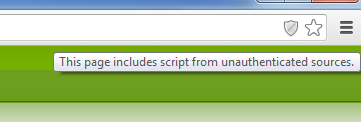
Doug, Had the same issue, the map DOES work, however most browsers won't show it as it contains a unauthenticated script within an https session. If your using Chrome, on the right, you should see a little "Shield" to the left of the favorites star, just click it and select "load unsafe script" cid:image001.png@01CEEF9B.A60B70A0 Gary KB2BSL From: app_rpt-users-bounces@ohnosec.org [mailto:app_rpt-users-bounces@ohnosec.org] On Behalf Of Doug Crompton Sent: Monday, December 02, 2013 8:08 PM To: app_rpt-users@ohnosec.org Subject: Re: [App_rpt-users] Lat Long update Asking again.... Where can I manually put in these numbers? 73 Doug WA3DSP http://www.crompton.com/hamradio _____ From: doug@crompton.com To: app_rpt-users@ohnosec.org Date: Sat, 30 Nov 2013 20:16:01 -0500 Subject: [App_rpt-users] Lat Long update How does one manually update the lat/long on the server page at allstarlink.org? It will not accept manual input of numbers and forces you to use the map which has never worked for me. 73 Doug WA3DSP http://www.crompton.com/hamradio _______________________________________________ App_rpt-users mailing list App_rpt-users@ohnosec.org http://ohnosec.org/cgi-bin/mailman/listinfo/app_rpt-users