
I was interested in installing a cloud version of ASL to see if I could setup a DVSwitch project. I have a linux virtual server running linux. I went by the following instructions: https://wiki.allstarlink.org/wiki/ASL_FAQ but i'm getting messages and i'm not sure how to correct it? 73, Russell Thomas, KV4S Cell: 205.202.1701 DMR: 3101393 D-Star: KV4S AllStar: 47923 EchoLink: KV4S-L HamShackHotline: 4225 Web: http://KV4S.com

Well, I redid my AWS to be debian x86. Now, i'm getting the attached trying to run this: wget https://github.com/AllStarLink/Asterisk/raw/develop/allstar/repository/insta... from the FAQ. any ideas? 73, Russell Thomas, KV4S NWS Liaison and Station Trustee http://alert-alabama.org Cell: 205.202.1701 DMR: 3101393 D-Star: KV4S AllStar: 47923 EchoLink: KV4S-L (1003254) HamShackHotline: 4225 Web: http://KV4S.com On Mon, May 14, 2018 at 11:51 AM, Russell Thomas <russell@kv4s.com> wrote:
I was interested in installing a cloud version of ASL to see if I could setup a DVSwitch project. I have a linux virtual server running linux.
I went by the following instructions: https://wiki.allstarlink.org/wiki/ASL_FAQ
but i'm getting messages and i'm not sure how to correct it?
73, Russell Thomas, KV4S
Cell: 205.202.1701 DMR: 3101393 D-Star: KV4S AllStar: 47923 EchoLink: KV4S-L HamShackHotline: 4225 Web: http://KV4S.com
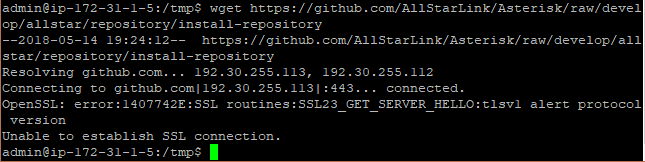

On Mon, May 14, 2018 at 12:27 PM Russell Thomas <russell@kv4s.com> wrote:
Well, I redid my AWS to be debian x86.
Now, i'm getting the attached trying to run this: wget https://github.com/AllStarLink/Asterisk/raw/develop/allstar/repository/insta...
from the FAQ.
any ideas?
Looks like your distribution/wget is running an old version of OpenSSL that can't speak the protocols supported by Github. Tom KD7LXL
yeah i think your right. do you happen to know how to do an OS update or update the SSL? I think this image is from 2014. 73, Russell Thomas, KV4S NWS Liaison and Station Trustee http://alert-alabama.org Cell: 205.202.1701 DMR: 3101393 D-Star: KV4S AllStar: 47923 EchoLink: KV4S-L (1003254) HamShackHotline: 4225 Web: http://KV4S.com On Mon, May 14, 2018 at 2:33 PM, Tom Hayward <tom@tomh.us> wrote:
On Mon, May 14, 2018 at 12:27 PM Russell Thomas <russell@kv4s.com> wrote:
Well, I redid my AWS to be debian x86.
Now, i'm getting the attached trying to run this: wget https://github.com/AllStarLink/Asterisk/raw/develop/allstar/repository/insta...
from the FAQ.
any ideas?
Looks like your distribution/wget is running an old version of OpenSSL that can't speak the protocols supported by Github.
Tom KD7LXL
_______________________________________________ App_rpt-users mailing list App_rpt-users@lists.allstarlink.org http://lists.allstarlink.org/cgi-bin/mailman/listinfo/app_rpt-users
To unsubscribe from this list please visit http://lists.allstarlink.org/cgi-bin/mailman/listinfo/app_rpt-users and scroll down to the bottom of the page. Enter your email address and press the "Unsubscribe or edit options button" You do not need a password to unsubscribe, you can do it via email confirmation. If you have trouble unsubscribing, please send a message to the list detailing the problem.
On Mon, May 14, 2018 at 12:47 PM Russell Thomas <russell@kv4s.com> wrote:
yeah i think your right. do you happen to know how to do an OS update or update the SSL? I think this image is from 2014.
You said you were using Debian, so this method should apply: https://www.debian.org/doc/manuals/debian-faq/ch-uptodate.en.html Tom KD7LXL
thank you. it doesn't appear everything updates? 73, Russell Thomas, KV4S NWS Liaison and Station Trustee http://alert-alabama.org Cell: 205.202.1701 DMR: 3101393 D-Star: KV4S AllStar: 47923 EchoLink: KV4S-L (1003254) HamShackHotline: 4225 Web: http://KV4S.com On Mon, May 14, 2018 at 2:49 PM, Tom Hayward <tom@tomh.us> wrote:
On Mon, May 14, 2018 at 12:47 PM Russell Thomas <russell@kv4s.com> wrote:
yeah i think your right. do you happen to know how to do an OS update or update the SSL? I think this image is from 2014.
You said you were using Debian, so this method should apply: https://www.debian.org/doc/manuals/debian-faq/ch-uptodate.en.html
Tom KD7LXL
_______________________________________________ App_rpt-users mailing list App_rpt-users@lists.allstarlink.org http://lists.allstarlink.org/cgi-bin/mailman/listinfo/app_rpt-users
To unsubscribe from this list please visit http://lists.allstarlink.org/cgi-bin/mailman/listinfo/app_rpt-users and scroll down to the bottom of the page. Enter your email address and press the "Unsubscribe or edit options button" You do not need a password to unsubscribe, you can do it via email confirmation. If you have trouble unsubscribing, please send a message to the list detailing the problem.


do I have to run 32bit? 73, Russell Thomas, KV4S NWS Liaison and Station Trustee http://alert-alabama.org Cell: 205.202.1701 DMR: 3101393 D-Star: KV4S AllStar: 47923 EchoLink: KV4S-L (1003254) HamShackHotline: 4225 Web: http://KV4S.com On Mon, May 14, 2018 at 4:02 PM, Russell Thomas <russell@kv4s.com> wrote:
thank you.
it doesn't appear everything updates?
73, Russell Thomas, KV4S NWS Liaison and Station Trustee http://alert-alabama.org
Cell: 205.202.1701 DMR: 3101393 D-Star: KV4S AllStar: 47923 EchoLink: KV4S-L (1003254) HamShackHotline: 4225 Web: http://KV4S.com
On Mon, May 14, 2018 at 2:49 PM, Tom Hayward <tom@tomh.us> wrote:
On Mon, May 14, 2018 at 12:47 PM Russell Thomas <russell@kv4s.com> wrote:
yeah i think your right. do you happen to know how to do an OS update or update the SSL? I think this image is from 2014.
You said you were using Debian, so this method should apply: https://www.debian.org/doc/manuals/debian-faq/ch-uptodate.en.html
Tom KD7LXL
_______________________________________________ App_rpt-users mailing list App_rpt-users@lists.allstarlink.org http://lists.allstarlink.org/cgi-bin/mailman/listinfo/app_rpt-users
To unsubscribe from this list please visit http://lists.allstarlink.org/cgi-bin/mailman/listinfo/app_rpt-users and scroll down to the bottom of the page. Enter your email address and press the "Unsubscribe or edit options button" You do not need a password to unsubscribe, you can do it via email confirmation. If you have trouble unsubscribing, please send a message to the list detailing the problem.
On Mon, May 14, 2018 at 2:03 PM Russell Thomas <russell@kv4s.com> wrote:
thank you.
it doesn't appear everything updates?
We're getting outside of the scope of this mailing list now, but make sure your EC2 instance has a public IP address, your VPC has an internet gateway, and your routing table has a default route to that internet gateway. For updates, you could also get away with a NAT gateway, and default route in your table to that NAT gateway, but for Allstar you'll want the public IP address. Tom KD7LXL
So, I scraped and restarted a fresh image with AWS. This time, I installed Ubuntu 16.04. ASL appeared to install fine. I edited several of the config files for the node (which is setup as hub no radio) i went to start asterisk and got this and I need some help: ~$ sudo astup.sh Starting asterisk... systemctl start asterisk.service A dependency job for asterisk.service failed. See 'journalctl -xe' for details. then i tried the following: $ sudo asterisk -rvvv AllStarLink Asterisk Version 1.01 2/13/2018 GIT Version 004b9dd Copyright (C) 1999 - 2018 Digium, Inc. Jim Dixon, AllStarLink Inc. and others. Created by Mark Spencer <markster@digium.com> Asterisk comes with ABSOLUTELY NO WARRANTY; type 'core show warranty' for details. This is free software, with components licensed under the GNU General Public License version 2 and other licenses; you are welcome to redistribute it under certain conditions. Type 'core show license' for details. ========================================================================= Unable to connect to remote asterisk (does /var/run/asterisk.ctl exist?) Asterisk directory: $ dir amd.conf extensions.conf pi.conf simpleusb.conf asterisk.conf features.conf pi-dsp.conf simpleusb_tune_usb_1999.conf beagle.conf gps.conf pi-nodsp.conf sip.conf chan_dahdi.conf iax.conf pi_tune_1.conf tlb.conf custom indications.conf pi_tune_2.conf usbradio.conf dnsmgr.conf logger.conf res_snmp.conf usbradio_tune_usb_1999.conf dundi.conf manager.conf rpt.conf voter.conf echolink.conf modules.conf savenode.conf 73, Russell Thomas, KV4S NWS Liaison and Station Trustee http://alert-alabama.org Cell: 205.202.1701 DMR: 3101393 D-Star: KV4S AllStar: 47923 EchoLink: KV4S-L (1003254) HamShackHotline: 4225 Web: http://KV4S.com On Mon, May 14, 2018 at 4:27 PM, Tom Hayward <tom@tomh.us> wrote:
On Mon, May 14, 2018 at 2:03 PM Russell Thomas <russell@kv4s.com> wrote:
thank you.
it doesn't appear everything updates?
We're getting outside of the scope of this mailing list now, but make sure your EC2 instance has a public IP address, your VPC has an internet gateway, and your routing table has a default route to that internet gateway. For updates, you could also get away with a NAT gateway, and default route in your table to that NAT gateway, but for Allstar you'll want the public IP address.
Tom KD7LXL
_______________________________________________ App_rpt-users mailing list App_rpt-users@lists.allstarlink.org http://lists.allstarlink.org/cgi-bin/mailman/listinfo/app_rpt-users
To unsubscribe from this list please visit http://lists.allstarlink.org/cgi-bin/mailman/listinfo/app_rpt-users and scroll down to the bottom of the page. Enter your email address and press the "Unsubscribe or edit options button" You do not need a password to unsubscribe, you can do it via email confirmation. If you have trouble unsubscribing, please send a message to the list detailing the problem.

did you issue the command: journalctl -xe The answer may be in it's output. On Thu, May 17, 2018 at 11:29 AM, Russell Thomas <russell@kv4s.com> wrote:
So, I scraped and restarted a fresh image with AWS. This time, I installed Ubuntu 16.04. ASL appeared to install fine. I edited several of the config files for the node (which is setup as hub no radio)
i went to start asterisk and got this and I need some help: ~$ sudo astup.sh Starting asterisk... systemctl start asterisk.service A dependency job for asterisk.service failed. See 'journalctl -xe' for details.
then i tried the following: $ sudo asterisk -rvvv
AllStarLink Asterisk Version 1.01 2/13/2018 GIT Version 004b9dd Copyright (C) 1999 - 2018 Digium, Inc. Jim Dixon, AllStarLink Inc. and others. Created by Mark Spencer <markster@digium.com> Asterisk comes with ABSOLUTELY NO WARRANTY; type 'core show warranty' for details. This is free software, with components licensed under the GNU General Public License version 2 and other licenses; you are welcome to redistribute it under certain conditions. Type 'core show license' for details. ========================================================================= Unable to connect to remote asterisk (does /var/run/asterisk.ctl exist?)
Asterisk directory:
$ dir amd.conf extensions.conf pi.conf simpleusb.conf asterisk.conf features.conf pi-dsp.conf simpleusb_tune_usb_1999.conf beagle.conf gps.conf pi-nodsp.conf sip.conf chan_dahdi.conf iax.conf pi_tune_1.conf tlb.conf custom indications.conf pi_tune_2.conf usbradio.conf dnsmgr.conf logger.conf res_snmp.conf usbradio_tune_usb_1999.conf dundi.conf manager.conf rpt.conf voter.conf echolink.conf modules.conf savenode.conf
73, Russell Thomas, KV4S NWS Liaison and Station Trustee http://alert-alabama.org
Cell: 205.202.1701 DMR: 3101393 D-Star: KV4S AllStar: 47923 EchoLink: KV4S-L (1003254) HamShackHotline: 4225 Web: http://KV4S.com
On Mon, May 14, 2018 at 4:27 PM, Tom Hayward <tom@tomh.us> wrote:
On Mon, May 14, 2018 at 2:03 PM Russell Thomas <russell@kv4s.com> wrote:
thank you.
it doesn't appear everything updates?
We're getting outside of the scope of this mailing list now, but make sure your EC2 instance has a public IP address, your VPC has an internet gateway, and your routing table has a default route to that internet gateway. For updates, you could also get away with a NAT gateway, and default route in your table to that NAT gateway, but for Allstar you'll want the public IP address.
Tom KD7LXL
_______________________________________________ App_rpt-users mailing list App_rpt-users@lists.allstarlink.org http://lists.allstarlink.org/cgi-bin/mailman/listinfo/app_rpt-users
To unsubscribe from this list please visit http://lists.allstarlink.org/cgi-bin/mailman/listinfo/app_rpt-users and scroll down to the bottom of the page. Enter your email address and press the "Unsubscribe or edit options button" You do not need a password to unsubscribe, you can do it via email confirmation. If you have trouble unsubscribing, please send a message to the list detailing the problem.
App_rpt-users mailing list App_rpt-users@lists.allstarlink.org http://lists.allstarlink.org/cgi-bin/mailman/listinfo/app_rpt-users
To unsubscribe from this list please visit http://lists.allstarlink.org/ cgi-bin/mailman/listinfo/app_rpt-users and scroll down to the bottom of the page. Enter your email address and press the "Unsubscribe or edit options button" You do not need a password to unsubscribe, you can do it via email confirmation. If you have trouble unsubscribing, please send a message to the list detailing the problem.

On 05/17/2018 09:42 AM, Chuck Henderson wrote:
did you issue the command:
journalctl -xe
The answer may be in it's output.
On Thu, May 17, 2018 at 11:29 AM, Russell Thomas <russell@kv4s.com <mailto:russell@kv4s.com>> wrote:
So, I scraped and restarted a fresh image with AWS. This time, I installed Ubuntu 16.04. ASL appeared to install fine. I edited several of the config files for the node (which is setup as hub no radio)
i went to start asterisk and got this and I need some help: ~$ sudo astup.sh Starting asterisk... systemctl start asterisk.service A dependency job for asterisk.service failed. See 'journalctl -xe' for details.
then i tried the following: $ sudo asterisk -rvvv
In addition to what Chuck said above for viewing the logs from the asterisk service startup, you can run asterisk directly with: asterisk -cvvv It will start spewing all the information on what is happening to the console.

I use verbosity 4, or 5, if i'm -really- wanting to see what's happening... and, it's #~> asterisk -Rcvvvvv to issue a command from the command line, it's as easy as #~> asterisk -rx "rpt fun <node-number> [command]#" At one time, someone had made a bash script to run, that would just allow you to enter the command, and it would parse the information into the command. I always follow a command with a pound sign (#). A lesson I learned when issuing remote-commands... if you don't enter the #, the remote xmtr will remain keyed up. It's just become habit for me. -Geoff/W5OMR On Thu, May 17, 2018 at 11:54 PM, Stacy <kg7qin@arrl.net> wrote:
On 05/17/2018 09:42 AM, Chuck Henderson wrote:
did you issue the command:
journalctl -xe
The answer may be in it's output.
On Thu, May 17, 2018 at 11:29 AM, Russell Thomas <russell@kv4s.com> wrote:
So, I scraped and restarted a fresh image with AWS. This time, I installed Ubuntu 16.04. ASL appeared to install fine. I edited several of the config files for the node (which is setup as hub no radio)
i went to start asterisk and got this and I need some help: ~$ sudo astup.sh Starting asterisk... systemctl start asterisk.service A dependency job for asterisk.service failed. See 'journalctl -xe' for details.
then i tried the following: $ sudo asterisk -rvvv
In addition to what Chuck said above for viewing the logs from the asterisk service startup, you can run asterisk directly with:
asterisk -cvvv
It will start spewing all the information on what is happening to the console.
_______________________________________________ App_rpt-users mailing list App_rpt-users@lists.allstarlink.org http://lists.allstarlink.org/cgi-bin/mailman/listinfo/app_rpt-users
To unsubscribe from this list please visit http://lists.allstarlink.org/cgi-bin/mailman/listinfo/app_rpt-users and scroll down to the bottom of the page. Enter your email address and press the "Unsubscribe or edit options button" You do not need a password to unsubscribe, you can do it via email confirmation. If you have trouble unsubscribing, please send a message to the list detailing the problem.
-- Operating your AM rig without a scope is like driving our car at night without headlights. (~K4KYV) 73 = Best Regards, -Geoff/W5OMR
participants (5)
-
 ARS W5OMR
 -
 Chuck Henderson
 -
 Russell Thomas
 -
 Stacy
Stacy -
 Tom Hayward