Assistance with Radio Operation

I have my server node running, 49155. I am able to use it to connect to another node with iaxrpt and speak with an echo link user. I have hooked up my sound card with a radio that will run fldigi on another raspberry pi with Jessie installed. Therefore I am confident that my hardware and wiring are ok. The card is a usb card. lsusb shows The first device listed is my sound card. When I connect to my node I have been using the keypad when the call ok appears. I enter *34911. When I speak the mic meter is indicating audio but my radio does not key. I am attaching copies of rpt.conf manager.conf modules.conf Please let me know if you need anything else from asterisk directory. Thank you. Martin Boroff, WD9GYM

Iis the problem system a pi or pc ? Radio interface simpleusb.conf or usbradio.conf ? Show the contents of that file you use. Is the radio interface a modified sound dongle or something else ? I'm trying to determine how you should be getting your cos/ptt and then looking at your set-up for it. But it sounds like your PTT is not inverted correctly for the radio or you can't sink enough current to pull it active. ...mike/kb8jnm On 10/21/2018 1:12 PM, Martin Boroff wrote:
I have my server node running, 49155. I am able to use it to connect to another node with iaxrpt and speak with an echo link user.
I have hooked up my sound card with a radio that will run fldigi on another raspberry pi with Jessie installed. Therefore I am confident that my hardware and wiring are ok. The card is a usb card.
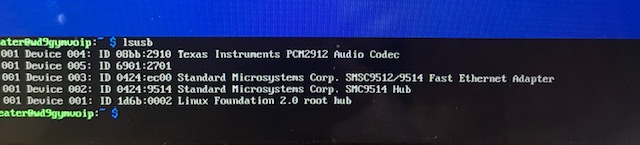
lsusb shows The first device listed is my sound card.
When I connect to my node I have been using the keypad when the call ok appears. I enter *34911. When I speak the mic meter is indicating audio but my radio does not key.
I am attaching copies of rpt.conf manager.conf modules.conf
Please let me know if you need anything else from asterisk directory.
Thank you.
Martin Boroff, WD9GYM
_______________________________________________ App_rpt-users mailing list App_rpt-users@lists.allstarlink.org http://lists.allstarlink.org/cgi-bin/mailman/listinfo/app_rpt-users
To unsubscribe from this list please visit http://lists.allstarlink.org/cgi-bin/mailman/listinfo/app_rpt-users and scroll down to the bottom of the page. Enter your email address and press the "Unsubscribe or edit options button" You do not need a password to unsubscribe, you can do it via email confirmation. If you have trouble unsubscribing, please send a message to the list detailing the problem.
Mike I think the problem is in the pi. I thought I may have tried to define usbradio but I am not 100% sure. I will attach the conf files with my codename on them. I’m not sure what you mean by which file I use. Where would I look to see which one I use. The radio is a Ten Ten Patriot usb transceiver I am using for testing. It connects with a Ten Ten USB sound card and has leads for ground, mic, audio out and PTT. I plan to later connect a Yeasu FTM100DR which I hope to operate remotely. 73, Marty
On Oct 21, 2018, at 1:12 PM, Mike <mm@midnighteng.com> wrote:
Iis the problem system a pi or pc ?
Radio interface simpleusb.conf or usbradio.conf ?
Show the contents of that file you use.
Is the radio interface a modified sound dongle or something else ?
I'm trying to determine how you should be getting your cos/ptt and then looking at your set-up for it. But it sounds like your PTT is not inverted correctly for the radio or you can't sink enough current to pull it active.
...mike/kb8jnm
On 10/21/2018 1:12 PM, Martin Boroff wrote:
I have my server node running, 49155. I am able to use it to connect to another node with iaxrpt and speak with an echo link user. I have hooked up my sound card with a radio that will run fldigi on another raspberry pi with Jessie installed. Therefore I am confident that my hardware and wiring are ok. The card is a usb card. lsusb shows The first device listed is my sound card. When I connect to my node I have been using the keypad when the call ok appears. I enter *34911. When I speak the mic meter is indicating audio but my radio does not key. I am attaching copies of rpt.conf manager.conf modules.conf Please let me know if you need anything else from asterisk directory. Thank you. Martin Boroff, WD9GYM _______________________________________________ App_rpt-users mailing list App_rpt-users@lists.allstarlink.org http://lists.allstarlink.org/cgi-bin/mailman/listinfo/app_rpt-users To unsubscribe from this list please visit http://lists.allstarlink.org/cgi-bin/mailman/listinfo/app_rpt-users and scroll down to the bottom of the page. Enter your email address and press the "Unsubscribe or edit options button" You do not need a password to unsubscribe, you can do it via email confirmation. If you have trouble unsubscribing, please send a message to the list detailing the problem.
App_rpt-users mailing list App_rpt-users@lists.allstarlink.org http://lists.allstarlink.org/cgi-bin/mailman/listinfo/app_rpt-users
To unsubscribe from this list please visit http://lists.allstarlink.org/cgi-bin/mailman/listinfo/app_rpt-users and scroll down to the bottom of the page. Enter your email address and press the "Unsubscribe or edit options button" You do not need a password to unsubscribe, you can do it via email confirmation. If you have trouble unsubscribing, please send a message to the list detailing the problem.

Marty, simpleusb and usbradio only work with CM108/CM119 compatible sound cards. These drivers don't support the TI PCM2912 chipset, as seen in your earlier screenshot. Note that COS/PTT must be attached to specific pins on the CMxyz sound device for signaling to work. There is lots of documentation out there about how the CMxyz device is attached to the radio. There are many compatible commercial boards available, including the DMK URIx, Masters Communications RA35/RA40, Repeater Builder USB-RIM, etc. You can also build your own and many other alternative CMxyz adapters have been designed/built by other hams and are available, too. Here is a link to one of many examples of building an interface: https://www.hamvoip.org/hamradio/usb_fob_modification/ 73, David KB4FXC On Sun, 21 Oct 2018, Martin Boroff wrote:
Mike
I think the problem is in the pi.
I thought I may have tried to define usbradio but I am not 100% sure. I will attach the conf files with my codename on them. Iâm not sure what you mean by which file I use. Where would I look to see which one I use.
The radio is a Ten Ten Patriot usb transceiver I am using for testing. It connects with a Ten Ten USB sound card and has leads for ground, mic, audio out and PTT. I plan to later connect a Yeasu FTM100DR which I hope to operate remotely.
73, Marty
Well, let's start with your rpt.conf file. rxchannel = SimpleUSB/usb_29285 If usbradio/usb_xxxxx send the usbradio.conf file In one form or another, the PTT trigger starts as software. I'm not sure about your radio interface, it's unknown to me. But the activation adjustments are normally made in those files. But it sounds like perhaps you have something proprietary ??? If ASL does not know what to send to the usb radio interface to activate the PTT and with the correct logic, you will not have one. But I doubt your pi is at fault. Control signals must have proper attachment to software and hardware. ...mike/kb8jnm On 10/21/2018 2:30 PM, Martin Boroff wrote:
Mike
I think the problem is in the pi.
I thought I may have tried to define usbradio but I am not 100% sure. I will attach the conf files with my codename on them. I’m not sure what you mean by which file I use. Where would I look to see which one I use.
The radio is a Ten Ten Patriot usb transceiver I am using for testing. It connects with a Ten Ten USB sound card and has leads for ground, mic, audio out and PTT. I plan to later connect a Yeasu FTM100DR which I hope to operate remotely.
73, Marty
On Oct 21, 2018, at 1:12 PM, Mike <mm@midnighteng.com> wrote:
Iis the problem system a pi or pc ?
Radio interface simpleusb.conf or usbradio.conf ?
Show the contents of that file you use.
Is the radio interface a modified sound dongle or something else ?
I'm trying to determine how you should be getting your cos/ptt and then looking at your set-up for it. But it sounds like your PTT is not inverted correctly for the radio or you can't sink enough current to pull it active.
...mike/kb8jnm
On 10/21/2018 1:12 PM, Martin Boroff wrote:
I have my server node running, 49155. I am able to use it to connect to another node with iaxrpt and speak with an echo link user. I have hooked up my sound card with a radio that will run fldigi on another raspberry pi with Jessie installed. Therefore I am confident that my hardware and wiring are ok. The card is a usb card. lsusb shows The first device listed is my sound card. When I connect to my node I have been using the keypad when the call ok appears. I enter *34911. When I speak the mic meter is indicating audio but my radio does not key. I am attaching copies of rpt.conf manager.conf modules.conf Please let me know if you need anything else from asterisk directory. Thank you. Martin Boroff, WD9GYM _______________________________________________ App_rpt-users mailing list App_rpt-users@lists.allstarlink.org http://lists.allstarlink.org/cgi-bin/mailman/listinfo/app_rpt-users To unsubscribe from this list please visit http://lists.allstarlink.org/cgi-bin/mailman/listinfo/app_rpt-users and scroll down to the bottom of the page. Enter your email address and press the "Unsubscribe or edit options button" You do not need a password to unsubscribe, you can do it via email confirmation. If you have trouble unsubscribing, please send a message to the list detailing the problem.
App_rpt-users mailing list App_rpt-users@lists.allstarlink.org http://lists.allstarlink.org/cgi-bin/mailman/listinfo/app_rpt-users
To unsubscribe from this list please visit http://lists.allstarlink.org/cgi-bin/mailman/listinfo/app_rpt-users and scroll down to the bottom of the page. Enter your email address and press the "Unsubscribe or edit options button" You do not need a password to unsubscribe, you can do it via email confirmation. If you have trouble unsubscribing, please send a message to the list detailing the problem.
_______________________________________________ App_rpt-users mailing list App_rpt-users@lists.allstarlink.org http://lists.allstarlink.org/cgi-bin/mailman/listinfo/app_rpt-users
To unsubscribe from this list please visit http://lists.allstarlink.org/cgi-bin/mailman/listinfo/app_rpt-users and scroll down to the bottom of the page. Enter your email address and press the "Unsubscribe or edit options button" You do not need a password to unsubscribe, you can do it via email confirmation. If you have trouble unsubscribing, please send a message to the list detailing the problem.
David If I interpret this correctly, I should be using an interface like the URI device for my radio interface. Is that correct? Maybe I should go back to John Kruk the Yeasu rep and get his hardware configuration. He did tell me he interface an FTM400XD. He just isn’t very responsive. 73, Marty WD9GYM
On Oct 21, 2018, at 1:55 PM, David McGough <kb4fxc@inttek.net> wrote:
Marty,
simpleusb and usbradio only work with CM108/CM119 compatible sound cards. These drivers don't support the TI PCM2912 chipset, as seen in your earlier screenshot.
Note that COS/PTT must be attached to specific pins on the CMxyz sound device for signaling to work.
There is lots of documentation out there about how the CMxyz device is attached to the radio. There are many compatible commercial boards available, including the DMK URIx, Masters Communications RA35/RA40, Repeater Builder USB-RIM, etc.
You can also build your own and many other alternative CMxyz adapters have been designed/built by other hams and are available, too. Here is a link to one of many examples of building an interface:
https://www.hamvoip.org/hamradio/usb_fob_modification/
73, David KB4FXC
On Sun, 21 Oct 2018, Martin Boroff wrote:
Mike
I think the problem is in the pi.
I thought I may have tried to define usbradio but I am not 100% sure. I will attach the conf files with my codename on them. Iâm not sure what you mean by which file I use. Where would I look to see which one I use.
The radio is a Ten Ten Patriot usb transceiver I am using for testing. It connects with a Ten Ten USB sound card and has leads for ground, mic, audio out and PTT. I plan to later connect a Yeasu FTM100DR which I hope to operate remotely.
73, Marty
_______________________________________________ App_rpt-users mailing list App_rpt-users@lists.allstarlink.org http://lists.allstarlink.org/cgi-bin/mailman/listinfo/app_rpt-users
To unsubscribe from this list please visit http://lists.allstarlink.org/cgi-bin/mailman/listinfo/app_rpt-users and scroll down to the bottom of the page. Enter your email address and press the "Unsubscribe or edit options button" You do not need a password to unsubscribe, you can do it via email confirmation. If you have trouble unsubscribing, please send a message to the list detailing the problem.
Marty, Yes, that's correct. For simpleusb and usbradio, you must use a URI type device which has a C-Media CM108 or CM119 family chip. 73, David KB4FXC On Sun, 21 Oct 2018, Martin Boroff wrote:
David
If I interpret this correctly, I should be using an interface like the URI device for my radio interface. Is that correct? Maybe I should go back to John Kruk the Yeasu rep and get his hardware configuration. He did tell me he interface an FTM400XD. He just isnât very responsive. 73, Marty WD9GYM
On Oct 21, 2018, at 1:55 PM, David McGough <kb4fxc@inttek.net> wrote:
Marty,
simpleusb and usbradio only work with CM108/CM119 compatible sound cards. These drivers don't support the TI PCM2912 chipset, as seen in your earlier screenshot.
Note that COS/PTT must be attached to specific pins on the CMxyz sound device for signaling to work.
There is lots of documentation out there about how the CMxyz device is attached to the radio. There are many compatible commercial boards available, including the DMK URIx, Masters Communications RA35/RA40, Repeater Builder USB-RIM, etc.
You can also build your own and many other alternative CMxyz adapters have been designed/built by other hams and are available, too. Here is a link to one of many examples of building an interface:
https://www.hamvoip.org/hamradio/usb_fob_modification/
73, David KB4FXC
On Sun, 21 Oct 2018, Martin Boroff wrote:
Mike
I think the problem is in the pi.
I thought I may have tried to define usbradio but I am not 100% sure. I will attach the conf files with my codename on them. IâÂÂm not sure what you mean by which file I use. Where would I look to see which one I use.
The radio is a Ten Ten Patriot usb transceiver I am using for testing. It connects with a Ten Ten USB sound card and has leads for ground, mic, audio out and PTT. I plan to later connect a Yeasu FTM100DR which I hope to operate remotely.
73, Marty
_______________________________________________ App_rpt-users mailing list App_rpt-users@lists.allstarlink.org http://lists.allstarlink.org/cgi-bin/mailman/listinfo/app_rpt-users
To unsubscribe from this list please visit http://lists.allstarlink.org/cgi-bin/mailman/listinfo/app_rpt-users and scroll down to the bottom of the page. Enter your email address and press the "Unsubscribe or edit options button" You do not need a password to unsubscribe, you can do it via email confirmation. If you have trouble unsubscribing, please send a message to the list detailing the problem.
_______________________________________________ App_rpt-users mailing list App_rpt-users@lists.allstarlink.org http://lists.allstarlink.org/cgi-bin/mailman/listinfo/app_rpt-users To unsubscribe from this list please visit http://lists.allstarlink.org/cgi-bin/mailman/listinfo/app_rpt-users and scroll down to the bottom of the page. Enter your email address and press the "Unsubscribe or edit options button" You do not need a password to unsubscribe, you can do it via email confirmation. If you have trouble unsubscribing, please send a message to the list detailing the problem.
Mike I received a reply from David McaGough FB4FXC which stated my card is a TM PCM 2912 chip set and it is not supported. No doubt this is a show stopper. Your comment about changing or adjusting my opt.conf file has rxchannel = SimpleUSB/usb_29285. I assume that 29285 is your node and my rpt.config has my node number. My simple_tune_usb49155 is the closest I have to a file with my node number in it and it is empty. Simples.conf has info in it. Should I adjust the statement to point to it? I suppose I can comment out the current statement and make a new one. Also my rpt.conf has two rxchannel statements. Again what should I send? 73, Marty
On Oct 21, 2018, at 1:56 PM, Mike <mm@midnighteng.com> wrote:
Well, let's start with your rpt.conf file.
rxchannel = SimpleUSB/usb_29285
If usbradio/usb_xxxxx send the usbradio.conf file
In one form or another, the PTT trigger starts as software. I'm not sure about your radio interface, it's unknown to me. But the activation adjustments are normally made in those files. But it sounds like perhaps you have something proprietary ???
If ASL does not know what to send to the usb radio interface to activate the PTT and with the correct logic, you will not have one.
But I doubt your pi is at fault. Control signals must have proper attachment to software and hardware.
...mike/kb8jnm
On 10/21/2018 2:30 PM, Martin Boroff wrote:
Mike I think the problem is in the pi. I thought I may have tried to define usbradio but I am not 100% sure. I will attach the conf files with my codename on them. I’m not sure what you mean by which file I use. Where would I look to see which one I use. The radio is a Ten Ten Patriot usb transceiver I am using for testing. It connects with a Ten Ten USB sound card and has leads for ground, mic, audio out and PTT. I plan to later connect a Yeasu FTM100DR which I hope to operate remotely. 73, Marty
On Oct 21, 2018, at 1:12 PM, Mike <mm@midnighteng.com> wrote:
Iis the problem system a pi or pc ?
Radio interface simpleusb.conf or usbradio.conf ?
Show the contents of that file you use.
Is the radio interface a modified sound dongle or something else ?
I'm trying to determine how you should be getting your cos/ptt and then looking at your set-up for it. But it sounds like your PTT is not inverted correctly for the radio or you can't sink enough current to pull it active.
...mike/kb8jnm
On 10/21/2018 1:12 PM, Martin Boroff wrote:
I have my server node running, 49155. I am able to use it to connect to another node with iaxrpt and speak with an echo link user. I have hooked up my sound card with a radio that will run fldigi on another raspberry pi with Jessie installed. Therefore I am confident that my hardware and wiring are ok. The card is a usb card. lsusb shows The first device listed is my sound card. When I connect to my node I have been using the keypad when the call ok appears. I enter *34911. When I speak the mic meter is indicating audio but my radio does not key. I am attaching copies of rpt.conf manager.conf modules.conf Please let me know if you need anything else from asterisk directory. Thank you. Martin Boroff, WD9GYM _______________________________________________ App_rpt-users mailing list App_rpt-users@lists.allstarlink.org http://lists.allstarlink.org/cgi-bin/mailman/listinfo/app_rpt-users To unsubscribe from this list please visit http://lists.allstarlink.org/cgi-bin/mailman/listinfo/app_rpt-users and scroll down to the bottom of the page. Enter your email address and press the "Unsubscribe or edit options button" You do not need a password to unsubscribe, you can do it via email confirmation. If you have trouble unsubscribing, please send a message to the list detailing the problem.
App_rpt-users mailing list App_rpt-users@lists.allstarlink.org http://lists.allstarlink.org/cgi-bin/mailman/listinfo/app_rpt-users
To unsubscribe from this list please visit http://lists.allstarlink.org/cgi-bin/mailman/listinfo/app_rpt-users and scroll down to the bottom of the page. Enter your email address and press the "Unsubscribe or edit options button" You do not need a password to unsubscribe, you can do it via email confirmation. If you have trouble unsubscribing, please send a message to the list detailing the problem.
App_rpt-users mailing list App_rpt-users@lists.allstarlink.org http://lists.allstarlink.org/cgi-bin/mailman/listinfo/app_rpt-users To unsubscribe from this list please visit http://lists.allstarlink.org/cgi-bin/mailman/listinfo/app_rpt-users and scroll down to the bottom of the page. Enter your email address and press the "Unsubscribe or edit options button" You do not need a password to unsubscribe, you can do it via email confirmation. If you have trouble unsubscribing, please send a message to the list detailing the problem.
App_rpt-users mailing list App_rpt-users@lists.allstarlink.org http://lists.allstarlink.org/cgi-bin/mailman/listinfo/app_rpt-users
To unsubscribe from this list please visit http://lists.allstarlink.org/cgi-bin/mailman/listinfo/app_rpt-users and scroll down to the bottom of the page. Enter your email address and press the "Unsubscribe or edit options button" You do not need a password to unsubscribe, you can do it via email confirmation. If you have trouble unsubscribing, please send a message to the list detailing the problem.
Well, I did copy the message since you are replying to the group. I did not think I could help with a proprietary interface but I did not want to say that because, as I have found, there are some that provide some level of support that is not part of our group here for interfaces they make. But I can not remember any by name. So you are not the first to look for support of others devices and most are not going to work with ASL. So, I would say, go to the wiki for instruction and use a cm108 dongle as david showed. Not as many options with a Pi. ...mike/kb8jnm On 10/21/2018 4:05 PM, Martin Boroff wrote:
Mike
I received a reply from David McaGough FB4FXC which stated my card is a TM PCM 2912 chip set and it is not supported. No doubt this is a show stopper.
Your comment about changing or adjusting my opt.conf file has rxchannel = SimpleUSB/usb_29285. I assume that 29285 is your node and my rpt.config has my node number. My simple_tune_usb49155 is the closest I have to a file with my node number in it and it is empty. Simples.conf has info in it. Should I adjust the statement to point to it? I suppose I can comment out the current statement and make a new one.
Also my rpt.conf has two rxchannel statements.
Again what should I send?
73, Marty
On Oct 21, 2018, at 1:56 PM, Mike <mm@midnighteng.com> wrote:
Well, let's start with your rpt.conf file.
rxchannel = SimpleUSB/usb_29285
If usbradio/usb_xxxxx send the usbradio.conf file
In one form or another, the PTT trigger starts as software. I'm not sure about your radio interface, it's unknown to me. But the activation adjustments are normally made in those files. But it sounds like perhaps you have something proprietary ???
If ASL does not know what to send to the usb radio interface to activate the PTT and with the correct logic, you will not have one.
But I doubt your pi is at fault. Control signals must have proper attachment to software and hardware.
...mike/kb8jnm
On 10/21/2018 2:30 PM, Martin Boroff wrote:
Mike I think the problem is in the pi. I thought I may have tried to define usbradio but I am not 100% sure. I will attach the conf files with my codename on them. I’m not sure what you mean by which file I use. Where would I look to see which one I use. The radio is a Ten Ten Patriot usb transceiver I am using for testing. It connects with a Ten Ten USB sound card and has leads for ground, mic, audio out and PTT. I plan to later connect a Yeasu FTM100DR which I hope to operate remotely. 73, Marty
On Oct 21, 2018, at 1:12 PM, Mike <mm@midnighteng.com> wrote:
Iis the problem system a pi or pc ?
Radio interface simpleusb.conf or usbradio.conf ?
Show the contents of that file you use.
Is the radio interface a modified sound dongle or something else ?
I'm trying to determine how you should be getting your cos/ptt and then looking at your set-up for it. But it sounds like your PTT is not inverted correctly for the radio or you can't sink enough current to pull it active.
...mike/kb8jnm
On 10/21/2018 1:12 PM, Martin Boroff wrote:
I have my server node running, 49155. I am able to use it to connect to another node with iaxrpt and speak with an echo link user. I have hooked up my sound card with a radio that will run fldigi on another raspberry pi with Jessie installed. Therefore I am confident that my hardware and wiring are ok. The card is a usb card. lsusb shows The first device listed is my sound card. When I connect to my node I have been using the keypad when the call ok appears. I enter *34911. When I speak the mic meter is indicating audio but my radio does not key. I am attaching copies of rpt.conf manager.conf modules.conf Please let me know if you need anything else from asterisk directory. Thank you. Martin Boroff, WD9GYM _______________________________________________ App_rpt-users mailing list App_rpt-users@lists.allstarlink.org http://lists.allstarlink.org/cgi-bin/mailman/listinfo/app_rpt-users To unsubscribe from this list please visit http://lists.allstarlink.org/cgi-bin/mailman/listinfo/app_rpt-users and scroll down to the bottom of the page. Enter your email address and press the "Unsubscribe or edit options button" You do not need a password to unsubscribe, you can do it via email confirmation. If you have trouble unsubscribing, please send a message to the list detailing the problem.
App_rpt-users mailing list App_rpt-users@lists.allstarlink.org http://lists.allstarlink.org/cgi-bin/mailman/listinfo/app_rpt-users
To unsubscribe from this list please visit http://lists.allstarlink.org/cgi-bin/mailman/listinfo/app_rpt-users and scroll down to the bottom of the page. Enter your email address and press the "Unsubscribe or edit options button" You do not need a password to unsubscribe, you can do it via email confirmation. If you have trouble unsubscribing, please send a message to the list detailing the problem.
App_rpt-users mailing list App_rpt-users@lists.allstarlink.org http://lists.allstarlink.org/cgi-bin/mailman/listinfo/app_rpt-users To unsubscribe from this list please visit http://lists.allstarlink.org/cgi-bin/mailman/listinfo/app_rpt-users and scroll down to the bottom of the page. Enter your email address and press the "Unsubscribe or edit options button" You do not need a password to unsubscribe, you can do it via email confirmation. If you have trouble unsubscribing, please send a message to the list detailing the problem.
App_rpt-users mailing list App_rpt-users@lists.allstarlink.org http://lists.allstarlink.org/cgi-bin/mailman/listinfo/app_rpt-users
To unsubscribe from this list please visit http://lists.allstarlink.org/cgi-bin/mailman/listinfo/app_rpt-users and scroll down to the bottom of the page. Enter your email address and press the "Unsubscribe or edit options button" You do not need a password to unsubscribe, you can do it via email confirmation. If you have trouble unsubscribing, please send a message to the list detailing the problem.
_______________________________________________ App_rpt-users mailing list App_rpt-users@lists.allstarlink.org http://lists.allstarlink.org/cgi-bin/mailman/listinfo/app_rpt-users
To unsubscribe from this list please visit http://lists.allstarlink.org/cgi-bin/mailman/listinfo/app_rpt-users and scroll down to the bottom of the page. Enter your email address and press the "Unsubscribe or edit options button" You do not need a password to unsubscribe, you can do it via email confirmation. If you have trouble unsubscribing, please send a message to the list detailing the problem.
participants (3)
-
 David McGough
 -
 Martin Boroff
 -
 Mike
Mike